EN
 FR
 DE
 IT
 PT
 ES


Windows 10 vs Windows 11: Which Version Do You Need?
Microsoft Windows is the most widely used desktop operating system in the world, and choosing between Windows 10 and Windows 11 is one of the most common questions we hear from customers. Is the newer version always the better pick? In this guide we compare Windows 11 with Windows 10 across system requirements, performance, memory, features and design so you can decide which edition fits your PC and the way you work.
If you are still weighing up your options, our Windows licences catalogue gives you a quick overview of every edition we sell.
Windows 10 vs Windows 11: system requirements
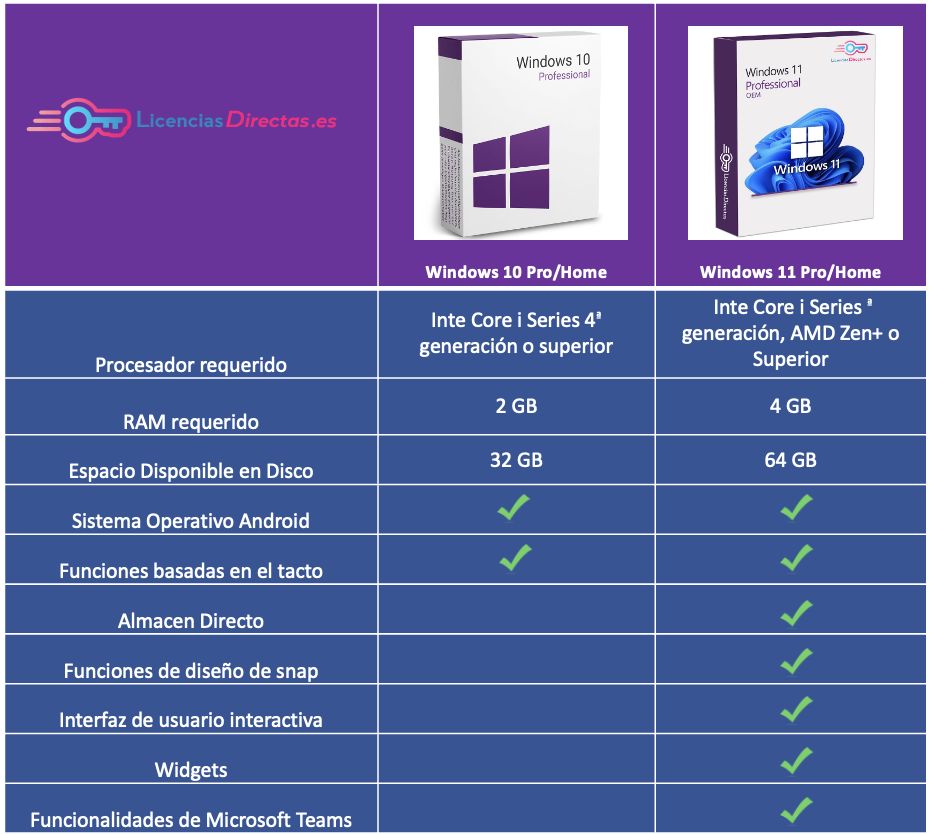
The biggest practical difference between the two versions is what they will actually run on. Windows 10 will install on machines with TPM 1.2 or higher and a 4th generation Intel Core processor or newer. Windows 11 raises the bar: it requires TPM 2.0, a 64-bit processor, and either an 8th generation Intel Core chip or an AMD Ryzen (Zen) processor as a minimum.
Before upgrading, it is worth checking exactly what hardware you have. Our guide on how to check whether your Windows is 32-bit or 64-bit is a good starting point.
Windows 10 vs Windows 11: everyday performance
The components behind Windows 11 are noticeably smaller and more efficient than those in Windows 10. Windows 11 uses a redesigned resource-allocation algorithm that gives the foreground app priority, which helps older hardware feel snappier and reduces background battery drain on laptops.
Windows 11 also introduces DirectStorage, which lets compatible games load assets directly onto the GPU. The result is shorter loading times and higher frame rates in supported titles. Windows 10 does not include DirectStorage, so gamers with recent NVMe SSDs will get more out of the newer version.
Application memory and RAM
Windows 10 will run on devices with at least 2 GB of RAM and 32 GB of storage. Windows 11 lifts the minimum to 4 GB of RAM and 64 GB of storage, so an older tablet or netbook that happily ran Windows 10 may not meet the newer requirements.
New features in Windows 11
Windows 11 introduces a redesigned Start menu, rounded window corners and a centred taskbar. Snap Layouts (shown when you hover over a window's maximise button) let you arrange several apps in pre-set grids on any screen size, which is particularly useful on ultrawide monitors.
Microsoft Teams chat is integrated directly into the taskbar, making it easy to start a call or send a message without opening a separate app. Widgets return in a dedicated pane for news, weather and calendar at a glance, and Android apps can be installed through the Microsoft Store.
The design
The visual overhaul is the first thing most people notice. The Windows 11 taskbar, Start menu and File Explorer have all been redesigned with softer shapes and more whitespace. Where Windows 10 borrowed some conventions from mobile, Windows 11 takes inspiration from modern macOS and Linux desktops while keeping the familiar Windows workflow.
Features and applications
Some familiar features have been removed or tucked away. Timeline, which organised recent documents chronologically, has been retired because it was rarely used. Cortana is no longer pinned to the taskbar by default, Skype is no longer pre-installed, and live tiles have been replaced by the widgets pane.
If you want a closer look at the two Windows 11 editions we stock, our Windows 11 Pro vs Home comparison explains which features are Pro-only. For Windows 10 users, the equivalent Windows 10 Home vs Pro upgrade guide covers how to move up without reinstalling.
Operating system support
Microsoft has confirmed that mainstream support for Windows 10 ended in October 2025, with extended security updates available for a limited period. Windows 11 will continue to receive feature and security updates well beyond that, so for long-term use the newer version is the safer investment.
Windows 10 or Windows 11: which is better?
If your PC meets the requirements, Windows 11 is the stronger choice: it is faster on modern hardware, receives ongoing updates, and includes genuinely useful features such as Snap Layouts and DirectStorage. If your hardware is older, Windows 10 remains a solid, familiar operating system and is still a valid pick for specialist software that has not yet been certified for Windows 11.
When you are ready to buy, you can pick up a genuine Windows 11 Pro licence or stay with a proven Windows 10 Pro licence directly from us. Every key is delivered by email with activation instructions and lifetime support.
Not sure which one suits your setup? Have a look at our Microsoft 365 and subscription options for an always-up-to-date alternative, or get in touch and our team will help you choose.
Best regards,
The Licendi Team