EN
 FR
 DE
 IT
 PT
 ES


The 3-2-1 backup rule: how to put it into practice in a small business
Most backup problems become visible at the worst possible moment: when somebody needs to restore something. The documents were included, but the database was not. The external drive worked perfectly, but it remained connected during the attack. The cloud contained the files, but the only copy of the login details was on the failed computer. Having duplicate files and being able to resume work are different things.
The 3-2-1 rule brings some order to that problem without asking a small business to build its own data centre. It does not require a particular brand or three new servers. It asks you to identify where each copy lives, what could destroy it and how you would retrieve a useful version. Software selection follows those decisions, rather than replacing them.
This guide works through a realistic design using Veeam, Synology, restic and a desktop option, Ashampoo Backup Pro. These are alternative routes, not products every business needs to buy together. The scenario is illustrative: it is not a laboratory test or a claim that one configuration will work everywhere.
1. What the 3-2-1 rule actually means
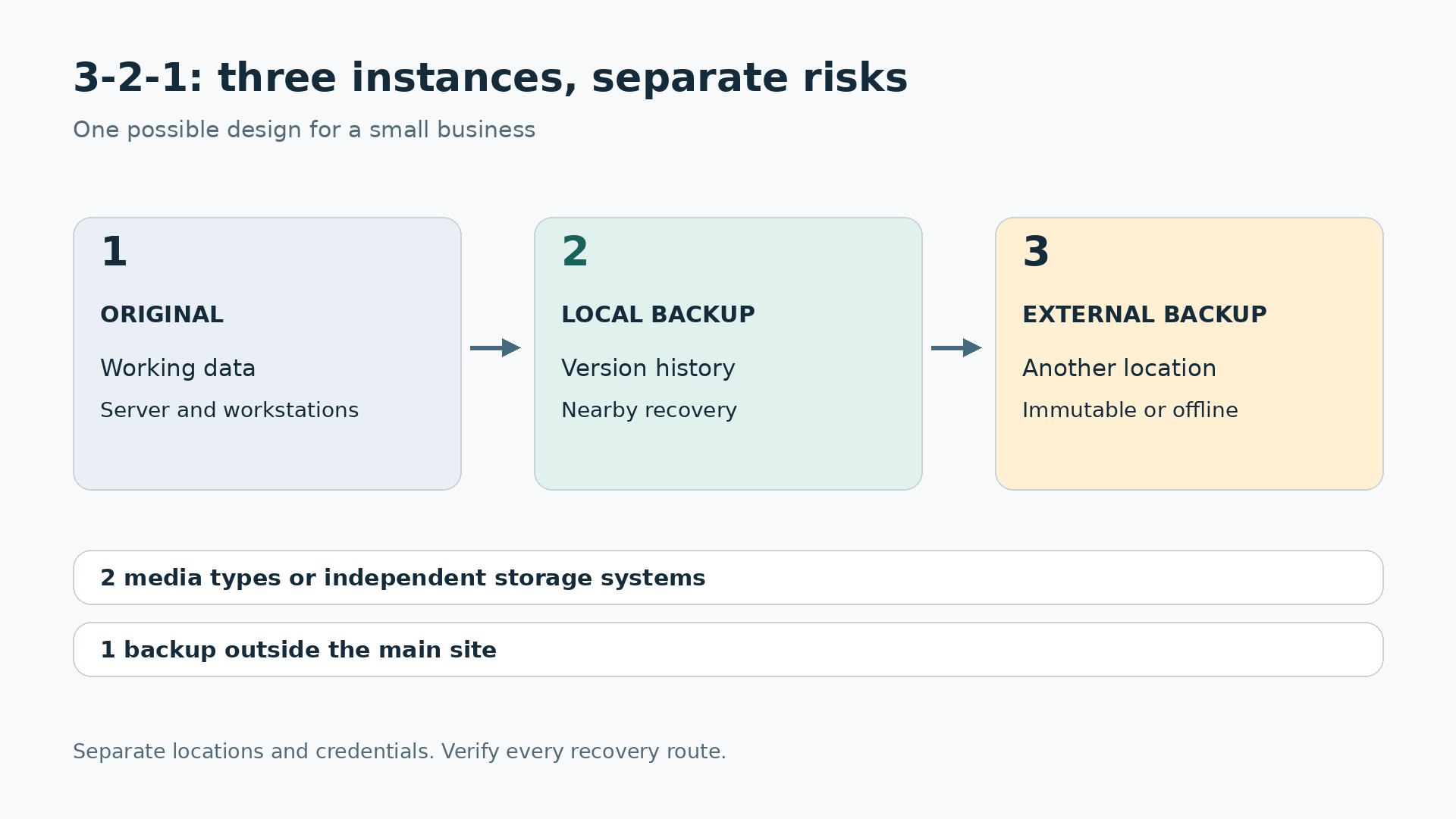
Three means three instances of the data: the working original and two backups. Two means placing them on two different types of media or storage systems with sufficiently independent failure risks. One means keeping at least one backup away from the main business premises. You do not need three additional backups to meet the basic rule, although keeping more may be sensible.
Picture working documents on a server, a versioned backup on a separate local repository and another copy at an external destination. If the server fails, the nearby repository gives you a convenient recovery route. If a fire destroys the office, the external copy remains available. That second recovery will probably take longer, which is a reason to retain both routes rather than choosing only one.
Two folders on the same drive do not provide that separation. Two drives in one enclosure do not solve theft of the enclosure. Even two providers can share a weakness when one administrator account can delete everything. Count storage systems, locations and credentials, then ask what would survive the loss of each dependency.
Modern designs also address deliberate deletion. Veeam describes the extended 3-2-1-1-0 approach: an offline, isolated or immutable copy, plus verification with no unresolved errors. Zero is an operational goal, not a promise that a particular purchase makes every future recovery perfect.
2. What should not count as an independent backup
RAID can keep a storage system running through certain drive failures. It does not, by itself, retain an earlier version after someone deletes a folder, an application corrupts records or ransomware encrypts documents. A NAS with redundant disks can make a useful backup destination. The redundancy inside it is not a substitute for protecting the NAS itself.
Synchronisation has a different purpose: keeping locations up to date. When a deletion or encryption event propagates, both locations may end up in the same damaged state. Some services add a recycle bin, version history or recovery features, so check their actual limits. They can be valuable, but do not automatically count them as an independent copy with your required retention.
Snapshots are useful for returning quickly to an earlier state. However, snapshots on the same device, disk pool and administrative account share risks with the original. They can complement the plan. An external recovery route still needs a separate destination and suitable access and retention policies, not merely another snapshot on the original appliance.
Try a simple written exercise. For each copy, state where it is, who can delete it and how far back it can recover. If two descriptions rely on essentially the same components, the apparent independence on your diagram is misleading. What matters is which incidents the design survives, not how many storage icons it contains.
3. Start with the work you cannot afford to lose
Before installing software, bring together someone from administration, operations and technical support. Ask what information would stop the business invoicing, fulfilling orders or serving customers. The inventory will often include shared documents, the management database, local files on selected computers, email, hosted applications and network configuration. Assign a business owner to each service.
Separate the data from the tools required to use it. Recovering an accounting folder is not enough if you lack a compatible application, its configuration or the database restore procedure. Retain authorised installers, version records, instructions and support contacts. Passwords and encryption keys need a separate secure store; a note inside the only encrypted backup is not a recovery strategy.
Include subscriptions and hosted services in the review. Using Microsoft 365, Google Workspace or cloud accounting does not tell you how much history you can recover, how to export it or what happens after losing access to the account. Review each service's recovery arrangements and add compatible protection where those arrangements fall short of your needs.
Finish with an explicit coverage decision: what is included, what is excluded and why. An accidental omission is not a storage optimisation. Ask the business owner to approve the inventory, because the technician may not know where the sales team really keeps its quotations. Also record dependencies: an application that needs a database and authentication service cannot be recovered simply by restoring its front end first.
4. RPO and RTO in everyday language
The recovery point objective, or RPO, describes how much recent work you can tolerate losing. If the limit is four hours, you need usable recovery points at that interval or better. A nightly backup does not meet that objective throughout the working day. Measure the age of completed, recoverable copies, not just the time a scheduled task was supposed to start.
The recovery time objective, or RTO, describes how long the service can be unavailable. It includes noticing the failure, deciding what to restore, obtaining equipment, downloading data, restoring it and checking that the application actually works. A claim about fast file recovery does not prove that your business can resume invoicing within two hours.
For our example, we will use a four-hour RPO for documents and an eight-hour RTO for essential operations. These are hypothetical business decisions, not universal recommendations. A clinic, factory or continuously trading shop might need different targets. The database will also need its own application-consistent protection method and an appropriate recovery schedule.
There is an important distinction between local and site-wide incidents. If the external copy updates only overnight, its RPO after losing the entire office will be worse than the local RPO. Write that down rather than hiding it behind a single green status. Management needs to understand both the small-failure scenario and the loss-of-premises scenario before accepting the design.
5. A complete example for a small company
Imagine a distributor with twelve employees, eight Windows workstations, a file server and a business management application. It has 1 TB of protected information and approximately 20 GB of daily changes. These figures are planning assumptions. Actual storage use will depend on version history, compression, encryption, open files, application behaviour and growth.
Working originals stay on the production systems. A dedicated local repository receives backups for quick everyday recovery. Another copy travels to a separate location or a compatible external storage service. That external copy is protected against deletion through a validated immutable implementation or a rotation of encrypted drives that are physically disconnected between uses.
Not every workstation needs a complete image every four hours. You might prioritise centralised documents and image the machines that would be difficult to rebuild on a less frequent schedule. Coverage follows the inventory. If a laptop contains unique information and spends days away from the office, account for when it connects and how you confirm its backup has finished.
Each morning, the owner reviews the latest local run, the latest external run and any unresolved incidents. A second person knows the recovery procedure. That avoids relying on one employee being available around the clock. The storage architecture creates technical independence; the handover and shared knowledge create operational continuity when the usual administrator is absent.
6. The Veeam route: servers and virtual machines
Veeam Backup & Replication is a candidate when you need centrally managed protection for servers or virtual machines. Start by checking the documentation for your exact version, edition and workloads. Agents, applications, hypervisors and repositories have distinct requirements. A feature available somewhere in the product family is not automatically available in every deployment or licence.
A basic design separates the job creating the first backup from the mechanism maintaining an additional copy. The Backup Copy documentation explains that second role. Set the source, destination, retention and schedule, then confirm that usable restore points actually arrive at the external repository. Manually copying a few files out of a backup chain is not equivalent to a supported copy job.
For a lab or small environment, you can evaluate Community Edition, advertised for up to ten workloads. That does not mean ten employees, unlimited services or every enterprise capability at no cost. Check how your workloads are counted and the applicable restrictions, including support, automation and use by service providers. Do not select an edition solely from the headline limit.
If the design needs immutability, choose a supported repository and meet its specific requirements. Naming a network share “secure” changes nothing. Do not expose backup storage directly to the public internet as a shortcut. Plan access with your technical provider, restrict administrative accounts and make sure the resulting configuration can be explained and recovered without relying on the installer's memory.
7. The Synology route: use a compatible NAS properly
If the business already has suitable Synology hardware, Active Backup for Business is worth evaluating. It centralises protection for supported environments. Check the model, DSM version, file system and client requirements. A Synology badge on an enclosure does not mean it supports every package, workload or security feature discussed in the manufacturer's wider range.
Keep two jobs conceptually separate: protecting computers to the NAS and protecting the NAS's information elsewhere. For compatible folders and data, Hyper Backup provides external backup destinations. Protecting an Active Backup repository requires its own supported procedure. Do not assume that an arbitrary Hyper Backup task aimed at an arbitrary repository folder creates a recoverable second instance.
Before buying equipment, ask for a demonstration of the full recovery path: from the second destination to a replacement NAS or supported environment, and then from that system to the final file or machine. This reveals requirements that a short feature table can miss, including destination capacity, package versions and the steps needed to reconnect or relink existing backup tasks.
Immutable capabilities also depend on particular models and configurations. Synology's explanation of immutable backup helps distinguish the layers, but does not make them available on every NAS. If the proposed appliance cannot provide the protection you require, change the design rather than quietly changing what the word “immutable” means.
8. The restic route: flexible, with real administration required
restic is an open-source option for administrators who want to back up files to local or remote repositories. Its two-clause BSD licence permits broad use, including business use, subject to its conditions. That does not include free hosting, a support contract or somebody else maintaining your management processes. The software licence is only one part of the operating model.
restic encrypts its repository and stores snapshots of backed-up files. The repository documentation explains destinations and password handling. Use a dedicated account, separate storage and a secure way for scheduled tasks to obtain secrets. Avoid putting credentials into shared documents or command lines that will later appear in logs, history or screenshots.
Begin with a controlled exercise: initialise a repository, back up a test directory, list its snapshots and restore one file into a different directory. Only then add scheduling, alerts and retention. Do not make automated deletion your first achievement. First establish that you can read the saved data and that the selection and exclusion rules include what you intended.
File backup is not automatically a bootable system image or an application-consistent backup of a running database. Use supported exports or application-aware methods for the latter. Encryption is not immutability either: an attacker with deletion rights can destroy an encrypted repository without decrypting it. A second repository or supported copy method needs its own credentials, retention, verification and restore test; a completed transfer proves only that a transfer completed.
9. A Windows workstation: where Ashampoo Backup Pro fits
A simpler desktop application can be appropriate for an individual workstation. The verified Ashampoo Backup Pro 27 offer at Licendi is a one-PC, one-off licence for version 27. It should not be confused with a multi-device subscription, a server licence or an entitlement to every future major release. Match the actual offer to the machine you intend to protect.
The official Backup Pro 27 specifications include file and partition backups and rescue media. Check the exact requirements before selecting it: Windows Server and ARM processors are excluded, as are partitions or storage devices of 8 TB or larger. A desktop application does not become a solution for the entire infrastructure merely because its name contains “Backup”.
Cloud destinations require a compatible account and sufficient capacity; we are not assuming a storage allowance is included. For a business purchase, confirm the rights applicable to your deployment and the supplied edition in writing. Successful activation alone does not establish the permitted number of installations or every contractual use case. That is especially important when comparing differently named offers.
You may also need to rebuild the operating system. Retain the terms of your existing licences and check recovery rights before buying replacements. The Windows 11 Pro product page provides options if a workstation genuinely needs renewing. Buying Windows does not create a backup or guarantee that an existing licence can be moved to different hardware.
10. Build an external copy that can survive the incident
Physical distance protects against local damage, but not necessarily against a compromised administrator. If one account can delete production, the local repository and external storage, an attacker has a shared route to all three. Separate identities, minimise permissions and enable multifactor authentication where available. Keep emergency access arrangements outside the systems you may need to recover.
Immutability means specified data cannot be changed or deleted for a defined period under the mechanism in use. Verify what is locked, who can alter policies, how new versions are treated and what happens to the account or contract. Do not apply long retention locks to test data without understanding the cost and the restrictions on removing it later.
An offline alternative is a rotation of encrypted drives. One receives a backup, is checked, safely ejected and moved to an authorised separate location; another covers the next cycle. This needs named owners and a record. A drive left plugged in permanently is not offline, even if it sits in a drawer or is only occasionally used.
CISA recommends offline backups and recovery testing in its ransomware guide. Treat this as one protective layer, not a complete security programme. Backups do not prevent data theft and do not replace patching, access protection or incident response. Recovering afterwards does not undo all the damage that may already have occurred.
11. Frequency, retention and capacity are different decisions
Frequency determines how often recovery points are created. Retention determines how long they remain available. Capacity determines how many can actually be stored. A backup every four hours with only one day's history may be useless for a deletion discovered two weeks later. Running the same task more often does not repair an inadequate historical recovery window.
As an illustrative starting point, consider thirty days of daily history and twelve monthly points, adapted to the software. This is neither a legal retention rule nor a universal recommendation. The business must justify its periods according to usefulness, confidentiality, contracts and applicable requirements. Keeping everything indefinitely just because space remains is not a considered retention policy.
With 1 TB initially and 20 GB of daily changes, thirty days adds roughly 600 GB before compression, deduplication and product-specific behaviour. That does not mean a 1.6 TB drive is sufficient. You still need operating headroom, growth, metadata, monthly points and possibly additional full backups. Measure actual usage in the pilot instead of treating a simple sum as a guaranteed sizing result.
Set capacity alerts before storage fills and understand how the product removes old versions. On immutable storage, cleanup may have to wait until locks expire. If scheduling, retention and locking periods conflict, consumption can keep rising. Base the final calculation on observed behaviour and leave enough budget and time to correct the initial estimate.
12. Plan the first upload and the whole cost
Suppose 100 Mbps of upload bandwidth is available for backup. Sending 1 decimal TB takes about 22.2 hours under ideal conditions: 8 × 10¹² bits divided by one hundred million bits per second. This is a theoretical minimum, not a measurement. Shared traffic, protocols, provider limits and retries will extend the elapsed time, sometimes substantially.
Schedule the first upload outside critical periods and investigate whether a supported physical seeding method is available. Then measure whether normal daily changes finish within the required window. For a full recovery, download speed and write performance at the restore destination matter as well, alongside the time needed to restart applications and check their results.
Separate software, local storage, external storage, cloud operations, downloads, support and administration time in the budget. Include replacement hardware when the RTO requires it. Affordable software can support a sound plan, but a software licence alone does not pay for storage or ensure that somebody will respond to an alert while the business is waiting.
Give suppliers the same inventory, volume, growth assumptions and objectives so their proposals are comparable. Request a total cost for a defined period and an included recovery exercise. A quote that omits outbound traffic or technical intervention is not necessarily cheaper. It may simply exclude the exact services you will need when an actual incident occurs.
13. A restore exercise that earns confidence
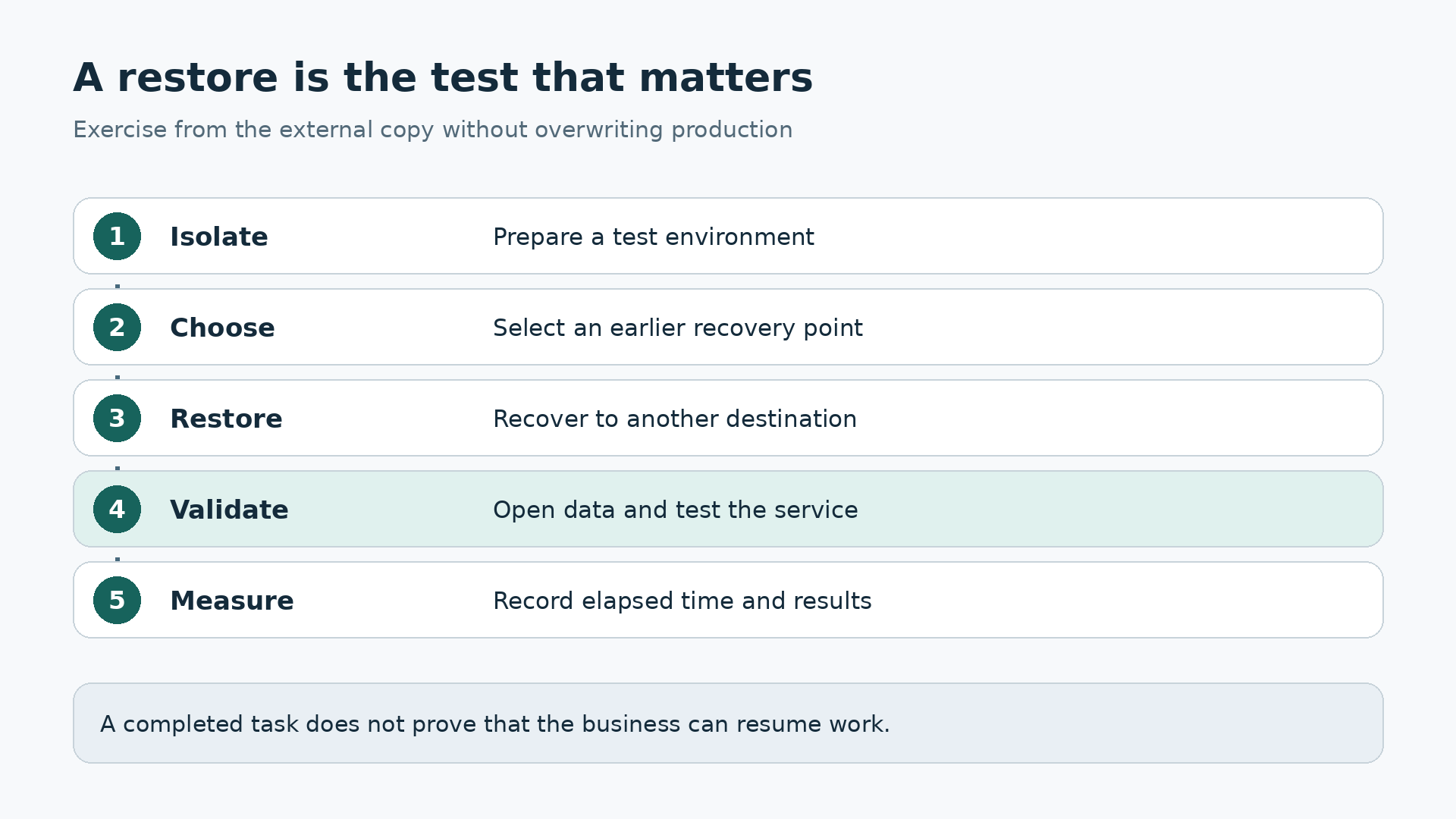
Start with a file selected by a business user, not only by the technician. Recover it to an alternative location, preserve the original and check its content, date and permissions. Next, try a folder containing different document types. Do not overwrite production just to demonstrate that the restore button works; the exercise should reduce risk, not introduce a new incident.
The next test should cover a representative application or machine. Recover into an isolated environment without duplicating active identities or accidentally connecting restored services to production. Check that the database opens, a user can perform real work and the records match the selected recovery point. A successful boot is not the same as a functioning business service.
Finally, simulate loss of the local repository and recover from the external copy. Include finding credentials, obtaining the software, downloading and functional validation in the stopwatch. Record elapsed time, obstacles and owners for corrective actions. That evidence lets you defend or revise the RTO rather than relying on an optimistic estimate made during the installation.
For restic, check and its data-reading options help verify the repository, but do not replace a functional restore. The restore documentation covers recovery. Keep a brief exercise record: date, chosen point, source, alternative destination, duration, result and user acceptance. Repeat after significant changes, distinguishing technical integrity, access to secrets and actual usefulness of recovered information.
14. Monitoring: silence can also mean failure
Do not rely exclusively on success emails. A disabled task or a laptop that never reconnects may simply stop sending anything. Check the age of the latest valid point for each workload and destination as well as the last job status. A missing expected backup should create a visible incident, rather than leaving a reassuringly empty inbox.
Name a primary owner and a substitute. Agree who receives alerts, when they review them and how repeated failures are escalated. An alarm without a person and a response deadline merely relocates the problem into email. Keep a short record of the cause, the correction and the subsequent successful run that confirms the issue was actually resolved.
Review everyday changes too: new users, relocated folders, added servers and rotated passwords can create silent gaps. Recheck protection after important application changes. Emergency access also needs maintenance: a disabled account, lost phone or departed contact can block recovery. Test the alternative authentication procedure without exposing secrets, and keep its instructions accessible during an office outage.
15. Roll out the plan in manageable stages
First inventory systems and agree priorities with the business. Next run a small pilot and restore data before expanding coverage. Then add the external destination, separate access and verify deletion protection. Do not call the project complete when only the local backup works. Each stage should produce an observable result rather than just another configured task.
Expand by groups of machines while watching duration, capacity and network traffic. Keep the previous protection until the replacement is verified, avoiding an unprotected gap caused by moving too quickly. Document a fallback if the pilot misses its targets. Do not rush to delete old recovery points that may still be required to recover an earlier version.
Close the rollout with an external recovery exercise and a handover to two people. They must be able to find the procedure without the failed server. Include contacts, recovery order, prerequisites, secret locations and criteria for declaring the service operational. Keep the document short enough to use under pressure but specific enough to prevent guesswork when colleagues are waiting.
16. What to do when an incident happens
If ransomware is suspected, do not automatically plug the offline drive into an affected computer or restore over a still-compromised environment. Activate the incident response procedure and obtain specialist assistance as appropriate. Preserve evidence and coordinate containment, assessment and recovery. The pressure to resume work must not expose the last healthy copy to the same attacker.
Choose a point before the problem and validate it in a controlled environment. Coordinate replacement of compromised credentials, rebuild what is necessary and recover services in priority order. Check dependencies such as authentication, networking, the application and its data. Bringing everything online simultaneously can make both diagnosis and safe recovery harder than a controlled sequence.
Afterwards, record what was lost, how long recovery took and where the plan failed. Adjust frequency, retention or infrastructure using that evidence. Avoid turning the incident into nothing more than an urgent drive purchase. The underlying failure may have been a shared account, an ignored alert or a database that was never included in the first place.
17. The best rule is one you can demonstrate
A small business does not need every tool mentioned here. Veeam may suit managed infrastructure; Synology can make use of a compatible NAS; restic gives technically managed environments flexibility; a desktop application can protect selected workstations. Choose the route that meets measurable recovery objectives with the people, skills and budget actually available, rather than the longest feature list.
Before signing off, ask for three demonstrations: find an earlier version, recover from outside the premises and continue without the usual administrator. If one fails, you know where the next improvement belongs. The 3-2-1 rule becomes useful when it lets you recover meaningful work within a known time, without betting the entire business on one copy.