EN
 FR
 DE
 IT
 PT
 ES


Visual Studio Professional vs Enterprise 2026: licensing comparison
Choosing between Visual Studio Professional and Enterprise 2026 may seem like a question of features, but there is another side to the purchase: understanding which rights come with the product. A more comprehensive edition does not imply an active subscription, unlimited access to Microsoft services or permission to share a key between developers. Nor does working for a business, in itself, require you to use Enterprise.
Imagine Lucía, a fictional developer who maintains business management applications for several clients. She needs to edit, debug, run tests and review coverage. Her colleague prepares complex tests for a legacy system. They may need different tools even though they work on the same project. It makes sense to identify those needs first, then check how each person's use is licensed.
This comparison draws on official documentation and Licendi's Spanish offers checked on 19 October 2026. The aim is to help you make an informed choice: neither paying for features you will not use nor confusing successful activation with having all the necessary rights.
1. Edition, channel and rights: three different questions
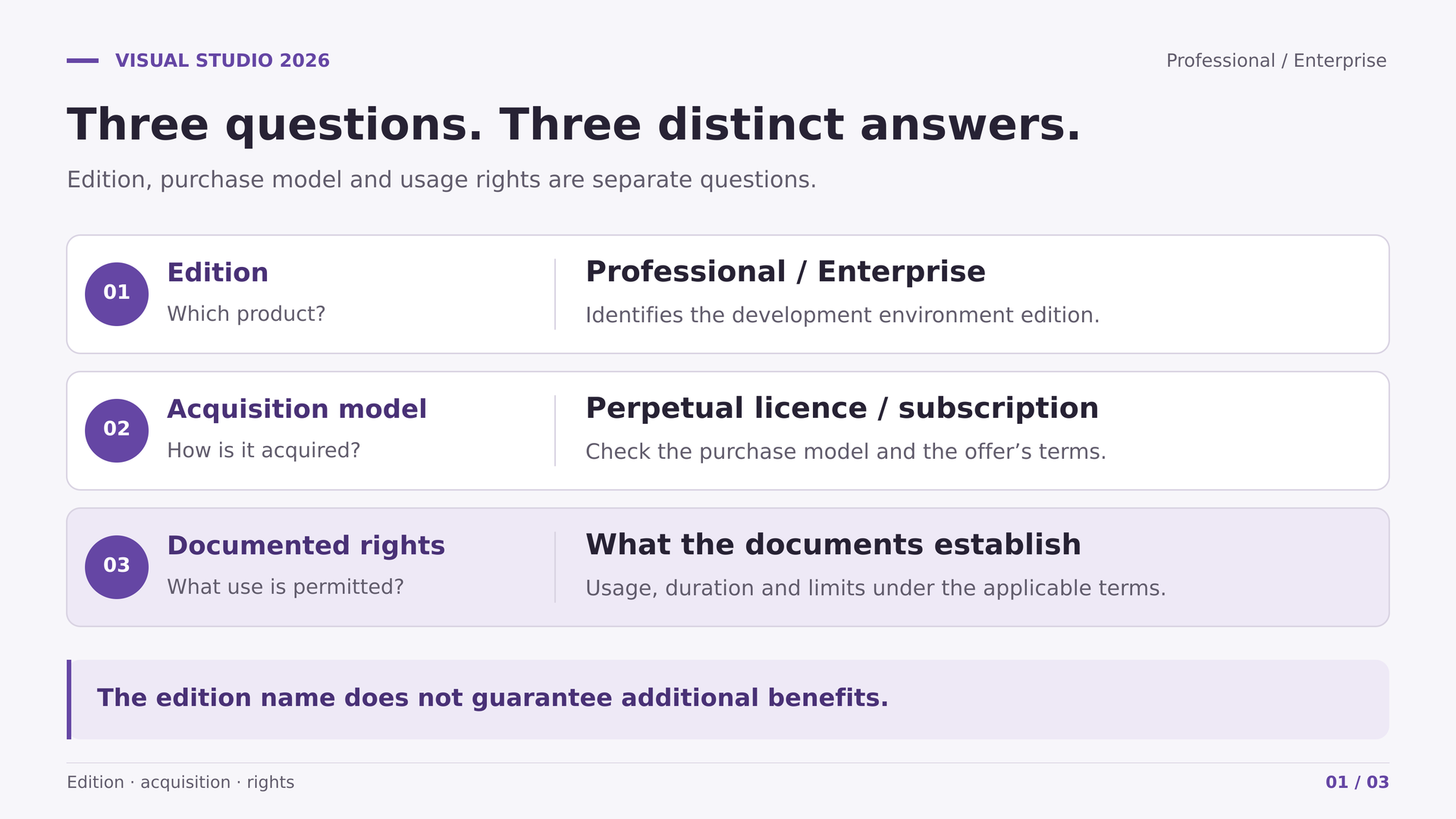
The edition tells you which tools the development environment includes. Professional and Enterprise share a broad foundation; Enterprise adds specialist capabilities. That technical difference does not automatically determine the licence's duration, transfer conditions or access to additional software.
The acquisition channel explains how the right reaches the buyer: a standalone purchase, a subscription or a secondary-market transaction, among other possibilities. Each route has its own conditions. Even when two installations display exactly the same name, their users may have different contractual rights.
The documentation establishes what you can actually do: who the authorised user is, which version is covered, for how long and subject to which restrictions. The invoice helps demonstrate the purchase, but must align with the contract and, where applicable, the provenance and transfer documents.
Then there are subscription benefits. Azure credits, lab software and collaboration services belong to specific packages; installing Enterprise does not make them appear. In Lucía's example, needing the IDE to develop a commercial application does not mean she also needs a subscription with its entire catalogue.
2. Feature comparison: what actually changes in 2026
The comparison needs to use information for 2026, not recycled older tables. The most important change for many teams is that Professional now includes code coverage. CodeLens, standard unit testing and general profiling are not exclusive to Enterprise either.
| Requirement | Professional | Enterprise | Practical interpretation |
|---|---|---|---|
| Editing, debugging and refactoring | Available | Available | Both cover everyday IDE work. |
| CodeLens and unit testing | Available | Available | These alone do not justify choosing Enterprise. |
| Code coverage | Available in 2026 | Available | Its former exclusivity is no longer a valid argument. |
| Static analysis, metrics and general profiling | Available | Available | Check specific capabilities, not just the category. |
| IntelliTrace | Not included | Included | Its scope depends on the language and environment. |
| Live Unit Testing | Not included | Included | Requires compatible projects and test adapters. |
| Microsoft Fakes | Not included | Included | A specific isolation tool for testing. |
| Architecture and dependency validation | These advanced capabilities are not included | Available subject to conditions | Live validation supports C# and Visual Basic. |
| Code maps | Open without editing | Create and edit | Professional can display maps generated with Enterprise. |
Coverage shows which parts of the code ran during testing; it does not prove that the checks are good or that every result is correct. You can achieve a high figure while still failing to test an important case. When evaluating both editions, therefore, combine coverage with a review of scenarios, assertion quality and bug tracking. The tool provides information, but the testing strategy remains the team's responsibility.
Profiling helps investigate where an application consumes resources; it does not mean you need Enterprise for every performance analysis. Start with a representative workload, reproduce the behaviour and compare results after a change. Avoid making a decision based on an isolated screenshot or the edition's name. An improvement needs to be verified in the project's context, not assumed when you change licence.
There is another important correction: IntelliTest is deprecated in Visual Studio 2026. That is not the same as saying it has been removed, but it is not sensible to make it the main reason for a new purchase either. When a sales comparison table and a specific technical warning differ, it is worth following the latter.
3. When Professional is sufficient
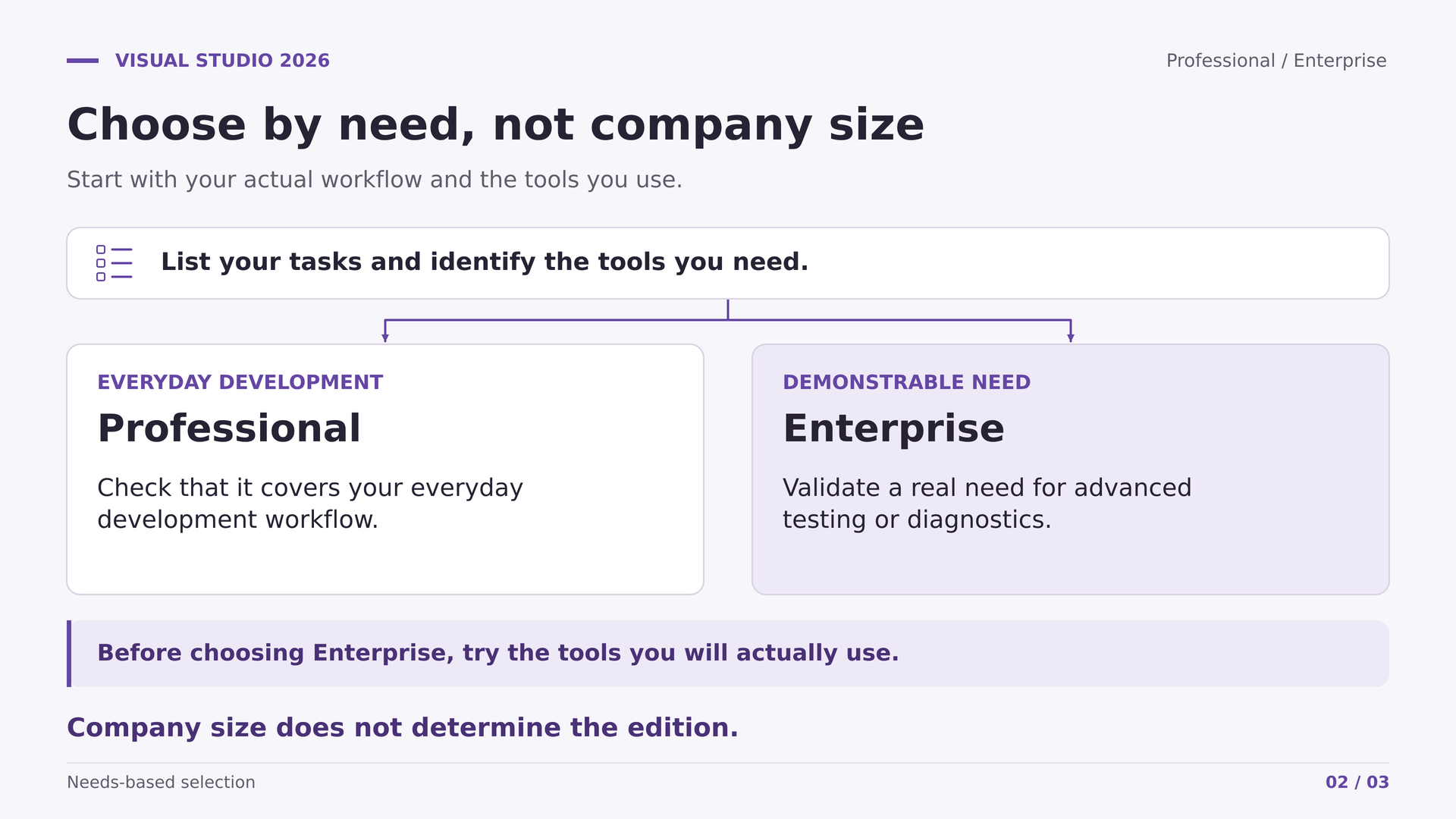
Professional suits many workflows for developing web applications, services and desktop software. It lets you work with code, debug errors, run tests and examine results without requiring every project to adopt advanced architecture tools or historical diagnostics.
Consider an API that receives orders and updates a database. A typical workflow involves editing the service, running validation tests, debugging an unexpected response and reviewing changes before integration. Professional can cover that workflow without making the project any less substantial. What matters is checking the components used and the actual process, rather than automatically associating business applications with the Enterprise edition.
For Lucía, the useful question would be: which specific task can she not complete with Professional? If she maintains an application, uses conventional automated tests and reviews coverage to identify poorly tested areas, Enterprise does not become essential simply because she invoices clients.
Professional can also be sufficient within a large organisation. The Enterprise name does not create a general obligation for businesses above a certain size. Community's organisational restrictions are a separate matter and should not be applied to Professional.
It is also worth distinguishing the IDE's features from external tools. A team may already have analysis, testing and observability within its continuous integration process. Buying duplicate capabilities only makes sense if local integration delivers a demonstrable improvement.
If this describes your work, review the Visual Studio Professional 2026 offer at Licendi as a purchase option, checking its conditions against your intended use. The technical choice and documentary verification should go hand in hand.

4. When Enterprise offers a specific advantage
Enterprise becomes more attractive when there is a recurring problem that its specialist tools can solve. Examples include diagnosing a fault that is difficult to reproduce, maintaining a test suite for legacy code or monitoring dependencies between layers of a large application.
IntelliTrace lets you collect and review execution information to investigate problems. Compatibility varies by language, platform and scenario: it is not equivalent to freely stepping backwards through any program. Before relying on it, check that it covers the type of application you actually maintain.
Live Unit Testing automatically runs tests as the code changes and displays related information within the environment. It is available in Enterprise for compatible .NET Core or .NET Framework projects, with supported adapters. Professional can still run unit tests; the difference is this specific automated experience.
Microsoft Fakes provides isolation mechanisms through stubs and shims. It can be useful when testing code with dependencies that are difficult to replace, but it does not make every mocking library an Enterprise-only feature. First evaluate the project's design and the alternatives the team already uses.
Architecture tools allow you to define and check relationships between components. The live validation documented for C# and Visual Basic can help detect breaches of those rules. Without agreed rules and ongoing review, the diagram alone offers little.
To assess Enterprise, prepare a focused evaluation using a representative solution and appropriate evaluation permissions. Choose a known fault, a dependency that is difficult to isolate or an architectural rule that is frequently broken. Then check whether the tool helps locate the problem and whether the team understands its results. You do not need to start with productivity estimates: simply observe whether it meets a recurring need better than the current procedure and whether maintaining that practice is feasible.
The Visual Studio Enterprise 2026 offer at Licendi is worth considering when you identify one of these uses. Before buying, check project compatibility and the specific rights attached to the offer.
5. Standalone purchases, Standard and Monthly are not equivalent
Microsoft offers Professional as a standalone product or as part of a subscription. A standalone purchase provides the IDE with a perpetual licence under its terms, without the rest of a subscription's benefits package. Perpetual describes the duration of the right, not a promise of unlimited services.
Microsoft's licensing guide states that Enterprise is offered only through a Visual Studio Subscription. This matters when comparing that route with a secondary-market offer advertised as permanent. Such an offer should therefore not be understood as an official standalone purchase on the same terms as Professional.
An eligible Standard subscription may establish perpetual use rights that remain after expiry. However, not every subscription type or contractual programme allows this in the same way. There are exclusions and acquisition conditions that need to be checked in the contract.
That possibility explains why a secondary-market offer might refer to residual rights, but it does not demonstrate that a particular offer includes them. For the Licendi products analysed, neither the chain of provenance nor the establishment of those rights has been verified. The appropriate conclusion is to request documentation, not automatically declare the product valid or invalid.
The residual right also has a version and a scope. Demonstrating an earlier purchase is not enough to establish that the user may run any later version. Ask for documentation explaining which product remained covered when the subscription ended and how that right reaches the current buyer. Associated services may have their own time limits: continuing to use the IDE does not mean retaining indefinitely every benefit that existed during the subscription.
Monthly maintains the right while the subscription continues; paying for an extended period does not automatically make it perpetual. Nor should Standard with annual billing be confused with the former Annual Cloud subscriptions. What matters is the exact contractual name, not whether an invoice arrives once a year.
6. Per-user licensing and organising the team
As a general Microsoft rule, Visual Studio is licensed per user, not per installation. The Professional and Enterprise 2026 licence terms allow the authorised user to install and use copies on their devices to develop and test applications. This does not turn a licence into a shared resource.
Two developers using the same computer on different shifts are still two users. They must not share a key or credentials to avoid obtaining their own licences. Equally, having several computers does not automatically mean needing as many licensed users as machines.
This general rule must remain separate from Licendi's commercial restriction of one installation per PC. You should not assume that invoking Microsoft's rules overrides that condition. Before buying, request a written explanation of the channel, user assignment and authorised devices.
A useful inventory records the person, edition, version, contract, proof of purchase and assignment date. Include employees and external professionals who need the software; do not assume that a supplier's contract automatically covers every collaborator.
A role-based review is usually more useful than counting desks. Identify who writes code, who runs tests using software subject to licensing and who only takes part in acceptance testing as an end user. These are different activities. If contractors are involved, record in writing who provides each right and who retains the documentary evidence when the engagement ends. This avoids discovering a gap when someone leaves.
When people leave or change roles, review the applicable reassignment rules. Reassigning a licence under a contract is not the same as lending it out each morning. Build tools and automated agents also warrant a separate review: an individual's IDE licence does not settle every licensing condition for a continuous integration server.

7. Observed prices and a realistic budget
On 19 October 2026, Licendi's Spanish pages displayed EUR 185 for Professional and EUR 200 for Enterprise. The difference was EUR 15. These are Spanish public prices in a B2C context: the seller's general terms state that VAT is included for end customers.
The tax treatment for each destination, any particular business purchase and the final checkout amount have not been verified. Confirm taxes, any charges and the total before accepting the order. These amounts are not equivalent to Microsoft's official subscription pricing either.
As a simple exercise, five units at the observed price would cost EUR 925 for Professional or EUR 1,000 for Enterprise: a difference of EUR 75. This is hypothetical arithmetic, not an offer for five users or verification of availability, delivery or terms for multiple units.
A small difference can make Enterprise attractive if its tools are needed and the right offered is documented. However, the full budget includes installation time, extension compatibility, training and maintenance. Buying the higher edition without a plan to use it does not eliminate those costs.
The time available to adopt the features matters too. If nobody can prepare tests or maintain architectural rules, those capabilities will remain unused however attractive the price. Conversely, a team already familiar with an advanced tool may have a specific reason to retain it. Compare the cost with a defined need, not an abstract promise of working better.
For an individual, the best saving may be an appropriate licence that avoids uncertainty. For a team, it may mean assigning different editions according to responsibilities, always with documented individual rights.
8. What Licendi's offers actually say
Both product pages advertise a one-off purchase, a perpetual licence, a single installation per PC and a non-transferable licence. They also include the phrase “Recommended for personal use”. These are the seller's conditions and descriptions; they do not, in themselves, certify the original channel or the chain of licensing rights.
The personal-use recommendation is not an express prohibition on business use. Even so, if you are buying for a business, it is worth obtaining written confirmation that the offer and its documentation cover the intended entity and user. This is particularly important when the longer description also refers to professional teams.
Do not assume that you can move between computers based on the general licence terms. The seller's conditions tie activation to a device and warn that formatting, reinstalling or changing hardware may prevent the key from continuing to work. For anyone who regularly replaces workstations, that limitation may matter more than the price difference.
The advertised technical support needs to be defined: scope, duration, procedure and remedy if activation fails. Neither a specific service-level agreement nor included Microsoft support incidents have been established. Installation help is not the same as unlimited assistance throughout the product's lifetime.
The same caution applies to territory and new versions. Worldwide authorisation and an automatic entitlement to future editions have not been verified. Ask for answers tied to the exact product, rather than settling for a generic explanation about all the licences in the shop.
9. Second-hand software: documentation before assumptions
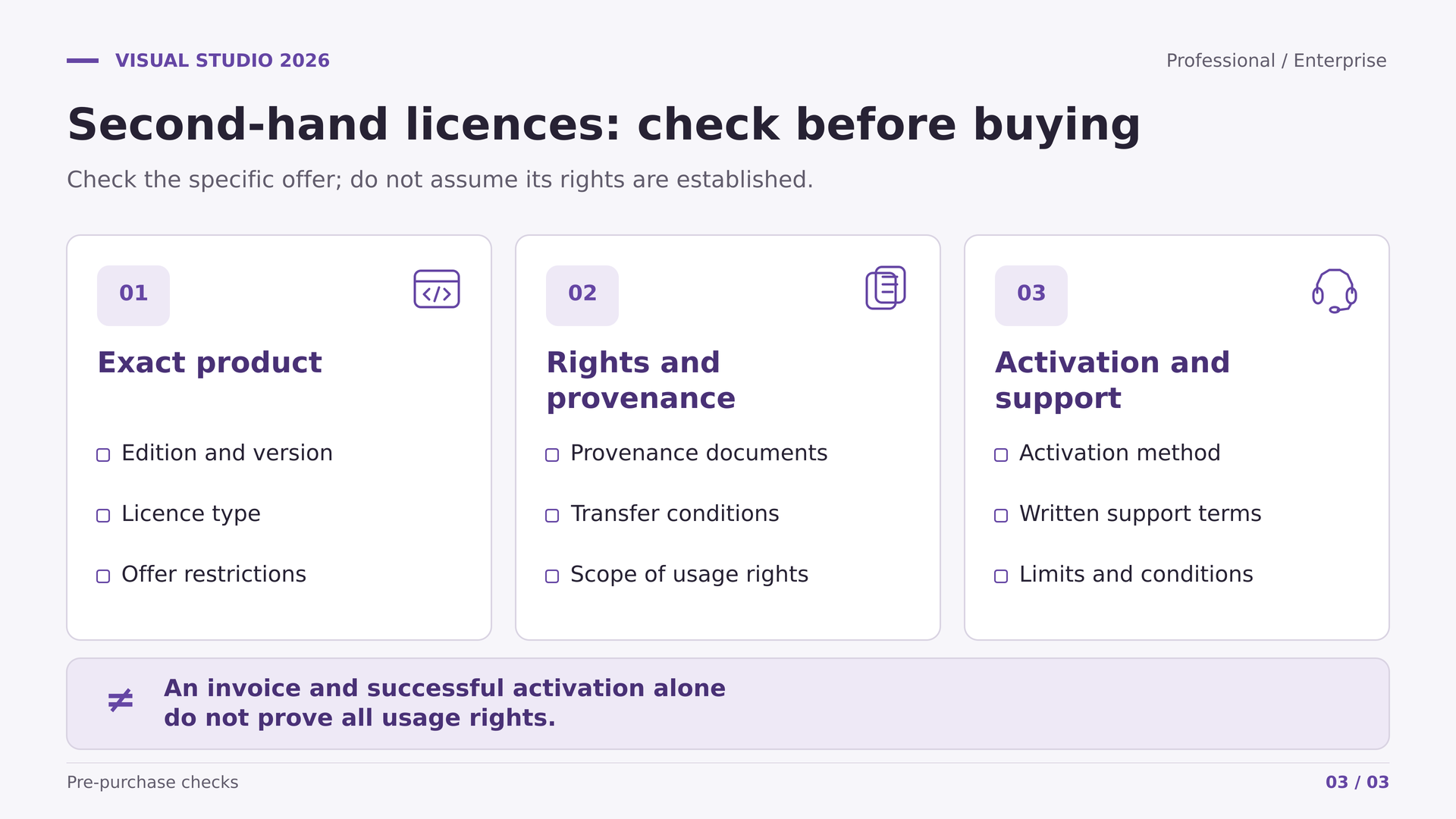
The secondary software market requires you to review which right is being transferred, not simply receive a string of characters. Activation demonstrates a technical result at that moment; on its own, it does not prove provenance, a valid transfer, subscription benefits or the scope of business use.
The Court of Justice's institutional press release on UsedSoft and Oracle summarises relevant conditions: an authorised first sale within the Union, acquisition for a fee of a right of unlimited duration, and the transferor's obligation to make their copy unusable on resale. It also warns that the purchaser cannot divide the licence in that case and resell part of it.
This summary does not amount to universal authorisation for any used key. It comes from a non-binding institutional press release, not a review here of the full judgment. The specific circumstances, territory and documentation require their own analysis; the conclusions should not automatically be extended to subscriptions or online services.
Ask for the product's identification, original contract, scope of the perpetual right and transfer documents where applicable. An invoice is necessary to keep the purchase in order, but does not replace that entire set of records. Nor should the legal transfer of rights be confused with the technical conditions for reactivation.
If you are buying for an organisation subject to audits or clients' contractual requirements, incorporate this review into the usual procurement process. The aim is not to turn every purchase into a legal dispute, but to retain enough evidence to explain who uses which software and with what authorisation.
10. What is not automatically included
GitHub Copilot requires separate access and is governed by its own terms. Integration of its features into the IDE does not mean the purchase includes a paid plan. Check the account, plan and code-handling policies before introducing it into your work.
Azure credits depend on eligible subscription levels and their continued validity. They are not money that can be deducted from the price of a key, nor a universal Enterprise benefit. Development and testing credits should not be budgeted as production infrastructure either.
Windows, Windows Server and SQL Server warrant another review. Subscriptions may provide software for evaluation, development, testing or demonstrations, subject to specific conditions. Buying the IDE does not automatically grant full licences for those products or rights to run a business's production systems.
A lab and an operational service are not interchangeable. A server used partly in production is not covered simply because code is also tested on it. Likewise, each person using lab software needs appropriate rights, unless an express exception applies; a single Enterprise licence does not cover the whole team.
These lab software restrictions do not mean that selling the applications you develop is prohibited. The product your team creates is distinct from the IDE and the systems used to test it. When distributing it, review the terms for redistributable components and incorporated dependencies. This analysis avoids confusing a development licence with all the permissions needed to deliver the solution.
Azure DevOps, Test Plans and GitHub Enterprise also depend on the package purchased. Separate the IDE, services, infrastructure and production licences in your budget. You can then compare like-for-like alternatives instead of attributing benefits to a key that nobody has substantiated.
11. Community can be a legitimate alternative
Before paying, check whether Visual Studio Community meets your legal and technical needs. It is not an edition restricted solely to education or free projects. The licence terms allow an individual to develop their own applications, including for sale, subject to its conditions.
For organisations, ordinary use requires not being an enterprise organisation as defined in the licence terms, and observing the concurrent-user limit. Enterprise organisations need to qualify for an exception. Revenue, size and affiliates must be assessed, not just the number of developers working in a department.
Organisational exceptions exist for applications under OSI-approved licences, Visual Studio extensions, Windows drivers, training, education and academic research, and certain data projects using the expressly specified tools. Each exception covers particular activities; it does not authorise any and all work by the organisation.
The responsible approach is to read the Community 2026 licence terms and document why the intended use qualifies. If it meets the conditions and provides the necessary features, paying for Professional may be unnecessary. If it does not qualify, Professional remains valid for commercial work: there is no need to jump straight to Enterprise.
12. Installation, compatibility and maintenance
Before installing, check the computer against Visual Studio 2026's official requirements. The current list includes supported versions of Windows 11 and Windows Server. Do not treat Windows 10 as a supported operating system for this IDE based on a sales description; exceptions for components or remote tools are a separate matter.
Download from Microsoft and select the workloads you need. Installing everything indiscriminately makes maintenance harder and consumes resources without guaranteeing compatibility. Check SDKs, compilers, packages, extensions and external tools using a representative solution before changing every computer.
Also identify the activation method for the right you have purchased. The documentation covers access through a subscription account and keys in certain scenarios. Not every licence is delivered in the same way; follow the procedure for the specific channel and avoid shared accounts or installers of unknown provenance.
Plan to test opening, building and running the project, as well as executing automated tests. Keep backups and a recovery procedure before modifying projects. Choosing Enterprise does not guarantee that an old extension will work or an application will build without changes.
Visual Studio 2026 follows Modern Lifecycle, with an annual model combining one year of feature updates and servicing with another year of security updates through LTSC. At the cut-off date for this comparison, that channel was planned for November 2026 and was not yet available. Consult the current schedule when preparing deployment.
On shared computers, also document who administers the installation and who receives maintenance notifications. You can retain a common workload configuration to reduce differences, but each user must still have their own rights. After updating, repeat the essential checks: restore dependencies, build, run tests and confirm that the results align with the project's integration process.
Perpetual does not mean lifetime technical support. Nor does the program's update mechanism automatically grant rights to future annual versions. Keep the contract, review the terms before updating and maintain a policy that distinguishes security, compatibility and the right to use the software.
13. Practical buying checklist and final decision
A well-prepared purchase can be summarised in a set of specific checks. Resolve them before paying and keep the answers alongside the documentation, rather than scattered across conversations and screenshots that are difficult to retrieve.
- Define the work. Note the languages, projects, tests and problems you need to address. Identify a specific feature if you are proposing Enterprise.
- Check alternatives. Review Community where appropriate and the tools the team already uses. Avoid buying two solutions for the same need without a clear advantage.
- Identify the product. Confirm the edition, version, contractual arrangement, authorised user and territory. Do not infer the channel from the product page's name.
- Clarify restrictions. Request written answers about devices, business use, reinstallation, hardware changes and transfer. Distinguish general rules from the seller's specific conditions.
- Review documentary evidence. Request provenance and transfer records where relevant, particularly if perpetual rights derived from another contract are advertised.
- Separate the benefits. Confirm what the purchase includes and what requires a separate purchase or agreement: Copilot, services, lab software, production and future versions.
- Verify payment and assistance. Review the total, taxes, delivery terms, the procedure for failures and the scope of support. Do not confuse displayed availability with verified delivery.
- Prepare deployment. Check requirements, run a trial with your projects and record assignment, maintenance and user offboarding.
If you need a comprehensive environment for everyday development, return to the Professional 2026 product page with that checklist in front of you. If you have identified a compatible advanced requirement, assess the Enterprise 2026 product page and demand the same documentary clarity.
Finally, leave a brief decision note: why that edition was chosen, which documents were checked and when the decision should be reviewed. If the project, team or contract terms change, you can reconsider the choice without starting from scratch.
The best choice is not determined by the licence price alone. It is the combination of tools you will use, rights you can substantiate and conditions that fit the way you work.
14. Official sources and consultation date
Documentation consulted on 19 October 2026. These sources explain features and general rules; they do not certify the individual licences offered by a seller.
- Microsoft: Visual Studio edition comparison.
- Professional and Enterprise 2026 licence terms.
- Visual Studio licensing guide.
- Purchase options and subscription benefits.
- Code coverage in current editions.
- IntelliTest status in Visual Studio 2026.
- Visual Studio Community 2026 licence terms.
- Official system requirements.
- Support and servicing policy.
- Annual release cadence and update channels.
- Rights when a subscription expires.
- CJEU: institutional press release on UsedSoft and Oracle.