EN
 FR
 DE
 IT
 PT
 ES


Software Budget for a Startup: From 1 to 10 Employees
Imagine Clara, the founder of a small consultancy. Today she works alone, prepares proposals and keeps the accounts; she hopes to bring other people on board if the expected projects come through. This is a hypothetical situation, but the question is very practical: what software does she need to buy now, and how much money should she set aside to grow to ten employees? Buying everything at the outset ties up cash. Making arrangements as each new person joins can leave files scattered across accounts, work tied to personal identities and licences whose use nobody can properly justify.
A useful budget needs to address both issues: how much to pay and how to keep work organised. It starts not with a choice between subscriptions and perpetual licences, but with identifying tasks, devices and existing rights. It then distinguishes one-off purchases, recurring services and implementation work. Here we will build a model you can reproduce using public prices checked on 14 October 2026, without presenting it as the complete cost of running a company's IT.
Count people, devices and tasks separately
Ten employees do not automatically mean ten purchases of every application. Someone preparing financial models may need a different desktop tool from someone checking orders in a browser. Nor does someone with two computers necessarily have the right to install a licence advertised for a single PC on both machines. The unit you budget for depends on the contract: a user, a device, capacity or a service.
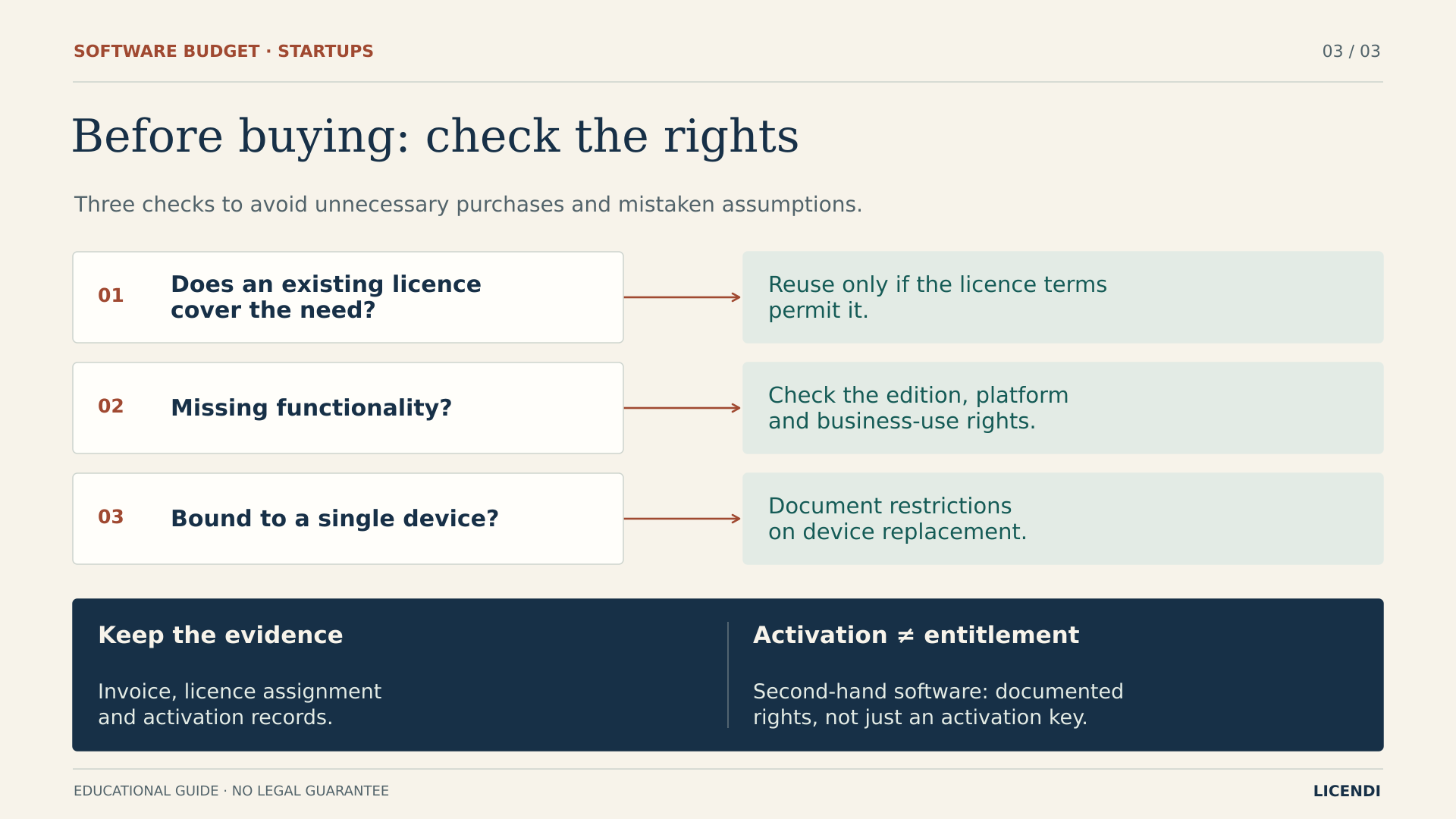
Start with a simple inventory. Record who uses each computer, which operating system it comes with, which applications are authorised and where you keep the invoices. Review existing subscriptions as well: a suite you already subscribe to may include the desktop applications you were planning to buy separately. Reusing valid rights avoids duplicate purchases; reusing a key without checking its terms simply postpones a problem.
It helps to describe each role through a task you can actually test. “Needs office software” tells you very little; “prepares proposals using client templates and reviews spreadsheets received by email” gives you a basis for testing a solution. Add whether the person works offline, uses complex files or needs to collaborate with others simultaneously. This description also helps identify specialist tools missing from the budget, such as design or development software, before treating a basket of administrative applications as the answer for every startup.
For the numerical example, we will assume one Windows PC per person and a need to buy Windows and Office for each machine. This is an assumption for the calculation, not a universal recommendation. Fewer workstations will need advanced PDF editing, and those licences will be assigned to specific devices. If your situation is different, change the quantities before discussing discounts.
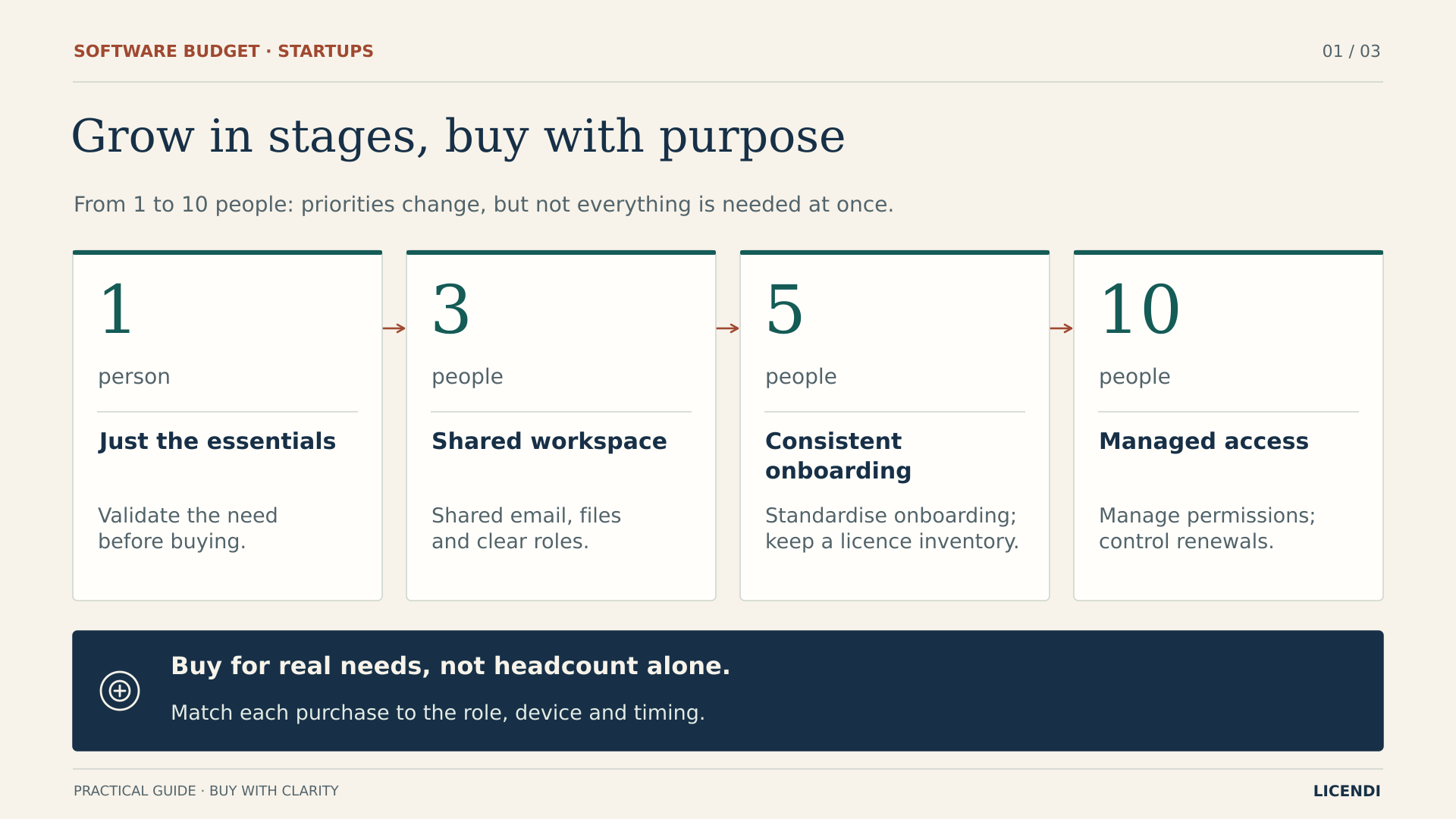
One person: get the work done and be able to recover it
Clara needs to send proposals from a professional email address, create documents, retain contracts and recover information if she loses her computer. Before adding applications, she needs to make sure the domain and accounts belong to the business. The recovery email address, payment method and emergency codes should not depend entirely on a personal account that could prove difficult to recover.
At this stage, it is worth separating three functions that are often confused: storing files, synchronising them and keeping recoverable backups. Seeing a document on several devices does not demonstrate that you can restore it after deletion or an incident. Define what you need to recover, how much work you could afford to lose and how long you could manage without access. Then ask for a service suited to those requirements.
Recovery deserves a simple test: choose a non-sensitive work file, check that a backup exists and restore it to a controlled location. Record who was able to do this and which credentials they needed. If the backup depends on the very account you are worried about losing, review that dependency with the provider. This check does not certify the security of the entire system, but it helps distinguish a service you have paid for from a capability the business can actually use.
Enable multifactor authentication wherever it is available, organise credentials and keep the computer updated. These measures require configuration and ongoing attention, even if some of the tools are already included. You do not need ten licences bought in anticipation, or an advanced PDF editor just in case. First check that you can create, send, save and restore a real working document.
Three people: share the work, not the passwords
When the first employees join, the important change is not multiplying applications but moving away from a personal way of organising work. Client documents need to be kept in company-controlled spaces with defined permissions. Each worker needs their own identity when a service is licensed per user; sharing a password to reduce fees may breach the terms and makes it harder to establish who made each change.
Allocate responsibilities before buying. In our example, all three workstations are used to edit desktop documents, but only one prepares case files requiring advanced PDF editing. That justifies budgeting for an editor licence on a particular device, not a key that circulates among everyone's computers.
Prepare an initial onboarding checklist: account, computer, authorised applications, folders and the person responsible. Decide who is allowed to sign up for services as well. If anyone can enter the company card details during a free trial, the budget will soon stop reflecting what the business actually pays. Recording a trial and its decision date is easier than trying to explain an unfamiliar charge later.
Five people: standardise before adding more tools
By the time you reach five people, small exceptions start consuming time. One computer runs a different edition, an invoice is buried in somebody's inbox and an application is still being billed even though it is no longer used. A shared inventory, with a named owner and a review date, often contributes more than adding another management platform without a clearly defined problem to solve.
Define a standard configuration for each role, rather than making every setup identical. Administration may need the PDF editor; sales may need a sales tool; someone else may work mainly in web applications. The model retains a single specialist PDF workstation at this stage. If simultaneous workloads justify more, review that quantity without turning an exception into an automatic purchase for the entire workforce.
Before paying for overlapping suites, test the documents you actually exchange: spreadsheets with formulas, templates, presentations and files sent by clients. An inexpensive alternative that forces you to rework every deliverable may be unsuitable. This functional check is separate from licence verification: the software needs to do the job, and the contract needs to allow you to use it as intended.
Ten people: assign responsibility and plan for departures
With ten employees, Clara may still approve purchases, but she should no longer be the only person who knows about renewals or can recover the domain. Appoint an operational owner and an authorised deputy. Document which changes need approval and the spending threshold above which quotations must be compared. The aim is not to create bureaucracy but to prevent decisions from being made out of sight.
An employee's departure should be as well prepared as their arrival. Remove access, retain business documents in line with the applicable policy and review the person's subscriptions. Releasing an account does not mean the provider will automatically refund what you have paid, nor does it allow you to move any desktop licence to another computer.
The ten-person scenario budgets for two devices with an advanced PDF editor. It does not assume everyone else needs that capability. It is also worth identifying which activity would stop if a service failed and who would carry out the recovery. The cost of support and that preparation belongs in the budget, even if it is not included in the price of a key.
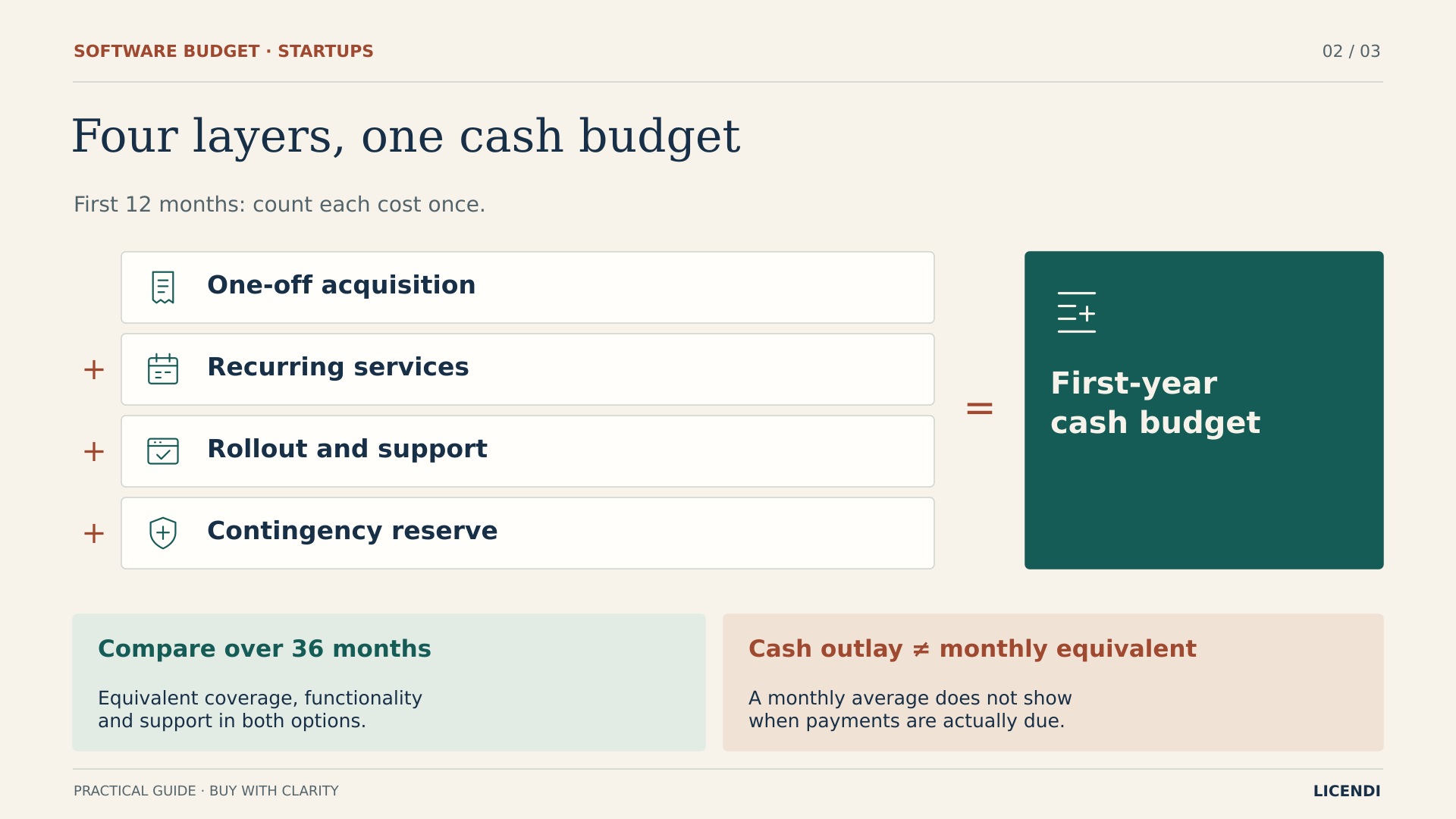
Separate four layers of spending
The first layer is acquiring usage rights: what you pay when adding a workstation. The second is recurring services, such as email, storage or backup. The third is implementation and support: configuring accounts, migrating documents, resolving incidents and training the team. The fourth is a reserve for identified risks, not a decorative figure that gives you permission to forget known expenses.
Do not confuse this cash budget with accounting amortisation. Spreading a purchase across several months helps with comparisons, but it does not change when the money leaves the bank. Likewise, a fee advertised as monthly may involve an annual commitment. Record the amount, payment date and date on which you can reduce or cancel the service separately.
Three specific products with different terms
Windows when the necessary rights are missing
The selected Windows 11 Pro offer is Retail with Digital delivery: SKU 2303, under product 23020. Its observed public price is €23.13. Do not confuse this with the minimum price for another variant on the page. If the computer already includes a valid and sufficient Windows Pro licence, do not buy another. Also check hardware compatibility and the supported release.
Ordinary use under the Windows terms covers one instance on the licensed device and one person at a time. It does not turn that PC into a multiuser service or automatically grant rights to other products. Checking the operating system is only part of validating a complete workstation.
The listing describes Retail as allowing reinstallation and transfer. The official terms distinguish standalone software from preinstalled software and, where transfer of standalone software is permitted, require its removal from the previous device. The applicable agreement and relevant law govern; this is not a licence to share software among computers. There is also a generic seller warning about being tied to the first computer, which conflicts with that specific description. Ask for written confirmation for the chosen SKU before relying on its transferability.
Office for a stable desktop workstation
The selected Microsoft Office 2024 Professional Plus LTSC offer is for 1 PC: SKU 7319-1, product 7319, at €60.32. The listing ties this option to the first machine on which it is activated. Do not assume you can transfer it free of charge when replacing the computer. It is not a per-user subscription with unlimited installations, nor is it a floating licence.
This Windows offer includes desktop applications such as Word, Excel, PowerPoint, Outlook, OneNote and Access. It does not include a hosted mailbox, Exchange Online, OneDrive storage, Microsoft 365 Copilot, Project or Visio. Outlook is an email client, not the service that hosts your messages. Microsoft positions LTSC within volume licensing agreements: a seller's second-hand package for one PC does not demonstrate that it is a new retail-channel licence. Request the documents establishing the applicable rights.
Advanced PDF tools only where they are needed
Kofax Power PDF Advanced 5.0, SKU 12461, has an observed public price of €200.00. The offer specifies a perpetual licence for 1 PC, non-transferable and with a single activation. It may suit a workstation that needs the editing, text recognition or redaction features described by the seller, after those capabilities have been checked against the documents normally used there.
Reading a PDF does not, by itself, justify buying this editor. Nor should you interpret a perpetual term as a guarantee of future versions, indefinite support or reactivation after changing computers. These three listings provide a basis for considering a purchase, but observed availability does not establish immediate delivery of ten units. Confirm stock, terms and lead time before scheduling a group of new starters.
When requesting a quotation, sending the program's name is not enough. Specify the edition, platform, quantity, licensing option and restrictions used in your budget. For Office, this example repeats the individual 1 PC option; it does not assume a package for several computers has the same unit price or terms. If you are offered a different product, update the whole comparison, including rights and supply, rather than simply replacing the amount in a table cell.
A basic budget you can recalculate
The following Spanish example uses euros and the public prices above, observed on 14/10/2026. The seller's public terms state that VAT is included for B2C end customers; we treat those amounts as the final cash outlay in the model. They do not establish the tax treatment of a particular business purchase; no customer-specific business invoice or tax calculation was checked for this example. Confirm the total and taxes on your own invoice before approving it.
We do not add another 21% to those prices. Although that is Spain's general rate as stated by the Spanish Tax Agency, it does not establish the treatment applicable to every buyer, destination or transaction. Nor do we assume the tax is deductible. Keeping the example explicitly based in Spain avoids carrying a tax assumption into other countries as though it applied universally.
For services, we use hypothetical allowances: €8 per person per month for business email and cloud services, €4 for independent backup and €24 per company per year for the domain. These are assumed final amounts for planning, not verified Microsoft rates or service quotations from Licendi. Replace them with actual quotations specifying capacity, retention, support, taxes and contractual commitment.
Everyone starts in the first month and remains for 36 months. Prices are held constant, without volume discounts or inflation. Each person receives a PC that needs Windows and Office; the numbers of PDF workstations are 0, 1, 1 and 2, respectively. The table covers only that core of licences and services: it is deliberately incomplete.
| People | PDF workstations | Licences, one-off payment | Services per year | First year | 36 months |
|---|---|---|---|---|---|
| 1 | 0 | €83.45 | €168.00 | €251.45 | €587.45 |
| 3 | 1 | €450.35 | €456.00 | €906.35 | €1,818.35 |
| 5 | 1 | €617.25 | €744.00 | €1,361.25 | €2,849.25 |
| 10 | 2 | €1,234.50 | €1,464.00 | €2,698.50 | €5,626.50 |
With N people and Q PDF devices, licences cost N × €83.45 + Q × €200. Annual services cost N × €144 + €24. The first year adds both items together; the 36-month figure includes licences once and three years of services. For five people, €417.25 for Windows and Office plus €200 for PDF therefore comes to €617.25; adding €744 in services brings the total to €1,361.25.
If every computer already has valid, suitable Windows Pro rights, deduct €23.13 per device from the acquisition cost and cumulative totals. Do not deduct it every year: the model purchases it once. If a chosen subscription includes the email service or applications you need, replace the corresponding items; do not count the same coverage twice.
The first month's spending is not the same as the one-off licence payment either. For the person starting alone, if the domain is paid for at the outset and services are paid monthly, the outlay is €119.45: €83.45 for licences, €12 for services and €24 for the domain. This distinction helps you plan cash flow without turning the entire year's services into an immediate invoice, or forgetting an annual payment by looking only at the monthly fee.
Fill in the costs the table leaves open
Additional items outside these totals include implementation, support, security and device management, a password manager, CRM, accounting, contractual review and a contingency reserve. Budget for them according to your business activities; costs cannot be treated as zero simply because the figures are still pending. Computers, replacements, extra capacity, recovery work, migrations and future upgrades are also excluded. The table does not represent the total cost of IT ownership.
To complete the implementation budget, ask for a quotation that separates computer preparation, account configuration, document migration and training. If you do the work internally, allocate time and assign someone to it; do not present that work as non-existent. For support, clarify which incidents the agreement covers, when the provider will respond and which interventions are charged separately. Assistance limited to product activation is not the same as keeping the business operational.
For security, first describe the data you handle and how devices are managed. A business dealing with particularly sensitive information may need controls that this example has not costed. The same applies to CRM or accounting: identify the process, necessary integration and people who will use the tool before adding a fee. Do not reduce those costs just to make them fit artificially within the table.
Finally, set a reserve linked to specific risks: a pending migration, additional storage or a replacement that may require new licences. Keep it separate from contracted expenditure and review what it covers. No reserve has been calculated or included here, so you need to add it to the core alongside the other budgeted items. A foreseeable expense should have its own line, rather than being hidden among contingencies.
Hiring during the year changes the payment schedule
Let us return to Clara. Suppose she starts alone, hires two people in month 4, another two in month 7 and five in month 10. She buys a PDF workstation licence in month 4 and another in month 10. She finishes with ten employees, but she has not needed ten accounts throughout the year.
Service months are calculated by cohort: 1 × 12 + 2 × 9 + 2 × 6 + 5 × 3 = 57 user-months. At €12 per person per month, email, cloud and backup total €684; including the domain, the amount is €708. Licences still cost €1,234.50 once all workstations are equipped. Buying them later postpones the cash outlay; it does not in itself reduce their price.
The first year therefore comes to €1,942.50. If all ten employees stay for the following two years, the cumulative core cost over three years will be €4,870.50. The €756 difference compared with having ten people from the outset comes entirely from fewer months of services, not from an invented licence discount.
This result requires genuine monthly flexibility, without annual minimum commitments that force you to pay for unused seats. An annual commitment paid monthly is not the same as a month-to-month contract. Before applying the calculation, review additions, cancellations, prorating and renewal. Also distinguish actual first-year expenditure from the annual service spending rate of €1,464 once you reach ten people.
Perpetual licences and subscriptions: compare the same work
A perpetual licence may suit a stable workstation that needs familiar applications. A subscription may make more sense when integrated services, central administration or particular collaboration capabilities matter. The aim is not to declare one model the winner, but to compare equivalent rights, functions and obligations.
Do not compare the price of desktop Office with a subscription that also includes email and storage without separating those services. Check whether the plan offers web, mobile or desktop applications, how many devices it allows and how it is assigned to a user. With Microsoft 365, also review the regional variant with or without Teams and the current terms. We have not verified a current commercial rate that would justify publishing percentage savings or a break-even point against that provider.
The period covered matters too. Office LTSC 2024 does not receive new features after release, and its support ends on 9 October 2029, according to the Pacific-time calendar published by Microsoft. A 36-month horizon beginning on 14 October 2026 ends a few days later. The totals above do not include the as-yet unknown cost of an upgrade or migration needed to maintain a supported environment.
Schedule that review before support ends. A perpetual right to use software does not mean perpetual security updates. For Windows, you need to maintain an eligible, supported release; for Kofax, an exact official end-of-support date has not been established here. Do not turn that missing information into a promise of unlimited maintenance.
Test a workstation before multiplying the purchase
Before equipping the entire team, reproduce the work on a reference workstation using an evaluation option or licence that permits it. Open representative documents, review printed output, check important formulas and try exchanging files with the client. Use test files without confidential information when you have not yet verified where the data will be processed.
For PDF work, check that the required feature solves the actual problem: recognising text is not the same as preserving a table correctly, and visually covering information does not guarantee that its underlying content has been removed. Review the resulting file, not just what the button appears to do. If a requirement is not met, compare another solution before multiplying a purchase you will later have to replace.
Document the handover as well: installed version, authorised computer, assigned person and location of supporting records. Separate functional testing from contractual checks. A program may work perfectly but not provide the rights required for the intended use; it may also be properly licensed but inadequate for the task. Both questions need an answer.
Second-hand software: document rights, not just activation
Buying software on the secondary market requires checking the rights you receive. The official Court of Justice summary of UsedSoft v Oracle, case C-128/11, explains exhaustion of the distribution right under certain conditions. It is a press release summarising the ruling, not the full judgment or a certification of every key offered for sale.
Relevant conditions include the first sale in the European Union by the rights holder or with its consent, payment for a right of use of unlimited duration and appropriate remuneration. The previous purchaser must make their copy unusable when reselling it. Furthermore, exhaustion does not permit splitting a multiuser licence to resell only the part that is no longer needed.
Do not automatically extend these conclusions to subscriptions, cloud services, every country or every volume-contract structure. For transactions in the EEA or cross-border situations, confirm the applicable scope with appropriate professional advice. The exact provenance of the keys in the cited offers has not been audited for this article; their presence in a catalogue does not replace that check.
Ask for an invoice, the exact edition and SKU, device quantity, business-use terms and transfer documentation. Where applicable, request evidence of lawful first placing on the market, the chain of ownership and a declaration of non-use or uninstallation by the previous holder. Keep these documents alongside the record of the assigned computer. Successful activation demonstrates only that the technical mechanism accepted it: the Windows terms themselves warn that it does not prove authenticity or proper licensing.
Turn the budget into a short routine
A budget loses its usefulness when it becomes disconnected from actual purchases. Keep a shared spreadsheet recording product, function, user or device, supplier, invoice, initial payment, recurring fee, commitment, renewal and responsible person. You do not need a complicated tool to begin; you need someone to update the record whenever something changes.
- Before buying, confirm the need, existing rights, compatibility and exact licensing option. Ask for written clarification of relevant restrictions.
- When someone joins, assign individual accounts, permissions and documented licences. Check access, updates and file recovery before considering the workstation ready.
- Every month, reconcile charges and active seats. Record free trials and decision deadlines, not just the next billing date.
- Every quarter, review overlapping tools, capacity, incidents and upcoming recruitment. Update price assumptions and the reserve using real information.
- Whenever someone leaves or a computer is replaced, remove access and review reassignment rights. Do not confuse a released account with a transferable licence.
To get started, take your current and planned headcount, complete the inventory and replace hypothetical allowances with comparable quotations. You can browse Licendi for options suited to those workstations and request confirmation of the variant, documentation and supply. Buy what is needed when it will be used, without sacrificing control or recovery. The budget becomes defensible when every figure has a need, a condition and a date behind it.
Sources and scope of the example
Prices and documentation were checked on 14 October 2026. The linked commercial listings support the seller's variants and restrictions; the seller's public terms support the B2C reference to VAT. Service amounts are our own hypothetical planning figures. This educational guide does not replace tax, accounting or legal advice.
- Microsoft Learn: Office LTSC 2024 overview, licensing channel, features and support.
- Microsoft Learn: Office LTSC 2024 lifecycle, with dates expressed in Pacific time.
- Microsoft: official Windows 11 terms, a PDF distinguishing preinstalled and standalone software; transfer, use and activation.
- Microsoft Learn: Windows 11 Home and Pro lifecycle.
- Microsoft: comparison of business plan features; not used as evidence of prices.
- Court of Justice of the European Union: official press release on UsedSoft, C-128/11, dated 3 July 2012; a summary, not the full judgment.
- Spanish Tax Agency: VAT rates; the general rate does not determine the treatment of a particular invoice.