EN
 FR
 DE
 IT
 PT
 ES


Software for ecommerce and online stores: the licences you actually need
Opening an online store usually starts with a list of products, some photographs and plenty of small decisions. Then come the software proposals: platform, apps, operating system, office suite, image editor and document tools. Everything sounds useful; very little clearly explains what you need to buy now, what you can reuse and what should be paid for by the provider maintaining your website.
The most sensible way to organise that list is to start with the work, not the brands. Taking payment for an order, preparing a product listing and reviewing a contract are different tasks. They can be handled with included services, free programs or commercial licences, but buying one tool does not automatically make the others necessary. For a small business, avoiding duplication matters just as much as choosing the right licence.
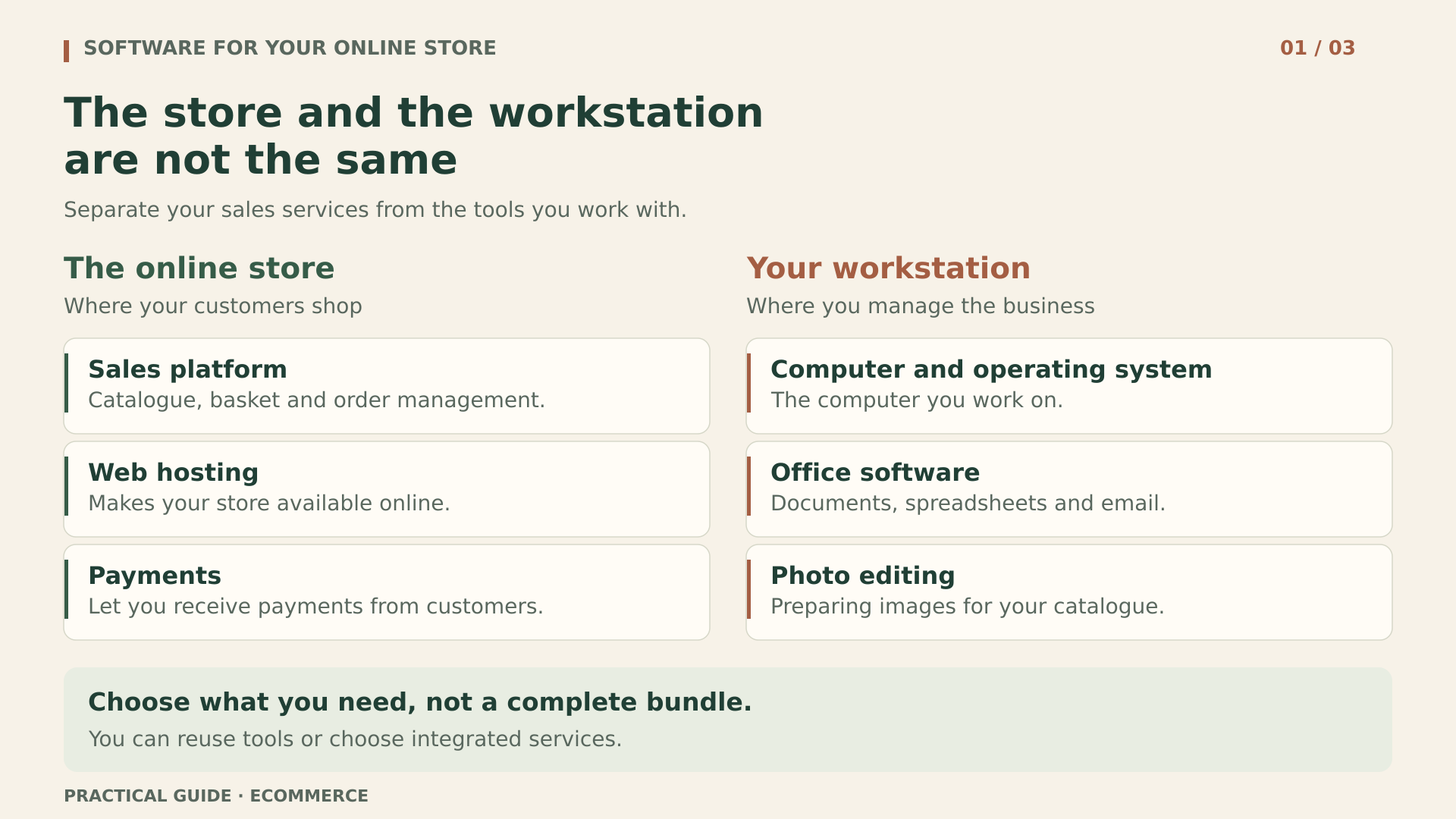
The store and the computer are two different things
The platform displays your catalogue, receives orders and connects to payment services. The computer lets you access the dashboard, reply to messages or prepare documents. Although both play a part in the business, their licences are not interchangeable: buying Windows does not provide hosting, and paying for hosting does not grant you the right to install any program you like on your laptop.
Before requesting a quote, draw two columns. Put the store in one: platform, domain, hosting, extensions, payments and maintenance. Put workstations in the other: computers, operating system, documents, images and utilities. Next to each item, add who supplies it, who uses it and whether you already pay for it. This distinction exposes unnecessary purchases before they appear on an invoice.
It also avoids a common misunderstanding: more visitors do not mean more desktop software licences. A customer looking at a T-shirt is not using your copy of Office. If a proposal links store traffic to those licences, ask it to identify the product, function and contractual condition that would justify that calculation.
Choosing a platform: subscription or your own infrastructure
A SaaS store brings part of the service together
With a SaaS solution such as Shopify, you pay for access to a managed platform. Its plans include hosting and an SSL certificate, with monthly or annual payment options. You do not need to buy a server to install that store. You should, however, check what the plan includes and what is billed separately: domain, apps, additional services or payment processing.
The key is not to compare the starting price alone. Check how many people can administer the store, which features you need and how you will retrieve your data if you change providers. A booking add-on, for example, may introduce a separate subscription. Paying annually does not turn the service into a perpetual licence either: it only changes the period you are paying for.
Also check how each additional app is priced: per store, user, order or level of usage. A tool that suits you at the outset may move into a different pricing tier as sales increase. Ask whether you can export its information in a usable format and whether it retains data after cancellation. Keeping a service solely to consult old information creates a dependency worth identifying before you sign up.
WooCommerce distributes costs differently
WooCommerce is an open-source platform for WordPress whose core can be downloaded and used free of charge. That does not mean a working store has no expenses. You will need hosting and a domain, and you must decide who handles updates, monitors incidents, makes backups and resolves compatibility issues. Some extensions are free; others have their own terms and charges.
This option lets you choose providers and take more technical control. That control requires time or a paid service. Compare like-for-like quotes: one may include maintenance and restores, while another offers only space on a server. Ask about specific tasks; do not accept the word “managed” as a substitute for a description of the work included.
To decide, write down your actual requirements: physical or digital products, variants, languages, shipping methods, taxes, warehouse integration and expected volume. A simple platform that meets those needs may be more suitable than a combination of modules nobody on the team knows how to maintain. No single model is universally better for every store.
Before launch, arrange a test purchase using the payment gateway's test environment: selecting a variant, calculating shipping, confirming payment and sending the customer message. Include a simulated return. This walkthrough proves nothing about the licence, but it does help check that the chosen tools handle the process you bought them for.
Domains, extensions and renewals: what comes next
The domain is the business's address; hosting makes the website available. They are different things, even when bundled together. Check whose name the domain is registered in, which email address receives its notices and who can renew or transfer it. If everything depends on a collaborator's personal account, you have a continuity problem.
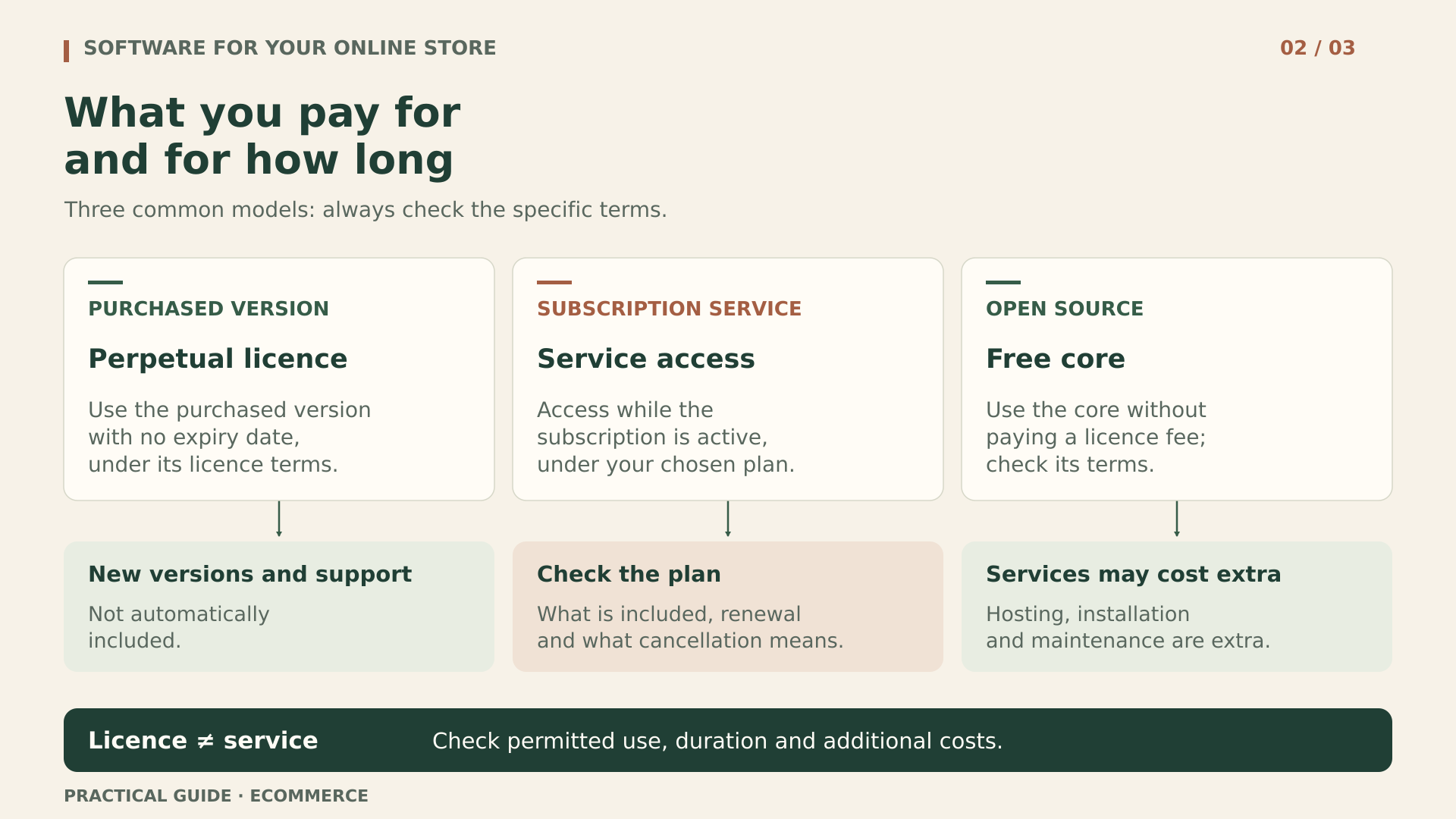
For themes and plugins, distinguish four questions: where you can install them, how long the rights you purchase last, how long you receive updates and who provides support. Check the permitted number of sites and how a test environment is treated. Having two domains or a multisite installation may change the terms; do not draw conclusions from the word “unlimited” without context.
Subscriptions from the official WooCommerce marketplace provide access to updates and support for the subscription period. According to its cancellation documentation, an extension is not automatically removed when the subscription ends, but updates stop, including security and compatibility patches. Remaining installed is not the same as being safe to leave unattended indefinitely.
Do not apply that rule to every app, either. An add-on connected to an external service may lose functionality when payments stop. Before cancelling, identify what happens to the data, settings and orders in progress. Downloading an installation file from another site is no substitute for an official subscription with support and an update channel.
If an app accesses orders or customer addresses, also review its permissions and data-processing terms. Buying a licence does not, by itself, resolve data-protection requirements. Limit access to what is necessary and confirm how to revoke it when you stop using the app permanently.
Prepare a calendar that includes renewals and an advance review. This gives you time to decide whether to keep, replace or remove a tool. Automatic renewal can prevent disruption, but it needs an owner, a valid payment method and accessible notices. Disabling it without an alternative merely replaces a visible expense with a potential service failure.
One useful review is to connect each plugin to a visible function. If two do the same job, investigate why both remain in use. If nobody on the team recognises one, consult whoever maintains the site before removing it: it may support internal processes. Test changes on a controlled copy and keep a way to roll back. Saving a renewal fee is not worth breaking checkout.
Windows: keep what works and choose the right licence type
If your computer already has a valid, compatible and maintained operating system, opening a store does not mean you need to buy another. A web dashboard is administered through a compatible browser; it does not make Windows Pro a requirement. First review the existing computer, its updates and the applications or peripherals you will use, especially label printers and other warehouse devices.
Windows 11 Pro may be useful when you need specific features, such as BitLocker, Remote Desktop hosting or business integration. It is not mandatory for every sole trader or shop. If those features justify the purchase, you can consider Windows 11 Pro at Licendi, selecting the Retail variant. Choosing the licence type matters just as much as choosing the edition.
According to the product listing reviewed, Retail permits reinstallation and transfer to another PC; that does not authorise simultaneous use of the same licence on multiple computers. The OEM option is described as tied to one computer and non-transferable. Do not buy OEM expecting Retail rights, or interpret a new activation as permission to duplicate use.
An Upgrade is not a universal base licence either. Microsoft's guide to upgrading from Windows 11 Home to Pro starts with an activated copy of Home. You must verify that your circumstances meet the conditions of the specific upgrade; having an old version of Windows or a saved key does not, on its own, prove that you can use any Upgrade offer.
Before paying, check the Windows 11 requirements, including a compatible processor, TPM 2.0 and Secure Boot capability. A licence cannot make an incompatible computer compatible. If you expect to replace it soon, factor any permitted transfer and its procedure into the budget, rather than discovering that limitation when the computer fails.
Office is an office tool, not your store
Spreadsheets help you review margins, plan purchases and organise supplier information. A word processor is useful for instructions or agreements. However, you may already have suitable tools, including free applications or services you pay for. Buy another suite only if you need its compatibility, features or a particular way of working.
One option for a Windows workstation is Office LTSC Professional Plus 2024 for 1 PC at Licendi. The offer reviewed describes a perpetual licence with activation tied to the first machine. It is not Microsoft 365, is not a Mac edition and should not be budgeted for as a licence you can freely move between the business's computers.
Provenance deserves particular attention here. Microsoft presents Office LTSC 2024 as a product available through volume licensing agreements. Before buying this offer, request documentation establishing the right of use being transferred and its connection to the original agreement. An invoice and an activated key, without sufficient context, do not automatically settle that question.
Also confirm what would happen after reformatting, replacing the motherboard or replacing the computer. The listing does not support a promise of unlimited reinstallations. Its one-month activation guarantee does not mean use is limited to one month: the seller's guarantee, licence duration and manufacturer support are different things.
Microsoft states that LTSC 2024 receives no new features after launch and has five years of mainstream support, with no extended support. Perpetual does not mean free new versions or maintenance forever. Verify the supported operating systems in the current documentation instead of assuming that any computer able to run the installer will remain supported.
Finally, Office does not, on its own, replace an ERP, accounting software or an invoicing solution suited to your obligations. A well-presented spreadsheet does not guarantee tax compliance or electronic invoicing. Discuss those needs with your advisers and check the applicable regulations, integrations and specialist provider's responsibilities.
If you use spreadsheets to import your catalogue, test a small sample first. Check decimal separators, codes with leading zeros, accented characters and required columns. Keep the original file and review the result in the platform. Compatibility is not just about opening a document: the data also needs to arrive intact in the process where you will use it.
PDF tools: pay for a task you actually repeat
Opening an invoice or printing a delivery note does not normally require an advanced PDF editor. Start by testing the reader and features you already have. Buying one may make sense if you need to convert scanned documents using OCR, correct files, combine documents or remove sensitive information before sharing them with third parties.
For those tasks, you can assess Kofax Power PDF Advanced 5.0 at Licendi. It is important to read the exact terms of the option researched: Windows, permanent licence, for 1 PC and “Non-transferable (single activation)”. Those conditions do not describe a licence shared between the warehouse and the office, or support a promise that you can transfer it to your next computer.
Do not confuse this version 5.0 offer with other current Power PDF products or licence types. The manufacturer's general FAQs mention transfer scenarios and secondary computers, but they do not justify expanding the specific terms of this purchase. If you need reinstallation, portability or a backup installation, obtain contractual confirmation before paying.
Do not assume that future updates or versions are included either. Confirm the installer, compatibility with a suitable Windows 11 system and the support available. To assess usefulness, use test documents without personal data: check tables, characters, search and the exported result. Covering text with a rectangle is not the same as removing it; verify any permanent redaction process before sharing documents.
Having PDF editing tools does not authorise you to freely modify invoices you receive or signed documents, either. Keep originals and separate internal annotations from official documents. If there is a tax-related error, arrange the correction with the appropriate party; changing the visible text is no substitute for the required procedure.
Photographs, fonts and templates have rights attached too
For cropping product images, adjusting exposure or preparing backgrounds, you can start with GIMP. Its documentation expressly permits commercial work. Your choice should depend on the tasks and the time you need to learn them, not on the idea that every professional tool must be purchased. Test it with a representative selection of your photographs.
Permission to use an editor does not grant rights to the material you open in it. A photograph found online, a supplier's illustration or a downloaded icon needs authorisation compatible with its intended use. Keep the source, licence and attribution requirements. If identifiable people or brands appear, also review the relevant permissions.
For fonts, distinguish desktop use from web embedding. Having a font installed on your computer does not mean you can upload its files to the server. Check the licence for the specific font family and its hosting, distribution and modification terms. Some open-source fonts permit those uses subject to conditions; not all free fonts share the same licence.
Do the same with templates: using one to design your store may be different from reselling it, distributing its original assets or incorporating it into downloadable products. Ask the agency for a list of the photographs, icons and fonts delivered, along with their permissions. A visually complete folder may still be incomplete when it comes to rights.
Organise assets by product and retain an unedited original, the published version and evidence of the relevant rights. This lets you resize images or replace a campaign without losing track of their source. Also agree who supplies editable files and whether the business can continue using them with another designer; that continuity should not be taken for granted.
Servers and CALs: you do not license every visit
If you use SaaS or managed hosting, do not add Windows Server to your basket on instinct. First identify the infrastructure the provider operates and the responsibilities it takes on. The licences for the computer you use to administer the store are not the server's licences, and a website does not necessarily need Microsoft server technology.
If you run your own Windows Server, the analysis changes: version, cores, virtual machines, users, devices and features used all matter. CALs are access licences governed by specific rules. The Windows Server 2025 guide includes an exception for certain public web workloads. It is therefore not appropriate to automatically multiply one CAL by every visitor to a store.
Internal access, file sharing or remote desktop services may require a separate assessment. RDS may require additional rights rather than replacing the base licences. Give your technical provider an architecture description and ask for a breakdown with reasons. Do not turn an exception for public web content into a blanket exemption for the business's entire infrastructure.
Second-hand licences: potential savings, essential checks
A second-hand licence can be a sensible purchase when it meets a genuine need, suits your computers and comes with sufficient documentation. Price should not override those conditions. Buying a version you cannot transfer just before replacing your computer, for example, may be a poor decision even if the initial outlay looks attractive.
In the European Union, the UsedSoft case clarified that exhaustion of the distribution right can apply to certain downloaded copies of software. Conditions must be met: a first sale in the Union by the rights holder or with its consent, payment and a right of use for an unlimited period. This is not blanket permission covering any key advertised as European.
The previous purchaser must make their copy unusable when reselling it. Furthermore, exhaustion does not authorise splitting a licence and reselling part of it because some user places are surplus to requirements. These limits are particularly relevant where a volume agreement is cited: there must be evidence of what is being transferred, its scope and the chain of documentation supporting it.
Do not apply that conclusion without analysis to time-limited subscriptions, SaaS services or licences subject to special requirements. Technical activation does not prove lawful provenance, ownership or compliance with the contract. This is practical purchasing guidance, not individual legal advice; for a complex transaction, review the documentation with a professional.
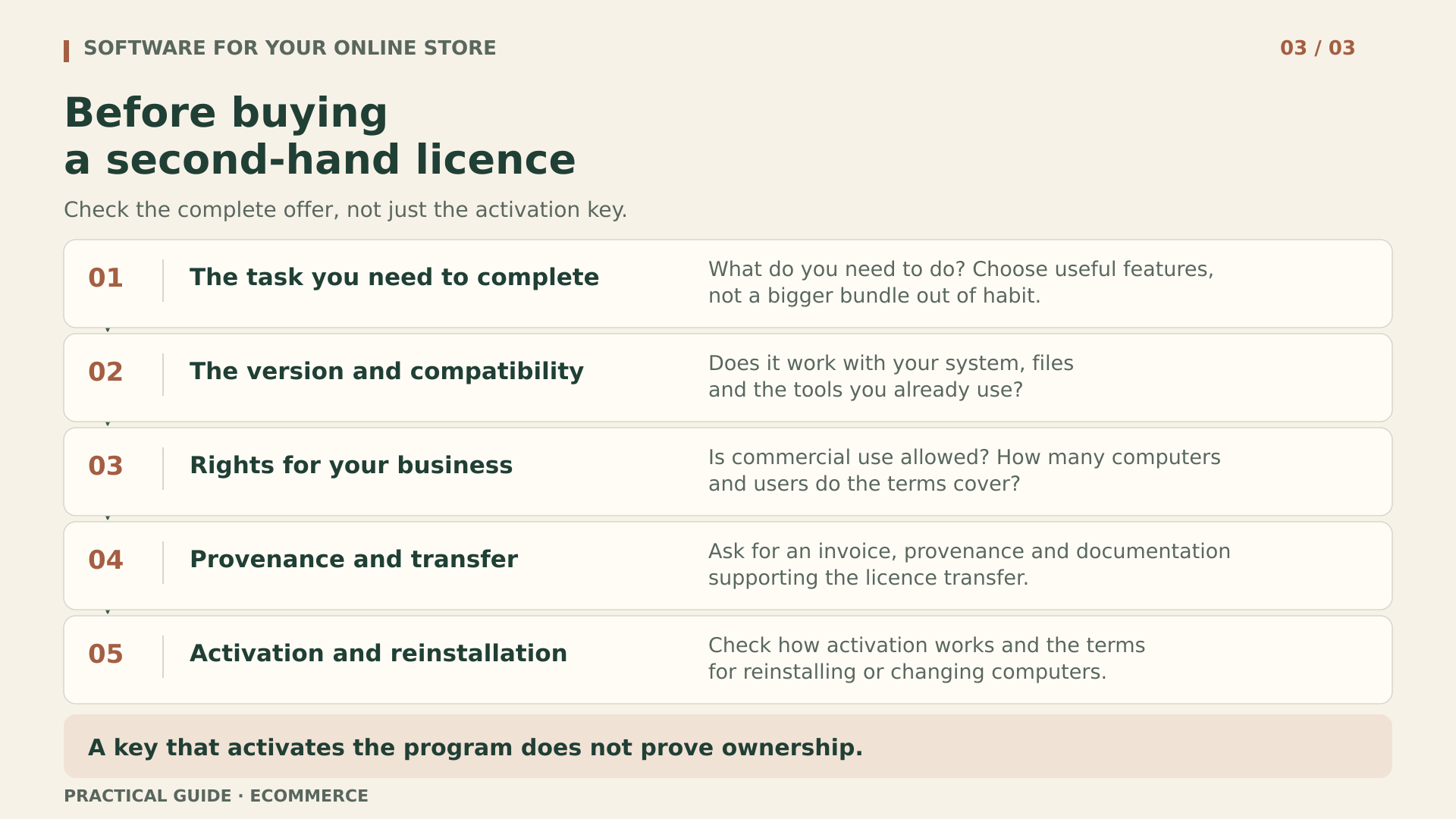
Request an invoice identifying the transaction and parties, the exact edition and licence type, authorised computers or users, provenance documentation and transfer terms. Keep the answers about activation and reinstallation. If an important condition is ambiguous, resolve it in writing before paying. Being able to download the installer or receive activation assistance does not answer all those questions.
The offers mentioned are options to assess individually, not certifications of provenance for every unit sold. Do not assume that they all come from the same distribution channel or share transfer rules. Request the information relevant to your order. If the seller clarifies a condition by email, keep that response with the contractual documentation and invoice.
A purchasing example for a small store
Imagine a ceramics shop with two people, a laptop and a desktop computer. This is a hypothetical example, not a customer case study. The catalogue includes size variants, and the business needs to issue documents, prepare labels and edit photographs. Before buying software, its owners make a list of weekly tasks.
- They choose a platform after checking variants, shipping and payments. They compare a SaaS proposal with a WooCommerce proposal detailing hosting, maintenance and backups, without confusing a service fee with a perpetual licence.
- They review both computers. They retain the existing licensed, compatible operating systems. They would only consider Windows Pro if they identified a necessary feature; they do not buy two licences simply because two people handle orders.
- They test their usual documents with existing tools. If they need specific Office features, they verify LTSC's provenance and assign the 1 PC option only to the chosen computer.
- They open and print PDFs using the available reader. They postpone an advanced editor until they establish that OCR or secure removal of information are frequent tasks that justify buying it.
- They prepare photos with GIMP and retain permissions for images and fonts. Before launch, they review a restore, administrative access and the renewal calendar with the technical provider.
The result may be a short shopping list, even with no new desktop licences. That is not cutting corners: it means allocating budget to what makes the business work. If new needs arise later, they can buy with a specific justification, without losing sight of what they already pay for.
To compare offers, use the same time horizon and include installation, renewal, assistance and possible computer replacement. Do not compare a monthly fee with a perpetual licence as though they covered exactly the same things. Also note limits that are not expressed in money: workstations, sites, portability, data export and dependence on third parties.
In this example, the purchase order identifies the version, licence type and target computer, as well as the problem it will solve. The person responsible does not approve an alternative merely because it has a similar name. If a different offer arrives, they check its terms again. Once it is received, they compare the order with the invoice and documentation before installing it on the intended computer.
A simple register prevents complicated problems
You do not need a sophisticated tool to start. A shared spreadsheet with controlled access and a document folder may be enough. Record each product when you introduce it, not months later. The aim is for someone else to understand what has been purchased or subscribed to and what to do when a renewal, cancellation or computer failure occurs.
- Identification: provider, product, edition, version, licence type, purchase reference and links to the invoice and retained terms.
- Scope: authorised business use, people, computers or sites covered, and assignment to the relevant device or store.
- Term: duration of the right of use, end of support, renewal, agreed price and person responsible for reviewing it.
- Continuity: official download, recovery procedure, reinstallation or transfer rules and support contact.
- Provenance: origin and transfer documentation where applicable, together with the clarifications obtained before buying.
Avoid storing complete keys in documents accessible to the whole team. Use secure storage and restrict permissions. The register can indicate where each item is held without exposing it. Do not confuse credentials with licences either: recovering an administrator password does not prove that the business holds rights to every installed tool.
Update assignments when someone joins or leaves the team. Granting access to the store dashboard and assigning a desktop licence are different operations. Use individual accounts where the service allows them, remove unnecessary access and review administrative permissions. Sharing a password to avoid a fee may breach the terms and makes it harder to establish who changed an order.
Your agency should deliver more than a working website
Before commissioning development or maintenance, agree who will own the domain, hosting, accounts and subscriptions. Some agencies work with their own licences, which do not automatically pass to the client. That can be part of a legitimate service, but you need to know what you would have to purchase if the relationship ended and which functions would be affected.
The handover should include an inventory of extensions, versions, graphic assets and customisations, along with access controlled by the business. Ask for instructions for updates, recovery and data export. Identify the integrations with carriers, payments and invoicing. The email account receiving a critical alert must remain accessible even if the technician responsible changes.
Finally, test the backups. For a self-hosted store, restore files and the database in an isolated environment and check products, images, orders and settings. Prevent the test from sending real emails or processing payments. For SaaS, verify the exports and recovery mechanisms the service actually offers; do not assume an export reproduces the entire store.
Document the date, result and who can repeat the procedure. A backup nobody has restored provides less certainty than it seems. The same applies to licences: keeping files is not enough if terms, access or instructions are missing. Continuity depends on being able to use what you have purchased, not simply having paid for it.
Define how long you can afford to stop selling and how many orders you could reconstruct from other records. That answer helps determine backup frequency and the recovery service needed. After restoring, reconcile orders and payments before resuming automation: an old database may omit recent sales or repeat messages. The test must include that administrative work, not merely checking that the homepage appears.
Buy what you can justify and maintain
The licences you need are those that cover the software you use and the rights that use requires. Start with the platform, make use of valid tools and add applications when they solve a specific task. Review duration, provenance, compatibility and recovery before deciding. That way, you can grow without accumulating programs nobody needs.
Once that need is clear, you can consult the Licendi catalogue and compare the specific offer with your register. A well-documented second-hand purchase may fit that plan; the best choice is still the one that serves your store, not the one that fills your basket.
Official sources for checking the terms
- Shopify: plans and included services.
- WooCommerce: free platform and associated costs.
- WooCommerce: cancellation and the end of updates.
- Microsoft: Office LTSC 2024 features and licensing.
- Microsoft: upgrading Windows Home to Pro.
- Microsoft: Windows Server 2025 licensing guide.
- GIMP: frequently asked questions and commercial use.
- CJEU: official press release on the UsedSoft case.