EN
 FR
 DE
 IT
 PT
 ES


Educational licences: who can buy them and what legal limits apply?
Finding software at a student discount seems like good news until the important questions arise: does any course qualify? Can a teacher who also works independently use it? Will it still work after graduation? Price matters, but the answer depends on what you are buying, who receives access and the work you intend to do.
An educational licence is not simply a cheaper version of a standard licence. Sometimes it is an individual subscription; sometimes it provides access administered by a university. Purchases granting indefinite use also exist, with specific conditions. Confusing these arrangements can leave a project without its tools or turn an apparently economical purchase into a decision that is difficult to justify.
This guide explains how to assess academic offers and non-educational alternatives from the perspective of Spain and the European Union. It distinguishes manufacturers’ terms from the legal rules governing software transfers, without treating a marketing label as a universal answer.
What an educational licence actually means
The word ‘educational’ identifies an access programme or commercial terms, not a legal category that is identical across all manufacturers. It may describe a discount, permission restricted to learning or a service linked to an institution. Start with the full product name, its edition, the licensing arrangement and the territory covered by the offer.
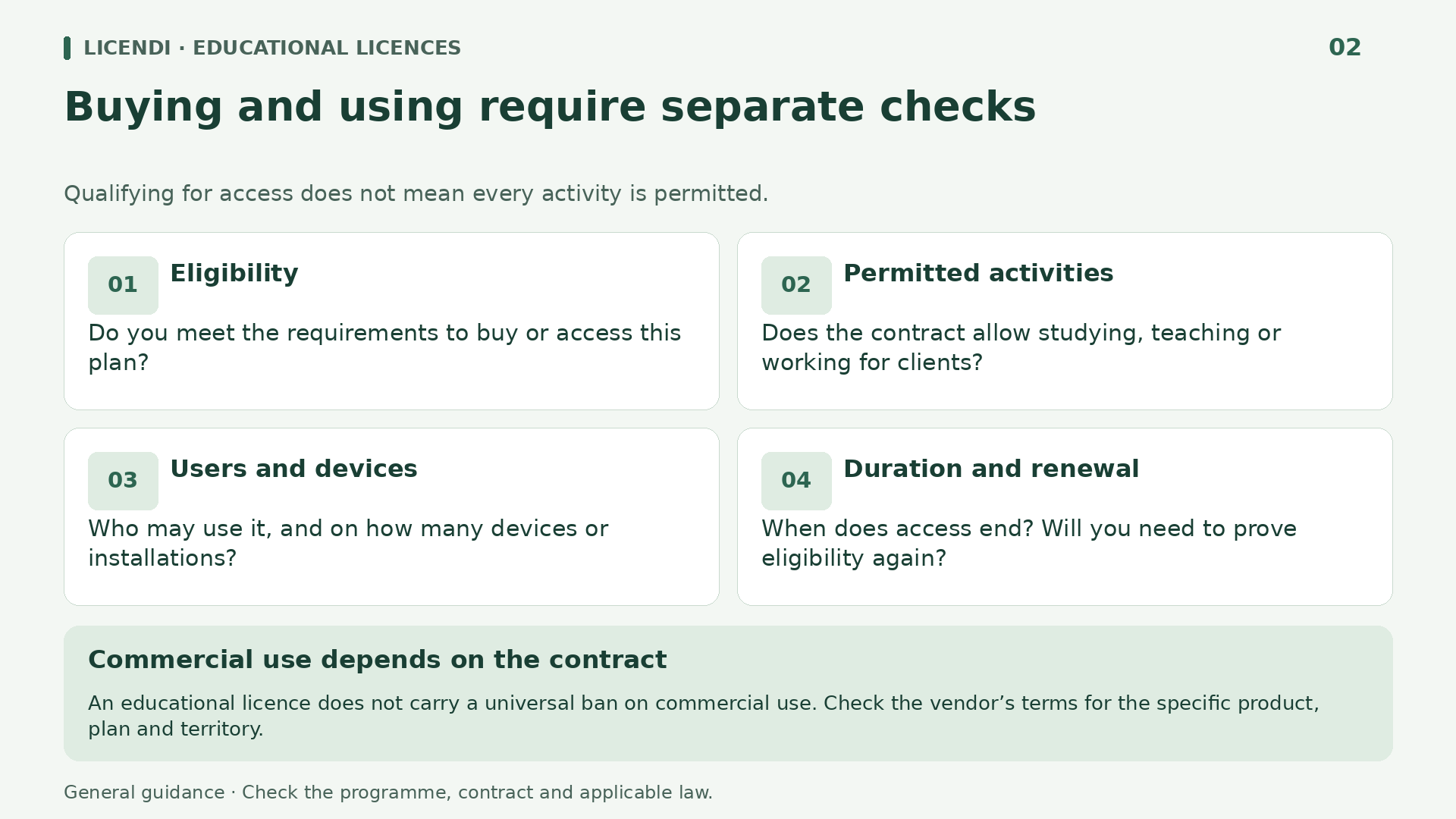
There are four separate questions. First, who can apply? Second, which activities are permitted? Third, how long can the software and its services be used? Fourth, can a particular copy be transferred to someone else? Answering one does not automatically answer the others: meeting the student eligibility requirements does not establish permission to undertake a professional assignment.
Nor does ‘free’ mean ‘unconditional’. An institution may provide access without charging students while retaining control over accounts, licence assignments and access termination dates. Similarly, a one-off purchase may limit installations or included services. The amount paid is no substitute for reading the rights granted.
A good offer makes all this clear before you pay. If an advertisement simply says ‘lifetime educational licence’, ask for the contract or official reference explaining that duration. The marketing phrase alone establishes neither a perpetual purchase nor a right to retain an institutional account.
Who qualifies: enrolment, institutions and verification
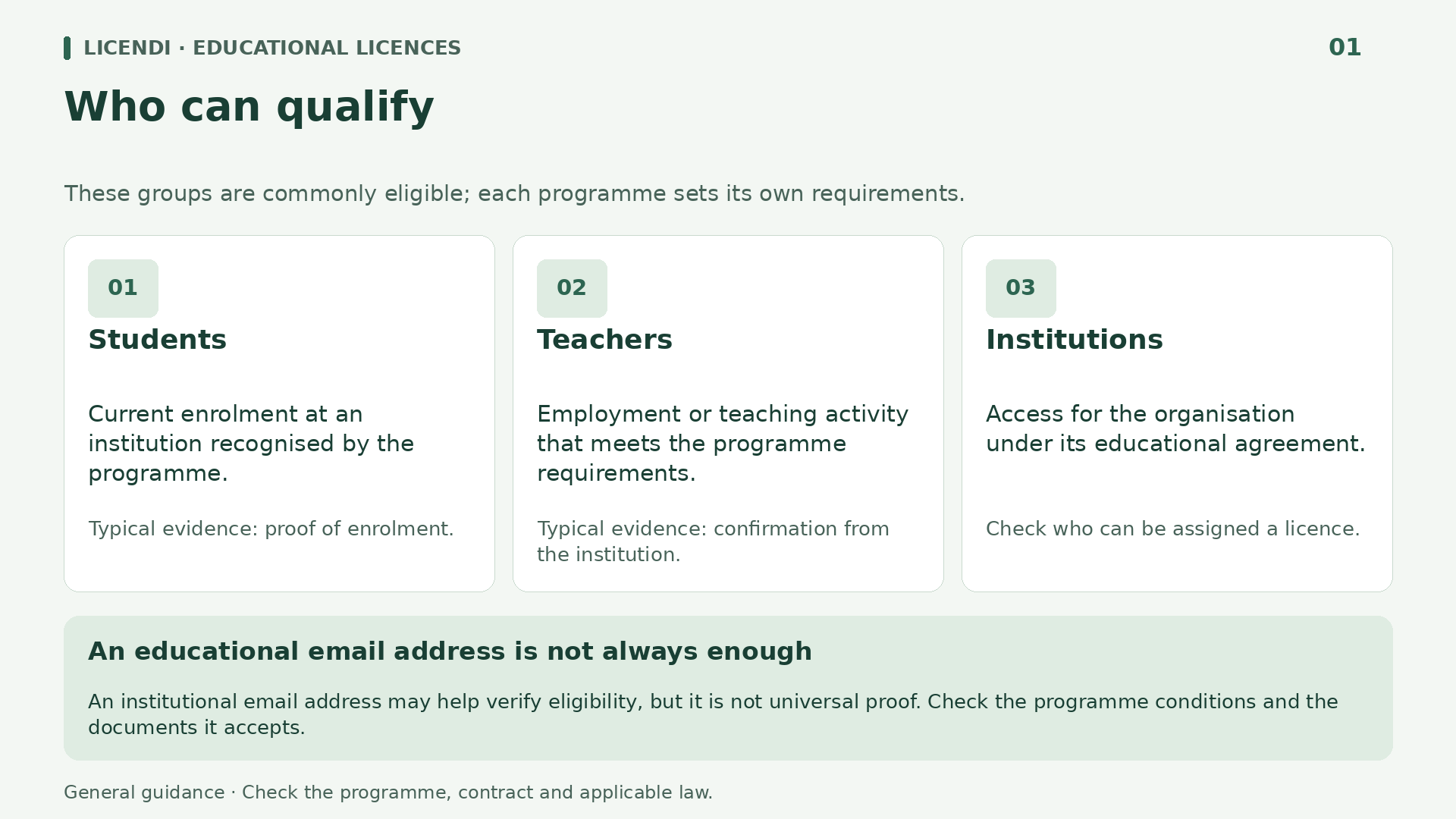
Students and teachers are the usual beneficiaries, but each programme defines its own requirements. Your current connection to the institution matters, as do the types of institution accepted and, where applicable, minimum age or country. Independent learning is valuable, but it does not automatically make someone eligible for every academic programme.
The official Autodesk eligibility page describes students enrolled at qualified educational institutions and requires those institutions to be accredited by an authorised government agency. It also excludes certain training centres and retraining programmes. Enrolling on just any course is therefore not enough to assume you qualify.
This source is from the manufacturer’s UK website. Its territorial exceptions should not automatically be applied to Spain. The useful principle is the verification process: find the definition applicable to the programme and check that your institution and personal circumstances meet it, without inventing a worldwide rule on ages or qualifications.
Distance learning deserves the same checks as classroom-based study. Do not dismiss an institution because it teaches online, or assume it qualifies simply because it issues a certificate. What matters is whether it meets the programme’s definition. If you are between enrolments, on a study placement or undertaking continuing education, describe your exact circumstances to the manufacturer: an answer for degree students may not cover your situation.
An institutional email address may help verify eligibility, but it does not prove every requirement on its own. An old address, a borrowed account or an apparently academic domain cannot replace current enrolment. Submit only the necessary documents through official channels, and never use someone else’s identity or false evidence to obtain a discount.
Students, teachers, institutions and administrators are not the same
An individual student purchase and an institutional agreement may provide access to similar software with different rights. In the first case, the beneficiary must meet the personal eligibility requirements. In the second, the institution manages an agreement that may specify covered groups, devices, assignments and particular uses. These arrangements should not be treated as interchangeable.
For teachers, another important distinction applies: preparing lessons, conducting research and providing private services are different activities. Being eligible for an offer through your teaching role does not mean that the same offer covers all your work. If you also run a professional practice, you must specifically check the intended professional use, even when installing the software on your personal computer.
Administrative staff should not assume they are included in an offer aimed at students and educators either. A university needs tools for enrolment, accounting and recruitment, but an institutional purpose does not make every activity teaching. The relevant agreement must clarify which staff are covered and for which tasks.
You also need to distinguish who pays from who enters into the agreement. A school reimbursing a teacher’s purchase does not necessarily turn a personal licence into an institutional licence. Record the licence holder, the assigned user and the authorisation to install it. If the teacher leaves the institution, this information will help determine what must be removed, what can be reassigned and what requires a different agreement, rather than improvising with a personal account.
Imagine a school equipping twenty shared computers. Buying twenty personal access entitlements does not establish that they can be freely rotated between pupils. Before choosing, its IT manager should check whether licensing is per user or per device, how licences can be reassigned and what happens with temporary teachers. The purchasing manager needs this information as much as the price.
Permitted use: studying does not authorise every kind of work
Commercial use depends on the plan: there is no universal prohibition arising solely from the word ‘educational’. Some programmes restrict their purpose, while other discounts may have a different scope. Before accepting paid work, request a clear reference to the terms applicable to the product, licensing arrangement and territory.
In the educational programme documented by Autodesk, the published terms restrict access to educational purposes and exclude commercial, professional or other for-profit purposes. This is a verified restriction of that programme, not a conclusion to apply to every manufacturer.
Ana studies architecture and is preparing an academic project. Later, an acquaintance asks her to design a refurbishment for their premises. Her student status does not make the second assignment educational. Doing it for free is not enough either: the cited prohibition includes professional purposes, not just work that generates an invoice. She needs appropriate rights before using the software for that assignment.
Other nuances matter too. Autodesk’s eligibility page allows for project topics proposed by companies when they form part of a degree. That does not authorise any work for a company or every placement. For a project combining different purposes, ask the institution and manufacturer to clarify how the specific activity fits the rules.
A non-profit organisation should not automatically equate its activities with authorised teaching either. Preparing a training workshop and providing a professional service to third parties may be treated differently, even if both projects are funded by donations. Explain the actual activity when asking about the terms: the organisation’s name or lack of profit does not replace an assessment of the permitted purpose.
For other brands, avoid relying on old forum answers. Check the current agreement and distinguish rights to use the software from rights relating to images, fonts or other resources incorporated into your work. Permission to use an application does not automatically grant every right over its content.
Duration and graduation: what happens with Microsoft Education?
A subscription provides access for a period and under certain conditions; a perpetual licence refers to the right to use the purchased version without an equivalent time limit. Neither expression alone promises future versions, unlimited maintenance or cloud services forever. The terms for each component may differ.
Microsoft’s official Office 365 Education information links use of the plan to working at or being enrolled in a qualified educational organisation. It also warns that eligibility may be checked again. Having access today does not establish that it will continue after that relationship ends.
Microsoft explains that when the plan expires, applications may enter reduced-functionality mode: documents can be viewed, but not edited or created. Online services associated with the institutional address also stop working. This explanation should not be read as an identical closure date for every university; the specific allocation must be confirmed with the institution.
If you finish your studies in June and submit a project in September, ask in advance how long your access will last. Do not assume a grace period of several months. Do not confuse the plans either: A1, A3 and A5 do not necessarily provide the same applications and services. Free educational access does not always mean having every desktop application installed.
For a subscription with an academic discount, also check renewal: the price may change, fresh evidence of eligibility may be required or the benefit may end, depending on the terms. These are not identical situations. Distinguish losing the discount from losing access, and check notifications, billing frequency and the cancellation procedure. Do not extrapolate Office 365 Education rules to every other subscription agreement.
Graduation does not automatically turn Office 365 Education into a perpetual home or business licence. Any specific entitlement for graduates or separate academic purchase must be established under its own terms.
Who controls the account and how to protect your files
With an institution-managed account, you use the service but do not necessarily decide whether it continues. The administrator may manage licences, access recovery and retention policies. Before storing the only copy of important work, find out who controls the account and what procedure applies when your enrolment or employment ends.
Prepare your exit in good time: identify your documents, check their formats and save copies of your own files where export is permitted. Do not take pupil or student databases, confidential institutional documents or other people’s materials simply because you can download them. Technical ability does not remove confidentiality or data protection obligations.
For example, a teacher moving schools may need to keep their own teaching materials, but should not automatically copy an entire shared folder containing pupil records. They should separate the content and check the relevant permissions. It is also worth checking that exported documents open correctly with the tools they will use afterwards.
A useful export needs a simple test: open a local copy without relying on the account you are about to lose. A shared link or shortcut does not always preserve the file. Check linked images, attachments and documents that depend on other folders. If you need to collaborate after access ends, arrange an authorised handover with the institution rather than retaining credentials you are no longer entitled to use.
Be wary of offers supplying a ready-made educational account at an unknown institution. Receiving a username and password is not the same as acquiring a software copy with transferable rights. If a third party retains control of account recovery or cannot explain why you have access, the offer’s continuity and legitimacy remain unclear.
Spain and the European Union: contracts and exhaustion are separate issues
Manufacturers’ terms and the legal rules on distribution must be considered together. Simply stating that a contract permits or prohibits resale is not enough. Nor is invoking a European rule without checking the particular transaction. In particular, the right to distribute a copy, its use and the provision of associated services are not interchangeable.
Article 4(2) of Directive 2009/24/EC on computer programs establishes exhaustion of the distribution right in a copy following its first sale in the Community by the rightholder or with their consent, subject to the exception concerning rental. The origin and territorial scope of that first sale matter.
In Spain, Article 99 of the Intellectual Property Act reflects this rule for the first sale in the European Union. Article 100 also governs certain acts by lawful users, including making a necessary backup copy. This does not authorise multiplying installations or sharing access without the corresponding rights.
Where the legal requirements for exhaustion are met, a contractual prohibition on transfer is not sufficient on its own to override it. However, exhaustion does not automatically remove all conditions of use either. Assessing particular conduct may require examining both the contract and intellectual property rights; not every breach warrants the same legal response.
It is therefore incorrect to claim that no educational licence can be resold. The opposite claim, without qualification, would also be wrong. The educational label does not settle whether a particular copy can be transferred or, by itself, determine the next purchaser’s rights.
What UsedSoft establishes and what it does not
UsedSoft v Oracle is a key reference for second-hand software, but it needs careful reading. The Court of Justice’s official press release 94/12, published on 3 July 2012, explains that exhaustion can extend to certain downloaded copies. This guide relies on that press release, not on a review of the full judgment.
The situation described combines the supply of a copy, payment of a price and a right to use it for an unlimited period. It is not limited to software supplied on discs. Where the applicable requirements are met, the rightholder cannot oppose resale of that copy solely because the contract prohibits subsequent transfer.
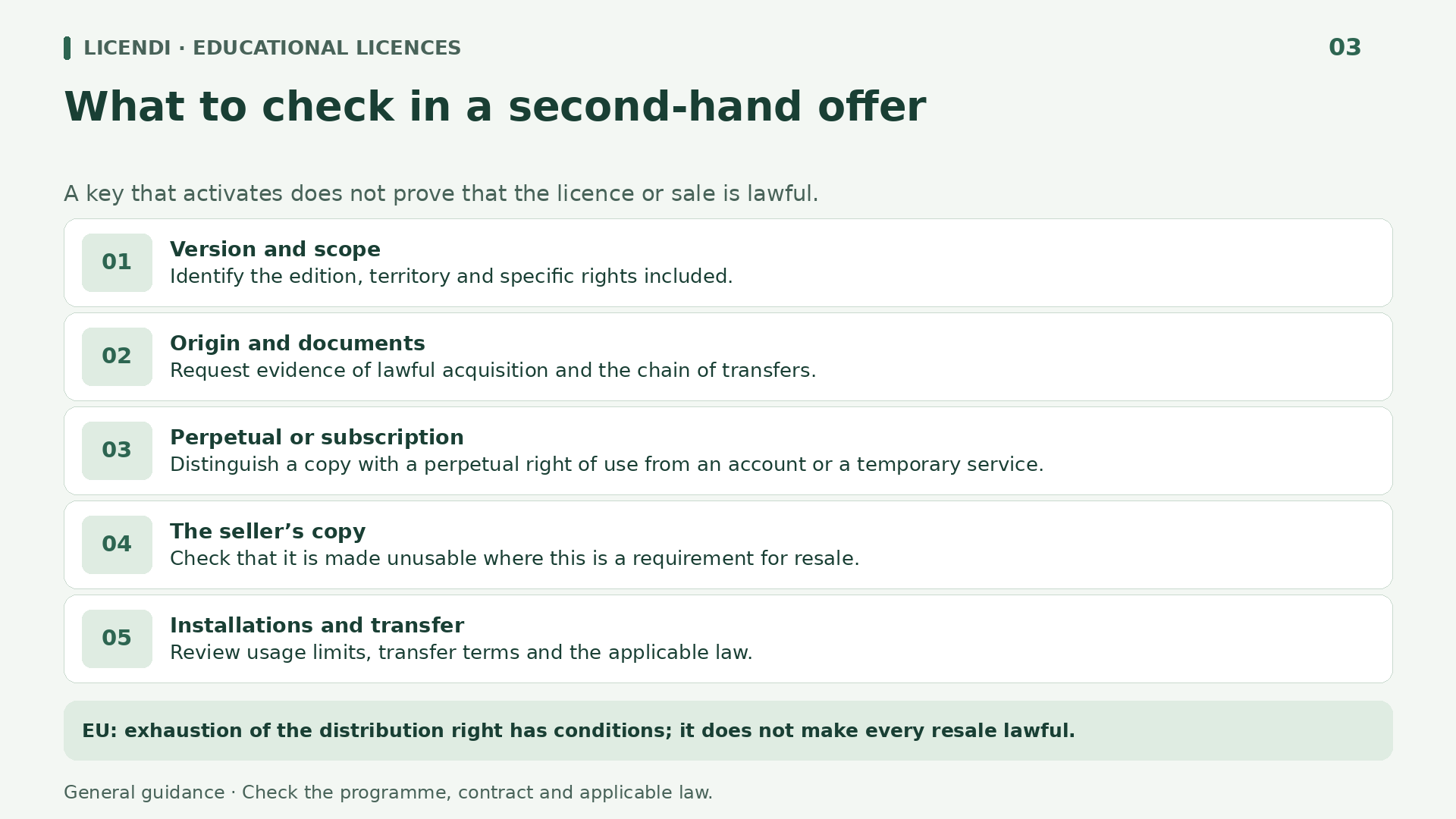
There are important limits. A purchaser who resells must make their own copy unusable at that point. Continuing to use it while someone else installs it is not legitimised by exhaustion, because the reproduction right is not exhausted by the first sale. One purchase does not automatically create two authorised users.
The press release also rejects using this principle to split a single multi-user licence and sell surplus seats. That does not mean every volume agreement necessarily constitutes one indivisible licence: the structure of the purchase and the specific rights it includes must be checked.
UsedSoft does not create a general right to resell fixed-term subscriptions, campus accounts or cloud storage. Nor does it independently resolve every restriction on the purpose or beneficiaries of an academic programme. The dispute did not concern an educational licence and does not turn every cheap key into a valid purchase.
Second-hand software: documentation before a working key
An activated key demonstrates a technical outcome, not the transaction’s entire legal history. By itself, it does not establish who originally acquired the copy, where it was marketed, which rights were granted or whether the previous user stopped using it. The documentation should allow you to connect what you are buying with the rights you need.
Ask for an invoice identifying the seller and product, together with sufficient information about the chain of acquisition and provenance. Where the transaction relies on exhaustion, check the relevant first placing on the market, the nature of the right acquired and appropriate evidence that previous use has ceased. An invoice alone does not remedy every defect.
Not every transaction requires exactly the same documentation, but a generic answer such as ‘it is genuine’ is insufficient when doubts exist. Ask about users, devices, the version and installation limits. If separate seats from a larger purchase are offered, request an explanation of how the rights are structured, without automatically assuming either validity or invalidity.
Traceability does not require publishing previous purchasers’ personal documents online. Request sufficient information through an appropriate channel and allow unnecessary personal data to be protected. If the seller cites confidentiality to refuse any explanation of provenance or rights, uncertainty remains. For significant transactions, a professional can help determine which evidence is relevant without collecting unnecessary documentation.
Keep the offer, the accepted terms and any written clarifications. For an educational institution, this file also helps maintain the inventory and answer questions when the systems manager changes. It does not replace legal advice where traceability or the scope of the transfer is disputed.
How to turn uncertainty into a purchasing decision
Start by describing your need in one concrete sentence: ‘I need to edit documents on a personal computer after graduation’ is more useful than ‘I want cheap Office’. For an institution, the sentence might specify user numbers, whether computers are shared and who will administer access. This makes it easier to rule out unsuitable offers.
Next, send questions that can receive verifiable answers. What is the product and version? Is the right temporary or perpetual? Who must meet academic eligibility requirements? Is the intended activity covered? What happens when changing computers? Who controls the account? Ask for answers tied to the order and its terms, not merely a general marketing description.
If an offer requires a fictitious identity, a borrowed account or activation that conceals the product’s origin, do not proceed. Do not buy in the hope that an important uncertainty will be resolved afterwards either. A seller who fails to clarify the licensing arrangement, provenance or rights leaves precisely the justification for purchasing unresolved.
Finally, compare the cost of transition, not just the purchase. Will you need to adapt templates, migrate files or replace your computer soon? What support is included, and for how long? Request specific answers, particularly if the work has a deadline. An option with clear terms may be more suitable than one whose savings depend on assumptions about future activations or services. Keep those answers with the order.
The consequences of getting it wrong may include loss of access, interrupted work or liability, depending on the circumstances. It is inaccurate to label every contractual breach a criminal offence, but equally unwise to reduce everything to an activation inconvenience. When a condition is ambiguous and affects the intended use, pause the purchase until you receive a documented explanation.
Office 2024 LTSC for one PC as a non-educational alternative
If you do not meet academic eligibility requirements, pretending to be a student is not the alternative. You can consider non-educational offers on the second-hand market, checking their rights independently. Licendi describes itself as a platform for used licences; that description does not replace checking the provenance of each transaction.
For documents, spreadsheets and presentations on a Windows computer, one option to consider is Office 2024 Professional Plus LTSC for one PC. The listing names Word, Excel, PowerPoint, Outlook, OneNote and Access, and describes a perpetual licence for the purchased version with digital delivery. It is not a Microsoft 365 subscription.
The one-PC variant is advertised as tied to the first machine on which it is activated. This matters if you expect to replace the computer or reinstall the system: do not assume that another activation, a transfer or reinstallation is guaranteed. Confirm the order’s scope before choosing it for a computer you will soon replace.
The offer is for Windows, not a Mac licence. Project and Visio are not included in the described package, and Microsoft 365 cloud services or artificial intelligence features should not automatically be attributed to it either. Check compatibility, your actual needs and rights for your activity; a list of applications does not in itself establish unlimited commercial permission.
Windows 11 Pro: Retail, OEM and Upgrade require different decisions
If you need an operating system rather than an office suite, you can review the Windows 11 Pro offer. It is a non-educational alternative for a compatible PC, but choosing the licensing option is essential. Pro should not be confused with Education, and neither name makes Windows an Office application suite.
The listing distinguishes Retail, OEM and Upgrade. Retail is advertised with reactivation and transfer to another computer available; however, this description must be checked against the specific order terms. The product-specific information and the website’s general terms are not fully aligned on reinstallation, so obtain written confirmation before relying on that possibility.
OEM is presented as an activation tied to a single PC. Do not buy it assuming the same transfer rights as the Retail variant, or counting on guaranteed reinstallation. Under any option, an authorised transfer, where available, does not amount to permission for simultaneous use on multiple computers.
Upgrade requires an eligible existing licence; it is not a full licence for a computer without a valid qualifying licence. The description combines general references to previous versions with upgrading from Home to Pro. Confirm exactly which starting edition the order accepts. Also check the processor, TPM 2.0, Secure Boot and computer compatibility: acquiring rights does not overcome hardware limitations.
Corel PDF Fusion for specific document needs
When your main task is combining documents, annotating reading materials or preparing PDF files, you may not need a complete suite. Corel PDF Fusion is another non-educational offer to consider in that context. The listing describes text editing, comments, document assembly and creation of PDF, DOC and XPS files.
It is advertised as a one-off purchase without a subscription, with digital delivery and device-specific activation. No particular numerical version has been verified: before buying, confirm which version you will receive, the formats you need and compatibility with your Windows installation. Do not infer an entitlement for Mac or to every future version.
Reinstallation, changing computers and the scope of your intended use also need clarification. A perpetual licence does not in itself promise activation after any hardware change, or unlimited support. The features described by the seller help assess the software’s usefulness, but do not replace the document granting the rights.
Before choosing a PDF tool, prepare a sample document without sensitive data and define what you need to preserve: comments, page order, fonts or forms. Ask about those specific features and the installation procedure. Do not assume advanced signature capabilities or features for handling confidential information that are not documented.
For example, a teacher who simply wants to prepare a document pack can compare this tool with her actual needs before purchasing a larger package. If she also intends to handle professional documentation, she must check that use. A sensible choice starts with tasks, formats and terms, not accumulating unnecessary software.
Buying wisely, within or outside an educational programme
An educational licence can be a good solution when three elements align: you meet the requirements, the activity is authorised and the duration suits your project. If any one fails, look for another arrangement. Being enrolled, receiving a key or getting an application to launch does not replace those three checks.
The non-educational offers from Licendi let you compare alternatives for office productivity, operating systems or documents without resorting to fictitious academic identities. Assess each order by its version, provenance, devices and verifiable rights. This article describes commercial offers; it does not certify ownership of particular copies or establish that their original acquisitions have been audited.
This content provides general information for Spain and the European Union and is not a substitute for legal advice. Before buying, reselling or using an educational licence for professional work, check the current terms and transaction documentation. If something essential remains unclear, the prudent decision is not to buy yet.