EN
 FR
 DE
 IT
 PT
 ES


ALPHACAM Designer: CAD Software for CAM, Machining and Licensing Guide
The file arrives in the engineering office, the part looks straightforward, and the clock is already ticking. Yet before anyone starts thinking about tools or cycle times, someone has to review the model: check its units, establish which revision is valid, and resolve the geometry that does not quite fit. Buying machining software starts right here, by identifying which part of the work needs to improve.
ALPHACAM Designer deserves a careful explanation because its name appears alongside terms such as CAD, CAM, and CNC, which do not mean the same thing. This guide uses the Alphacam Designer 2020 license from Licendi as an example and separates three issues: design preparation, programming machining operations, and purchase terms. It is neither an installation test nor certification of the license supplied; it is a practical, document-based guide to making an informed decision.
What DESIGNER is and where its role ends
Hexagon's documentation presents DESIGNER as a direct modeling CAD solution aimed at CAM users. That description positions the product clearly: preparing and modifying geometry to facilitate subsequent manufacturing work. The 2021.1 manual, for example, documents operations on solids, surfaces, wireframe geometry, and meshes. This is information about that release, not a contractual list of features automatically included in a 2020 offer.
CAD deals with geometric design; CAM prepares manufacturing using the appropriate tools and strategies; CNC describes machine control. They are connected in a real project, but buying a CAD preparation application does not in itself establish that you are also acquiring CAM modules, machine simulation, postprocessors, or any multi-axis machining capabilities.
The useful question is not just “Can it be used for CNC?” but “What exactly does it hand over to the next person in the process?” If you need to clean up a solid before programming it, a preparation tool may be a good fit. If you want to generate the final program for a particular machine, you need to check the CAM solution, its configuration, and its usage rights separately. The official introduction to DESIGNER 2021.1 helps explain that boundary.
The value of properly prepared geometry
Imagine receiving a part with details that belong to the product design but have no bearing on the operation you are about to study. Before simplifying them, distinguish between an adjustment to a working model and an engineering change. Creating a copy to prepare a workholding arrangement is one thing; altering the part the customer has approved is another.
Direct modeling lets you work on geometry without necessarily having to reconstruct its original history. In the release cited, Hexagon documents the removal of certain features, hole capping, and adjustments to areas of the model. We should not turn that general description into a promise that any file can be repaired with one click or that every feature will be enabled under every license.
As a working practice, keep the file you received and create a separate version for manufacturing. Record what you changed, why, and who authorized it. That way, you can compare both versions when a question arises. The aim is not to produce a visually attractive model, but geometry that is understandable, traceable, and suitable for the intended operation.
There is also a contemporary reference: the ALPHACAM brochure printed in November 2020 describes direct modeling, model repair, simplification, and the reuse of DXF or DWG profiles to build three-dimensional geometry. It also explains geometry preparation for machining. This document confirms the product family's focus at that time, but does not identify the exact build or modules supplied by Licendi. A useful historical reference is no substitute for checking the specific offer.
Which workshops might benefit
An engineering office that receives models from different customers may see value in a dedicated geometry preparation tool. It may also interest anyone who designs fixtures, adapts stock material, or needs to communicate a modification before programming. These are situations to evaluate, not productivity guarantees: the benefit depends on the files you normally work with, training, and the applications your team already uses.
Think of a woodworking shop working with panels, a metalworking shop preparing a fixture, or a stone fabrication business reviewing contours. Although all three may be involved in CNC workflows, their needs are not interchangeable. Each case requires checks on its geometry, operations, materials, tools, and machines, without inferring specific capabilities solely from the industry mentioned in a commercial listing.
If your current CAD software already handles these tasks effectively, adding another program may not be a priority. List recurring problems: files that are difficult to open, changes that take too many steps, information lost between applications, or reliance on just one person. Then compare a representative demonstration with your current process. Do not buy a label; look for a solution to a specific problem.
| Need | What to check |
|---|---|
| Prepare an incoming model | Import, editing, and export of the required geometry. |
| Program an operation | A CAM solution, module, and strategy suited to the work. |
| Obtain code for a machine | The specific postprocessor and configuration, with process validation. |
| Share the workstation among professionals | Authorized assignment, access, and concurrent-use conditions. |
The 2020 version: do not confuse age with scope
The version number matters more than it might seem. A recent DESIGNER demonstration may show tools that did not exist, were not included, or were licensed differently in an earlier release. Likewise, a modern format table does not prove that the 2020 version can open files created today by any CAD system.
To assess the offer, ask for the full product designation, the build supplied, its modules, and the applicable documentation. A screenshot of a current sales page is no substitute for that inventory. If a decisive feature is promised, ask for it to be identified within the specific product you will receive and checked using a file comparable to yours.
An earlier version may make sense in a stable, verified environment; it may also be unsuitable if you depend on continual exchange with recent programs. The decision cannot be settled by saying “old software works” or “newer is always better.” It is settled by checking the file's entire journey and the support, security, and continuity conditions you need to maintain.
What Licendi's license listing advertises
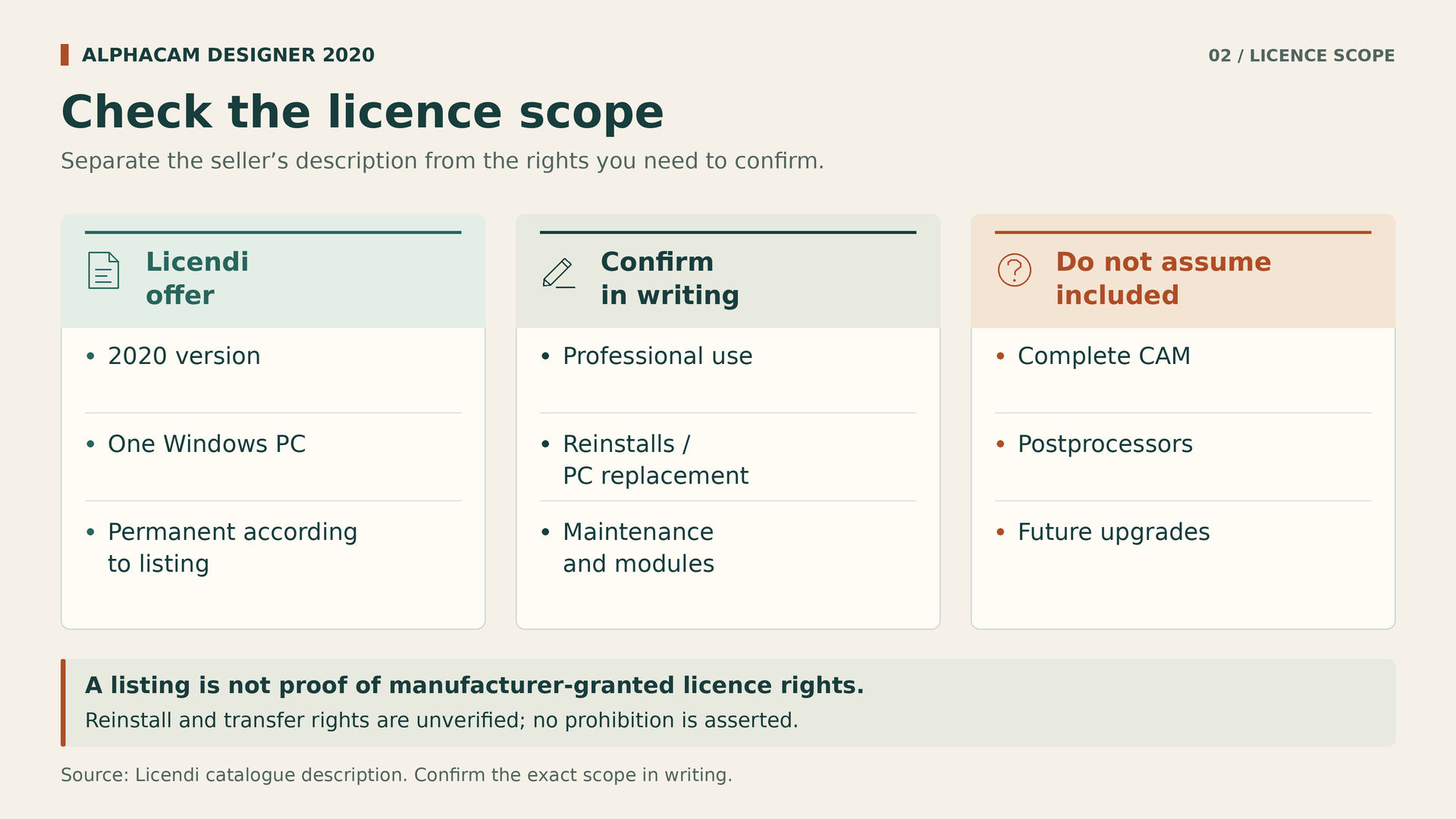
The Alphacam Designer 2020 listing on Licendi advertises a permanent, subscription-free license for one Windows PC, with multiple languages and digital delivery. These are the terms described by the seller. They do not amount to independent verification of the installer, the origin of each license, or all the rights granted by the manufacturer.
The description discusses geometry preparation and manufacturing-oriented workflows. It does not list a specific package of CAM modules or identify a postprocessor for a particular machine. It would therefore be incorrect to present the purchase as a complete CNC programming solution without further confirmation. The example is useful because it teaches you to distinguish what is offered from what still needs clarification.
There are also questions the listing reviewed does not answer: the number of activations, reinstallation, computer replacement, transfer, business use, maintenance, and updates. The absence of a prohibition does not automatically grant those rights, but neither does it justify inventing restrictions. This guide does not assign conditions from other catalog products to this license. Every offer requires its own documentation.
Permanent licensing, maintenance, and network licensing are not synonyms
When you read “permanent,” think first of the advertised right to use the version purchased. Do not interpret it as unlimited future updates, indefinite support, activations guaranteed forever, or compatibility with any computer you buy later. All these points require specific terms. An advertised license duration does not, by itself, describe the technical activation mechanism or its dependencies.
Maintenance is a separate issue. Ask whether it is available, what it covers, for how long, and what happens when it ends. Make the same distinction for support, training, and postprocessor adaptation: they may be part of a professional quotation, but should not be presumed included with an individual license. Ask for an itemized answer, not just the phrase “full license.”
An offer for one PC does not establish that the license is floating, concurrent, or usable through a license server. If several professionals need to work at the same time, describe that scenario to the supplier. Ask about assignment, remote access, and authorized concurrent use, rather than trying to solve the problem by sharing a key. The appropriate model must match the company's actual usage.
The manufacturer's documents show why you need to ask about versions and options. In 2021.1, certain drawing and customization features are presented as optional or subject to an additional license. The DESIGNER 2025.2 notes link macros and scripting to maintenance. These are examples of changing conditions; they do not describe the rights attached to the 2020 offer. Nor should Companion agreements published for other products, such as EDGECAM, be applied to this purchase without applicable documentation.
Questions worth getting answered in writing
Before paying, identify the purchaser and intended use. Explain whether the program will be used professionally, who will operate it, and on which computer. Request confirmation of the exact edition, included modules, and conditions applicable to that use. A generic sales response may leave out precisely the requirement that prompted the purchase.
Next, raise normal continuity scenarios: reinstalling Windows, replacing a drive, changing a motherboard, or replacing the computer. Ask what procedure applies in each case, whether it requires the supplier's involvement, and whether there is a charge. Do not assume that a successful initial activation guarantees every future reinstallation. Equally, do not infer that reinstallations are prohibited when the offer does not say so.
Finally, retain the invoice, product identification, accepted terms, and answers that supplement the offer. If the transaction involves a transferred license, request sufficient documentation of its origin and the specific right being transferred. This guide does not certify the legality of an individual transaction. Where significant contractual questions remain, resolve them with the supplier and appropriate advice before relying on the software.
A useful message for requesting confirmation
Rather than simply asking whether the license is genuine, send a specific inquiry: “We need Designer 2020 to prepare customer files on a Windows workstation at our company. Please confirm the version and build supplied, the modules included, the professional use permitted, and the procedure for reinstalling the software or replacing the computer. Please also state whether there are maintenance conditions, additional costs, or activation limits we should know about before purchasing.”
Complete the message with the formats and applications in your workflow, without attaching confidential information if an appropriate agreement is not yet in place. A point-by-point answer helps reveal discrepancies before purchase and provides a more useful reference than a telephone conversation remembered differently by each party. Keep the reply with the final accepted and dated quotation.
Compatibility: test the file, not just the extension
Two programs recognizing an extension does not mean they exchange all information in the same way. DESIGNER's format documentation distinguishes import, export, supported versions, and entity types. The official 2021.1 table illustrates why these details need checking, but must not be used as certification of the 2020 edition offered.
Prepare a small selection of representative jobs: a simple part, another with complex geometry, and a case that has caused problems. Check dimensions, orientation, bodies, surfaces, and the information you need to retain. If you work with assemblies, also check what happens to their components. Do not consider an import successful merely because the preview resembles the original.
Where you can agree on an alternative exchange format with the customer, document its losses and limitations too. The alternative must solve the task, not hide a failure. Keep the source file, the conversion, and the accepted result. That way, you can repeat the check if the version of any application in the process changes.
A simple checklist can have five columns: test file, source application, format version, import result, and output result. Add a note when entities are missing or a conversion requires intervention. This list lets you compare suppliers using the same material and prevents the conversation from ending with the ambiguous “it supports that format.” What matters is whether it supports your specific files and preserves what you need for manufacturing.
Computer and operating system: check before installing
Licendi's listing recommends Windows 10 Professional in its 64-bit edition, a multicore processor, and an SSD; it specifies a minimum of 8 GB of memory and 16 GB or more for large projects. It also mentions a display of at least 1280 × 1024 and a possible Internet connection for downloading, activation, and validation. These are requirements published by the seller, not independent historical certification by the manufacturer.
Do not turn an old recommendation into a current security plan. Check that the chosen operating system has appropriate support status and that the program's build is validated for it. Do not infer Windows 11 compatibility just because a later edition supports it. If you need virtualization, remote desktop access, or a managed computer, also confirm the technical and contractual conditions.
The test computer should resemble the production workstation. Review permissions, drivers, folder access, and company policies with the person responsible. Do not disable security measures or use installers of questionable origin to complete activation. A stable, recoverable workstation is worth more than a quick installation that nobody knows how to keep running.
A practical workflow: receive, review, and prepare
Start by creating a project folder containing the file received, the approved drawing, and a clear revision reference. Identify the units and a known dimension before proceeding. If the model and drawing disagree, stop that part of the work and request clarification. It is not the program's role to decide which of the customer's contractual information takes precedence.
Next, open a working copy and review the geometry required for the operation. Record the bodies, surfaces, and areas that need attention. Simplification must serve a specific purpose: studying a workholding arrangement, preparing an operation, or communicating a proposal. Always maintain a clear relationship between the prepared model and the approved design.
Before exporting, agree with the CAM programmer on what they need to receive. They may require particular geometry, an agreed orientation, and a record of changes. Avoid handing over files simply called “final” when several revisions exist. An orderly handover helps each professional understand which information they are working with and what remains to be validated.
To organize revisions, you can use an internal identifier consisting of the part, revision, and purpose. For example, keep the received model, the prepared copy, and the file sent to CAM separate. There is no need to impose a complex naming system; the whole team simply needs to understand it. Add a brief change log whenever a modification could affect the person receiving the work. Sound document management is also part of a successful implementation.
From the prepared model to machining: do not skip stages
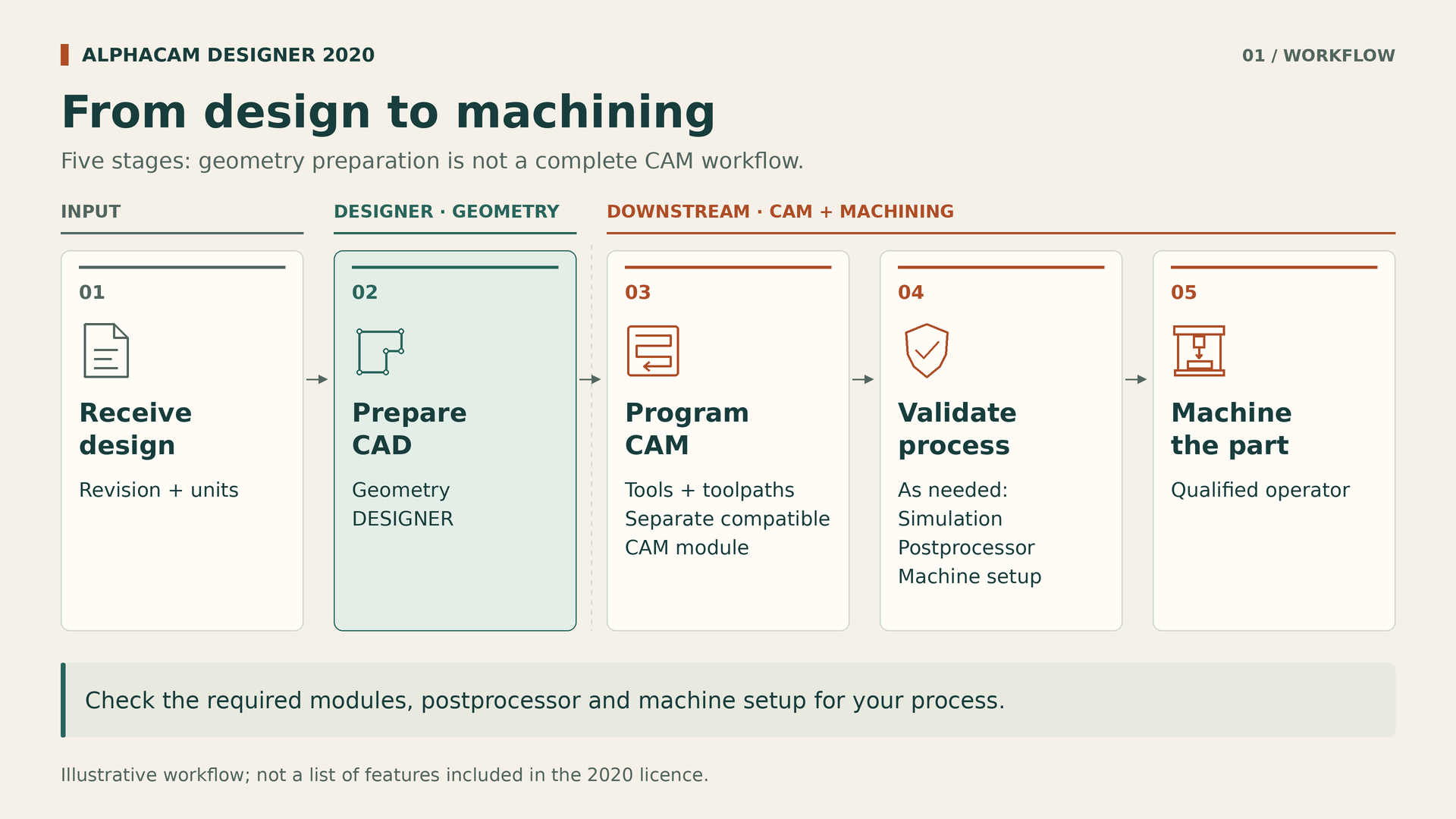
The next phase must take place in a suitable CAM solution with the capabilities covered by your purchase. This is where tools, strategies, and working conditions are planned according to the part, material, and machine. This guide does not provide cutting parameters or instructions for operating equipment: those decisions belong to qualified personnel and validated procedures.
A postprocessor should not be chosen because a machine's name resembles another's. Its correspondence with the actual control and configuration must be checked, along with the scope of the adaptation and support service. If the quotation does not identify this item, ask who supplies it and who is responsible for validating it. Do not assume it is included in DESIGNER.
Simulation can form part of the review when appropriate tools are available, but it does not replace safe setup or first-part inspection. Organize the handover with the person responsible for the machine: current documentation, workholding, tools, and necessary checks. The aim is to prevent an assumption made in the office from reaching the workshop as though it were an approved instruction.
Example: preparing a fixture plate
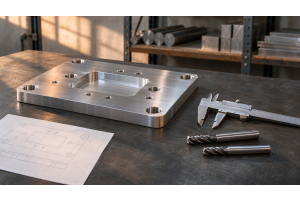
Consider a hypothetical example: a plate with a recess and several holes that needs to be incorporated into a fixture. We are not describing a test performed with Licendi's license. The purpose is to show how to separate the questions. First, identify the valid drawing and the surfaces that provide references for assembly.
During the CAD phase, prepare the geometry needed to study the assembly and document the proposal. If you remove details to simplify the view, keep another copy with the original design. A seemingly secondary face may have a support or mounting function; changes that affect the product must therefore be approved, not decided on for programming convenience.
The CAM programmer will then assess how to manufacture the part with the available resources. The process owner will review accessibility, workholding, and checks, without shifting that responsibility onto the software's name. The geometry preparation license addresses one part of the journey; the job's feasibility depends on the whole process. That is the same criterion to apply to the purchase budget.
How to calculate costs beyond the license key
To compare alternatives, divide the budget into acquisition, implementation, and continuity. In the first category, include exactly the licenses and modules required. In the second, consider installation, training, testing, and any configuration services. In the third, ask about support, maintenance, and foreseeable costs when the computer or working environment changes.
We do not need to invent a price to understand the difference. An apparently inexpensive license may not be the best option if it leaves an essential task unresolved. Conversely, paying for a larger package adds no value if its additional capabilities go unused. Compare quotations covering the same scenario, with the same files, professionals, and machines.
You can use Licendi's Designer 2020 offer as a starting point for requesting that clarification. Check the current price and terms when purchasing; this guide neither sets an amount nor guarantees immediate availability. What matters is being able to explain which problem the purchase solves and which costs or dependencies remain outside its scope.
A purely hypothetical example helps structure the calculation: if you allocate three hours to training and two to preparing tests, you have five hours of work to cost separately from the software. Multiply those hours by your actual internal cost, without confusing it with a seller's rate. Then add the services actually quoted. This is neither a universal estimate nor a promise of return; it is a way to avoid overlooking implementation effort in the budget.
An acceptance test that provides answers
Before introducing the program into a job you have committed to delivering, agree on what an authorized test must demonstrate. The first criterion may be opening the selected files correctly. The second is carrying out representative preparation work. The third is delivering a result the next application can use without losing essential information. Define in advance what you will consider a satisfactory result.
Record the computer, versions used, steps followed, and problems identified. If you need to measure time, repeat a comparable task and separate learning from routine work. Do not turn a demonstration prepared by someone else into a performance promise for the whole workshop. A modest but reproducible result is more useful than a spectacular impression without context.
Include a documentary check: product received, activated components, and usage conditions. Technical and contractual acceptance are different; both matter. If an essential feature is unavailable or a condition remains unclear, resolve that point before making the application an indispensable part of the process. Do not rely on an answer that is still pending to meet a delivery commitment.
Also record who accepts each part. The purchaser reviews the supply and terms; the person preparing geometry reviews the CAD result; the CAM lead checks the transfer; and the workshop validates the process according to its procedures. In a small company, one person may perform several roles, but distinguishing them avoids assuming everything is settled merely because the program opens correctly on the purchaser's computer.
Buying mistakes worth avoiding
The first is buying because of the term CAM without identifying the exact application. The second is extrapolating features from a recent version to an older license. The third is confusing a permanent offer with unlimited support, updates, and hardware changes. All three have the same root cause: filling gaps in the documentation with assumptions.
Another mistake is building the workflow around a single person who knows all the exceptions. Document where originals are kept, how revisions are identified, and whom to ask when a question arises. Maintain appropriate backups and check that you can recover the files. Workshop continuity should not depend on remembering which computer held the latest valid project.
Finally, do not change software, operating system, and work organization simultaneously without a test plan. Make the transition proportionate to the risk, retain a reference for the previous process, and assign responsibilities. Buying well does not mean avoiding all change; it means knowing what is changing, how to check it, and what to do if the result is not as expected.
Frequently asked questions before deciding
Does DESIGNER replace all of ALPHACAM?
That is not the right way to frame it. DESIGNER focuses on preparing CAD geometry for CAM users. Programming machining operations requires checking the relevant applications, modules, and configurations. Buying a license with that name does not establish that it includes the entire ALPHACAM family or every function available within it.
Does the 2020 license include future versions?
The listing advertises permanent licensing, but does not establish unlimited update rights. Ask for explicit confirmation of the version delivered and any included maintenance or updates. If your work depends on recent formats, that answer needs to be accompanied by a compatibility check, not merely a sales explanation about duration.
Can I reinstall it or move it to another computer?
The information examined does not allow a definitive answer. Describe your specific situation and request the applicable conditions in writing. We are not saying it is permitted or prohibited. This question should be resolved before purchasing, especially when the workstation is part of a production process that cannot stop.
Is it suitable for professional use?
The sales presentation is aimed at manufacturing work, but you should confirm the business-use rights attached to the specific product supplied, as well as its technical suitability. Having features useful to a workshop and having contractual permission for the intended usage scenario are related checks, but they are not identical.
Do I need another license for each CNC machine?
You cannot deduce that from the number of machines. You need to know how the software is licensed, how many workstations or users require access, and which modules or postprocessors the process uses. Describe your organization to the supplier and request an explicit proposal, without automatically treating a computer, a user, and a machine as equivalent.
The right decision starts with defining the need
ALPHACAM Designer can be evaluated as a CAD preparation tool within a manufacturing workflow. Its value lies not in promising that a single purchase will solve every stage, but in checking whether it helps prepare better geometry for subsequent use by other professionals and applications.
Review the Alphacam Designer 2020 license from that perspective: identify the product, test your files, and clarify the missing conditions. If those points fit, you will have a reasonable basis for deciding. If they do not, stopping the purchase is also a good decision. In machining, a suitable tool starts with a proper understanding of what it does.
Sources and scope of this guide
Licendi's listing and Hexagon documentation have been cross-checked. References later than 2020 are used to explain concepts and differences between versions, not to automatically attribute their features to the offer examined.