EN
 FR
 DE
 IT
 PT
 ES


Affinity Designer vs Illustrator: one-time purchase vs subscription
Choosing a vector design application seems straightforward until the first client file arrives. Budget matters, but so do fonts, effects that remain editable, and the person who will need to continue the work. Savings on licences can disappear into fixing documents or resolving incompatibilities that seemed minor; a subscription is not justified simply because it is common in agencies, either.
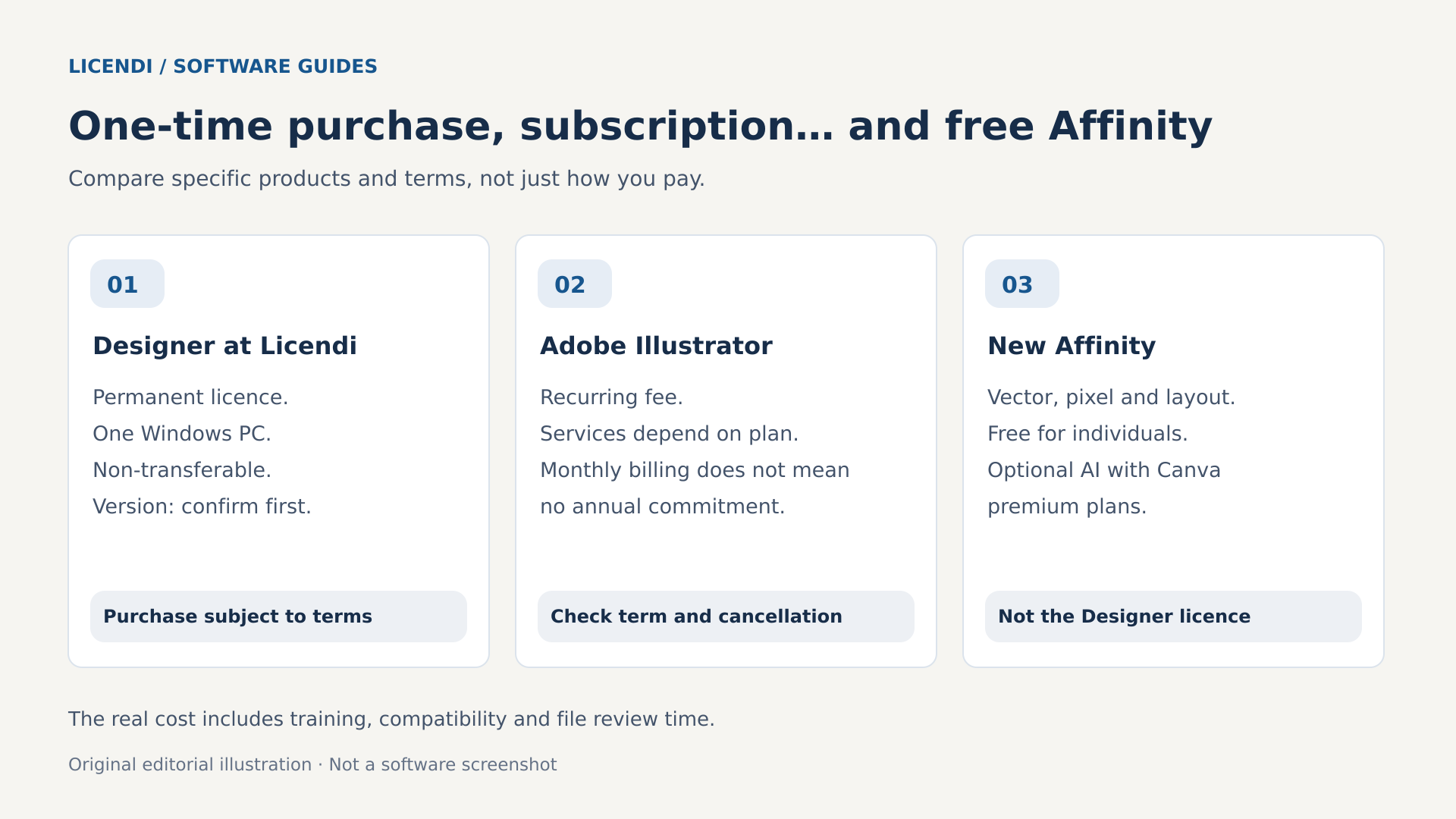
There is also a change that makes this comparison due for an update: the new Affinity brings vector design, image editing and page layout together in an application that is free for individual users. The historical contrast between a one-time purchase of Designer and an Illustrator subscription therefore no longer covers all the options. If you are starting now, it makes sense to evaluate that free application before buying an older licence.
Here we distinguish between three things: the earlier Affinity Designer 2, the new unified Affinity, and the permanent Designer licence offered by Licendi, whose listing does not specify a version. These are not interchangeable products. You do not need to buy that licence to use the free application, nor can you assume it includes the current application's features. Your choice should start with what you need to deliver and the specific conditions of the product.
What you are really comparing
Designer attracted attention as a one-time purchase alternative for illustration, visual identity and other vector tasks. Illustrator retains a subscription model and an important position in professional workflows built around Adobe. That financial difference still matters to anyone maintaining older projects or looking for a particular version, but there is now a third route with no licence cost for individual users.
The new Affinity is available for Windows and macOS. Its website announces a new iPad version as coming soon, not as a download that is already available. Its vector, pixel and layout tools are offered free of charge; the optional Canva artificial intelligence features require a compatible premium plan. Being free does not automatically mean commercial use is prohibited: check the applicable terms and the specific options for organisations.
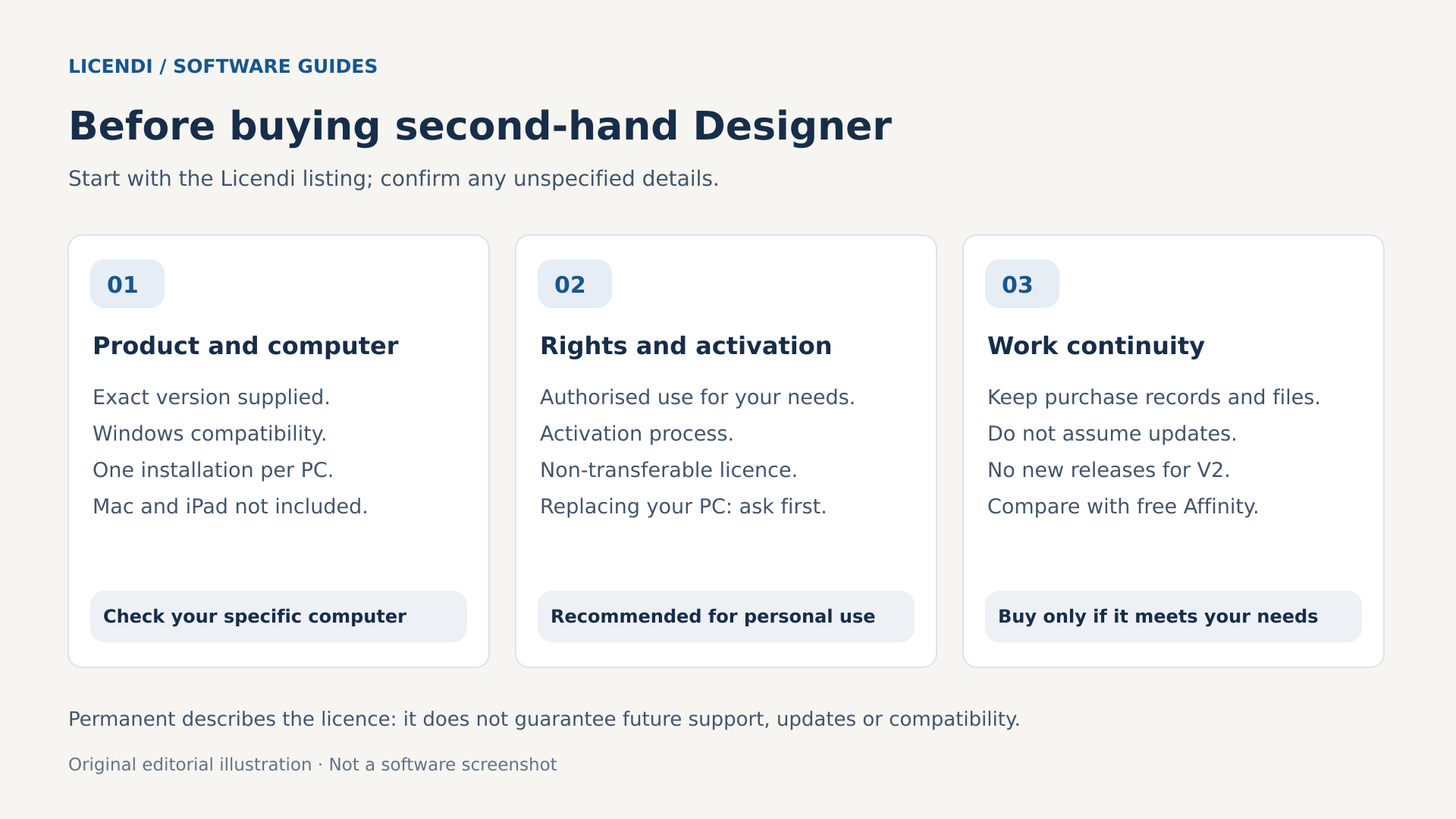
By contrast, the Affinity Designer listing at Licendi describes a permanent Windows licence, with one installation per PC, non-transferable and recommended for personal use. It does not give a version number. Before buying, ask for confirmation of the version supplied, authorised use, activation procedure and your rights if you replace the computer.
The distinction also affects the future of your files. Serif states that the V2 applications will remain usable and that it will maintain their activation servers, but they will not receive future updates. The new Affinity opens V1 and V2 files; new .af files cannot be opened or edited in those earlier versions. Saving an original copy before migrating is no minor detail.
One-time purchase and subscription: compare the full cost
A permanent licence avoids a recurring fee for the right to use that licence. It does not mean free major upgrades forever, indefinite support or guaranteed compatibility with every future Windows release. Nor does it turn an installation tied to one computer into permission to move it freely. The initial price tells only part of the story.
A subscription spreads the expense and can make sense when you use the application and its services continuously. But paying every month does not prove that you can cancel every month without consequences. An annual contract billed monthly is not the same as a monthly plan with no annual commitment. Check the term, renewal, taxes, introductory discounts and possible cancellation charges before comparing amounts.
A simple calculation that includes your time
Assume a hypothetical fee of €25 per month: that would be €300 over twelve months and €900 over thirty-six. This is not a current Adobe price. Also assume a permanent licence costs €60. Comparing €60 with €900 is tempting, but we have not yet included training or file conversion.
If migration requires eight hours valued at €30 each, add €240. The permanent alternative then totals €300 for the licence and the transition; the free alternative totals €240 if it requires those same eight hours. Under these assumptions, compared with €900 in subscription fees over three years, the differences would be €600 and €660 respectively. These are not guaranteed savings: maintenance, add-ons and possible additional tasks are still missing.
Now add a recurring correction taking twenty minutes a week for forty-eight weeks: that is sixteen hours a year. At €30 an hour, it amounts to €480. If that work arises because every delivery needs rebuilding, it can consume the financial advantage. And if the change removes difficulties you already faced, the saving could be greater. Timing two representative jobs is worth more than debating a price table in isolation.
Build your budget with two columns: expenses that disappear and expenses that will remain. If you retain other Adobe services for unrelated reasons, do not credit a change of vector editor with the savings from the entire package. Check what you can actually cancel and what alternative you would need to pay for. Also separate cash outlay from opportunity cost: eight hours of learning will not always generate a bill, but they take up time you could spend on client work, training or rest.
Drawing: where technique matters more than the brand
To create a logo, refine an icon or prepare a geometric illustration, compare specific operations. Can you place a Bézier curve with just a few nodes? Is it comfortable to adjust its handles, align points and close paths? Can you quickly see which object is selected? Designer 2 and Illustrator have vector tools capable of handling these tasks; the practical difference lies in the actions you take and the organisation of the document.
Test Boolean operations with a simple logo: unite two shapes, subtract a circle and retain an internal opening. Then change a proportion. Producing the silhouette once is not enough; you need to know whether you can revise it without starting again. Distinguish between destructive operations and constructions that retain editable components, depending on the tool and version. Save a variant before expanding or converting elements.
Artboards also deserve a real test. Create horizontal, vertical and small-scale versions of an identity; arrange colour variants and export each output. Check names, dimensions and consistency of the results. For social media, add different sizes. Export speed matters, but spending time looking for the right artboard or overwriting an asset can cause more trouble for a delivery.
It also helps to distinguish vectors from pixels. A vector outline retains its geometry when scaled, whereas a rasterised texture depends on its resolution. Combining them may be exactly what an illustration needs, but not every destination handles them in the same way. Zoom into the exported file and check which parts are still curves. For a small icon, also review the result at actual size: a shape that looks elegant when enlarged can become hard to read at just a few pixels.
Automatic tracing and artificial intelligence: keep generations separate
The old objection that Affinity has no automatic tracing no longer works as a general statement. Designer 2 did not have built-in automatic tracing; the new Affinity does advertise Image Trace for converting images into editable vectors. Illustrator is also a common choice for vectorisation work. If you depend on this task, check the feature in the exact version you intend to use.
Test it with a difficult scan, not just a perfectly crisp black symbol. Count unnecessary nodes, check openings and examine corners. Automatic tracing can help recover an illustration, but it does not reconstruct the geometric logic of a logo on its own. It is often better to redraw a few clean curves than to correct hundreds of points.
With AI, the useful question is which stage it handles and under what conditions. Generating a proposal does not replace checking rights, confidentiality and the finished result. In the new Affinity, Canva AI tools are optional and linked to premium plans; buying an older licence does not include them. With Adobe, verify the available features and their conditions within your chosen plan, without assuming that any subscription covers every use.
Illustrator and the value of working in the same environment
Illustrator can have a decisive advantage when the rest of the process already depends on Adobe. This is not about a poster made with another application being less professional. It is about libraries, existing documents, trained staff and procedures that expect a particular file. Changing an individual tool can be easy; changing the working arrangements of an entire team requires more coordination.
Think of an identity that then moves into a publication, an animation and several advertising adaptations. If collaborators work with Photoshop, InDesign or After Effects, test how they receive the assets, what they retain and what they need to recreate. Do not assume perfect integration even within the same manufacturer's products: versions, effects and import methods still have an influence.
Add-ons and automation need a separate inventory. A studio may depend on a lettering plugin, a script that renames artboards or a routine that generates variants from data. Check the supplier, compatible version, operating system and add-on licence. Do not automatically attribute the new Affinity's automation capabilities to Designer 2, or assume that an Illustrator script will work outside Illustrator.
For someone who draws and delivers final files without further collaboration, these dependencies may not carry much weight. For a department with dozens of templates and daily deliveries, they can justify the subscription. Ask what work would no longer get done after a change, who would take it on and how long it would take. That conversation often clarifies the decision sooner than any feature list.
SVG, PDF, EPS and AI: opening a file does not preserve everything
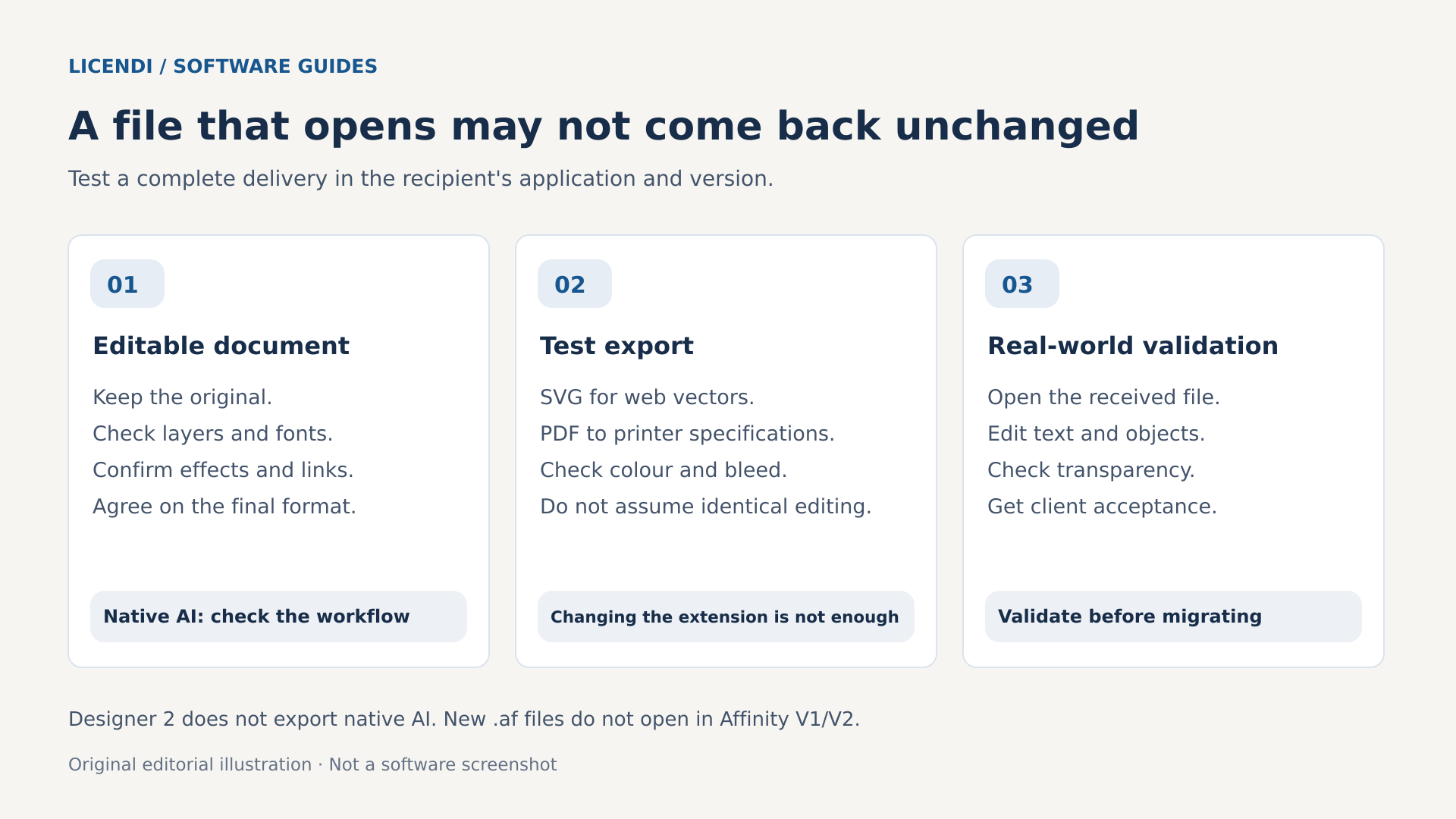
Compatibility has two distinct levels: whether a document looks right and whether it remains easy to edit. A PDF can reproduce a composition faithfully on screen while splitting text or transforming effects. For approved final artwork, the first level may be enough. For a template that someone else will modify for years, you need the second.
The Designer 2 documentation explains that when importing Illustrator files, it uses the embedded PDF, not Illustrator's complete native data. That makes the way the original AI file was saved important. In addition, Designer 2 does not export a native AI file. Delivering a PDF with a changed extension does not solve the problem and gives the recipient a false expectation.
SVG is useful for icons and graphics intended for the web, but masks, filters, text and scaling need to be checked at the actual destination. PDF is often the exchange format for review and production, with settings tailored to each output. EPS still appears in older workflows; do not choose it out of habit if you need transparency or other features that the workflow may handle less well.
Run a round-trip test before committing
Open a copy of the document, edit some text, change a gradient and export it in the agreed format. Ask your collaborator to open it in their application and make another change. Then review the returned result. Check layer names, groups, clipping, strokes, transparency and the resolution of any rasterised sections. A screenshot does not reveal all these changes.
Include a master file, a final output and a brief note on fonts, versions and converted elements with each delivery. Agree beforehand whether the client needs a fully editable AI file or simply a scalable vector. These are different commitments. If the contract requires native AI, Designer 2's limitation may rule out that workflow even if the design can be reproduced perfectly.
It also helps to distinguish review from editing. To approve colour, proportions or composition, a PDF with comments may be enough. To build new pieces from a template, the recipient will need well-organised objects and usable assets. Ask what they usually change: text, colours, photographs or the entire structure. You can then agree on a delivery suited to the actual work, rather than sending several formats that seem to offer flexibility but that nobody has tested.
Fonts and printing: problems that emerge late
Fonts deserve attention before you cancel a subscription or move a project. Check which are installed locally, which depend on a service and which licences allow sharing or embedding. Having access to a font while you maintain a plan does not necessarily mean you will have it afterwards. Nor can you attach its files for a client simply because you used it in a logo.
Keep a master with editable text and a delivery copy with text converted to curves where appropriate. Outlining helps fix the appearance, but removes normal typographic editing and can harm accessibility and searchability. It does not replace a valid licence. Check accents, currency symbols, line spacing and breaks after importing: a subtle substitution can change an entire label.
For printing, ask the printer for its specifications: size, bleed, colour profile, PDF/X standard and handling of spot colours. Working in CMYK alone does not guarantee a correct file. Check overprinting, blacks, transparency and the effective resolution of images. The profile should match the output process, not be chosen because its name looks familiar.
Test the exporter in the specific version. Designer 2 has production-oriented options, but you should not attribute them without checking to a licence whose version number you do not know. Send a sample PDF, request a technical review and approve a proof when the job calls for one. The cost of an incorrect print run quickly exceeds any difference between licences.
A useful test includes details that often fail: small text on a dark background, a transparent shadow, a cropped photograph and an element that reaches the edge. It does not need to be a huge project. Ask the printer to check that document using the same process it will use to produce the job. If there is a discrepancy, identify whether it originates in the original, the export or the interpretation of the file before changing settings at random.
What to check in a permanent licence on the secondary market
The secondary market may interest someone who needs to maintain a well-defined older workflow or acquire a specific licence with sufficient documentation. It is not an automatic recommendation over the new free Affinity. If both options meet your needs, paying for an earlier version requires a verifiable reason: project compatibility, a validated environment or a condition of use that genuinely fits.
When reviewing the permanent Designer licence available at Licendi, distinguish the product description from the rights you need to confirm. The listing consulted specifies Windows, digital delivery, one installation per PC and a non-transferable licence. It recommends personal use and allows you to select the language during installation. It does not present a universal authorisation for every professional purpose.
Do not infer that it works on Mac or iPad because other editions of Affinity exist for those platforms. Nor should you assume that it is Designer 2, that it includes the unified application's features or that it includes future versions. Ask for the exact version in writing and check it against your documents, computer and requirements. If you intend to use it for paid work, explicitly confirm the authorised commercial use.
Also ask how it is delivered and activated, what supporting documentation you will receive and what happens after a breakdown, reinstallation or PC replacement. The “non-transferable” condition calls for clarification of that last point, not an invented exception. A key that activates does not, on its own, settle every licensing question. Avoid blanket statements about the legality of any resale in Europe: the licence and documented circumstances matter.
The purchase documentation should let you understand which product you are receiving without relying on your memory of a conversation. Keep the invoice, description, installation instructions and answers about usage rights. If a decisive condition remains unclear, postpone the purchase. An attractive price does not compensate for discovering later that the platform, intended purpose or recovery procedure does not fit. Do not assume a return period or a replacement guarantee that has not been confirmed, either.
Published requirements and safe compatibility
The listing mentions 64-bit Windows 10 or 11, an i5 processor or equivalent, 4 GB of RAM with 8 GB recommended, 1 GB of available space and DirectX 10-compatible graphics. These are the published requirements for the product offered, not a guarantee of good performance on every project. They must be checked against the version supplied. An illustration with numerous effects can require considerably more than a simple icon.
The fact that Windows 10 appears in a listing does not automatically make it a safe recommendation for a new installation today. Check the support and security updates applicable to your computer; for a new installation, prioritise a compatible, maintained system. Before paying, also check drivers, your graphics tablet and screen resolution. Technical compatibility and system security are separate checks.
Digital delivery describes the means of supply; it does not remove the need for checks beforehand. Review the instructions before uninstalling anything and retain access to the documentation you receive. The listing requires an Internet connection for activation: do not assume an offline deployment is possible without confirming a procedure compatible with that licence.
Three hypothetical situations that change the answer
Hypothetical case 1: starting with icons and posters
Lucía is learning design, works on Windows and prepares SVG icons and posters for personal projects. She does not receive AI files or depend on plugins. A sensible first test would be the new free Affinity: drawing, exporting and checking results without committing to a purchase. There is no reason to recommend an older licence simply because she prefers to avoid subscriptions.
It would only make sense to consider a permanent purchase if a specific need arose that the free alternative could not meet but the version offered could, under suitable conditions. For simple personal projects, learning curves, composition and typography is usually a more useful investment than paying for a supposed advantage whose existence she has not yet verified.
Hypothetical case 2: collaborating with an agency
Marcos receives AI documents with organised layers every week and must return them to an agency in editable form. He also uses a specific Illustrator add-on. Even if another application can recreate his designs, conversion may break the shared process. First, he needs the agency's approval and a complete test with the plugin, fonts and real files.
If the requirement remains native, editable AI, keeping Illustrator may be the most economical choice once time and risk are considered. He could use Affinity for independent projects without imposing it on that collaboration. Combining tools is not inconsistent: what matters is not promising a delivery that forces the next professional to rebuild it.
Hypothetical case 3: preserving an older project
Elena has a collection of personal designs created in an older version and wants to preserve her editing environment on a particular PC. Before buying, she tests copies in the new Affinity and checks whether they meet her needs. If she specifically needs to retain the previous environment, she can examine a permanent licence offer, but only after identifying the required version.
In that case, she can check the Designer offer and request its conditions, verifying the version match, activation and authorised use. The purchase would serve a specific purpose, not promise access to the latest features. She would keep originals separate, document the computer and clarify in advance what would happen if she needed to replace it.
A practical migration checklist to protect your client work
Do not try out a new workflow for the first time the day before delivery. Start with a small job that leaves room to return to the previous application. Before cancelling or buying, complete these checks and save the results with the project:
- Define the outputs. Note whether you need editable AI, SVG for the web, print-ready PDF or final images. Ask the recipient to confirm the format and requirements.
- Choose representative documents. Include a simple file and another with fonts, masks, gradients, transparency and linked images. Avoid testing only the easiest example.
- Protect the originals. Duplicate files and assets before opening them in another version. Do not overwrite the only master or rely on backwards compatibility.
- Audit dependencies. Check fonts and their rights, plugins, scripts, colour profiles and external assets. Distinguish essentials from things you can replace.
- Reproduce a complete delivery. Draw, review, export and ask the recipient to open the result. Include a subsequent change to check editability.
- Measure the time. Record the initial transition and repeated corrections. Calculate their cost using a realistic hourly rate, even if you are self-employed.
- Validate the licence and computer. Confirm the version, platform, authorised purpose, activation and computer replacement. For subscriptions, review the commitment and cancellation terms.
- Decide with a fallback plan. Keep masters, exports and notes. Cancel services only when you know how to handle future revisions without losing necessary assets.
Set criteria for passing the test in advance: no unresolved font substitutions, exports accepted by the recipient and a manageable correction time. If something fails, record the file and the exact step that causes it. Changing a template may be enough; at other times, the dependency is structural. That distinction prevents both rejecting an alternative over a small problem and persisting with an unsuitable migration.
During the transition, specify which application and version hold the authoritative master. If two people edit different copies, the confusion can look like a compatibility failure when it is actually an organisational problem. Use clear names, an agreed location and identifiable revision versions. When closing the project, also archive a reference export that lets you check its appearance without rebuilding the entire environment.
Frequently asked questions
Is Affinity Designer still worth paying for?
It can be for a specific version or environment requirement, once rights and compatibility have been confirmed. If you are starting from scratch, try the new free Affinity first. An older licence should not be presented as a requirement for accessing the current application or as an automatic improvement on it.
Does a permanent licence receive every new feature?
No. A permanent right of use, updates and support are different concepts. Serif states that the V2 applications will not receive future updates. That information does not identify the version of a commercial offer that leaves it unspecified, either. Ask for that detail before assessing features or continuity.
Can I use the free option professionally?
Do not confuse “free for individual users” with “prohibited for commercial work”. Review the current terms applicable to your situation and, if buying for an organisation, its business options. These conditions differ from those of the Licendi licence, whose listing recommends personal use and requires clarification of your intended purpose.
Does Designer replace Illustrator for delivering AI files?
Not necessarily. Designer 2 imports AI through its embedded PDF content and does not export native AI. Agreed formats such as PDF or SVG may work for delivering final vectors, but that is not equivalent to returning a fully editable Illustrator document. Confirm the requirement before accepting the job.
Is AI included when buying a permanent licence?
You should not assume so. The optional Canva AI features belong to the new Affinity and require a compatible premium plan. The Designer licence offered without a specified version does not imply access to those features. Also assess privacy, service limits and the conditions for using the results.
The best purchase starts by ruling out what you do not need
If you are starting without inherited dependencies, the new free Affinity deserves to be your first option to evaluate. If you collaborate in a workflow that requires Illustrator, the subscription can pay off through continuity and reduced work. And if you need an earlier permanent version, buying only makes sense when that version and its conditions meet a verified need.
You can review Affinity Designer at Licendi and ask about the missing details before deciding. Confirm the version, authorised use, activation and rights when changing PCs; then test the product against a real project. This is not about defending subscriptions or one-time purchases on principle, but choosing a tool you can use and deliver work with confidently.