EN
 FR
 DE
 IT
 PT
 ES


Windows 10 IoT Enterprise LTSC 2021: who it is for and how to buy it
A payment terminal, an information kiosk or a computer dedicated to a machine needs something different from a computer used to run all kinds of applications. What matters is keeping its task running, ensuring peripherals are supported and being able to plan updates. In that context, Windows 10 IoT Enterprise LTSC 2021 deserves consideration. But its long support life does not make it a low-cost Windows licence for any PC.
This guide helps you decide whether it suits your device and understand Licendi’s offer before buying. The information has been checked against documentary sources as at 21 October 2026: the examples are illustrative, not tested installations or customer stories. We will distinguish Microsoft’s product features, the rights you need to demonstrate and the terms advertised by the seller. That lets you assess the price without losing sight of what matters: buying a usable, properly documented solution.
1. What the name actually means
Windows 10 identifies the operating system generation; Enterprise, its business foundation; IoT, its focus on specialised devices; and LTSC, the long-term servicing channel. These concepts are related, but none replaces the licence agreement and its restrictions.
The documentation for the 2021 edition places its features on the Windows 10 21H2 baseline, in the 19044 build family. It was released on 16 November 2021. It is not Windows 10 22H2 or Windows 11, even though it shares names or tools with other versions.
It helps to separate four questions: which edition you are buying, how it is serviced, through which channel the rights were acquired and what the applicable agreement permits. A key addresses only part of getting the system up and running. Nor is an invoice simply saying “Windows” enough: it should identify the product adequately and come with the relevant documentation.
According to Microsoft, binary equivalence with Windows Enterprise lets you use familiar development and management tools. For an integrator who already has a Windows application, that continuity can be useful. Even so, technical familiarity should be kept separate from commercial authorisation: recognising the desktop or running a familiar program does not prove that the device is covered by the licence.
2. For dedicated devices, not just any computer
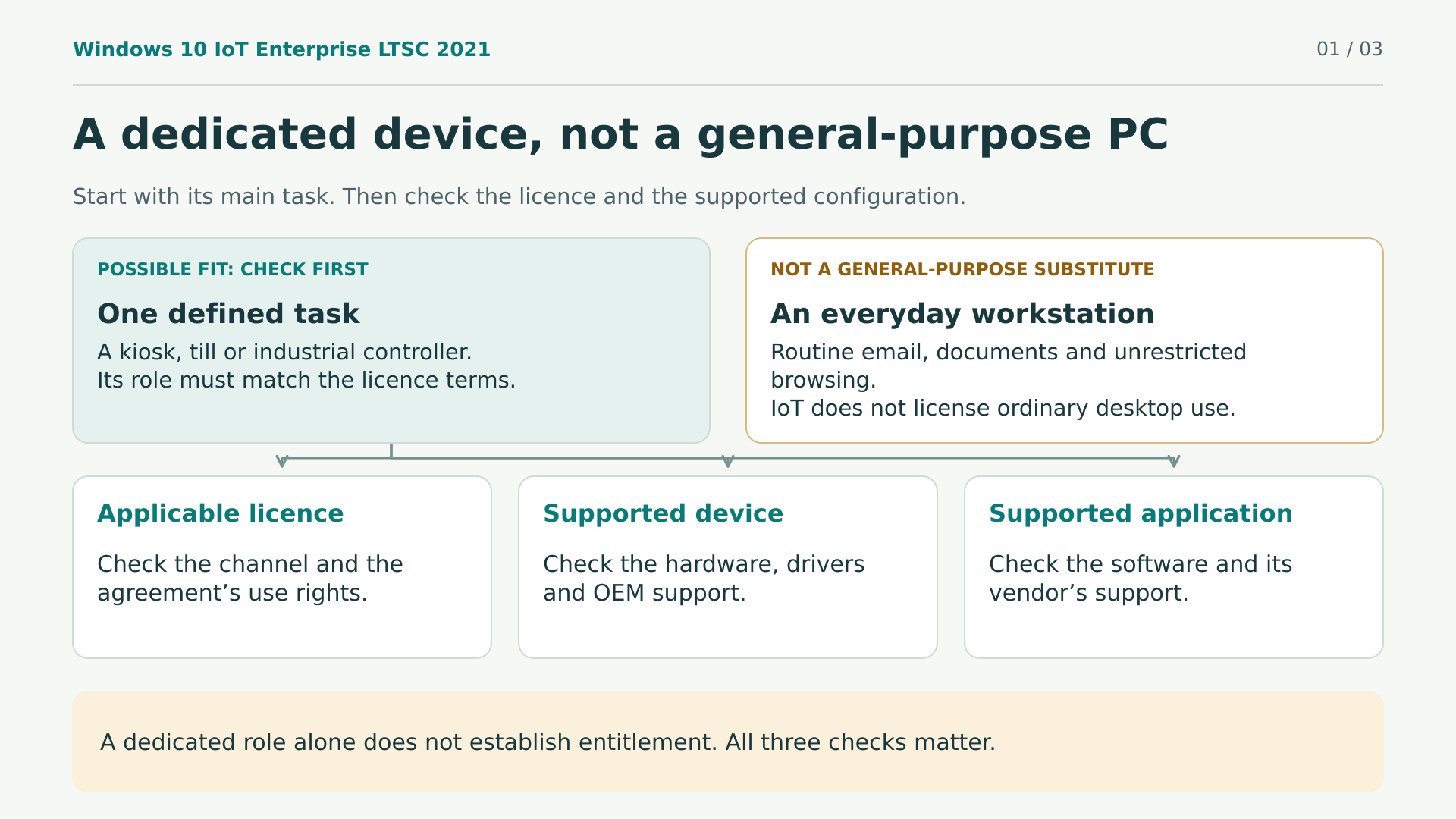
Microsoft reserves IoT Enterprise LTSC for specialised, fixed-purpose devices. The current Windows terms prohibit using this licence on a general-purpose PC or a commercially viable substitute. They include email, documents, spreadsheets and ordinary web browsing among general-purpose tasks.
A home, gaming or office computer therefore does not become eligible just because you install IoT or want to keep Windows 10. Being owned by a business is not enough either. Conversely, a device that looks like a PC can have a genuinely dedicated purpose: for example, displaying a restricted catalogue at an information point. The decision depends on actual use and the agreement, not the shape of the case.
There are important nuances. The current OEM agreement permits desktop functions when they support the dedicated application and operate only with it. A browser restricted to the kiosk’s service is not the same as giving an employee general web access. That wording comes from an agreement updated in April 2024; it does not establish which contract accompanies a particular 2021 offer.
Before choosing, write down the main task, who uses the device and what other functions will be available. This is a simple way to identify conflicts before paying, without turning a usage example into automatic certification.
Consider another example: a terminal reserved for taking payments versus the laptop the manager uses for email, accounting and meetings. Both are in the same shop, but their functions are not equivalent. If the terminal starts being used as a general workstation when it is free, its design and permissions will need reconsidering. The boundaries around its tasks must be maintained in practice, not just appear in the original project description.
3. Three editions, three support schedules you must not confuse
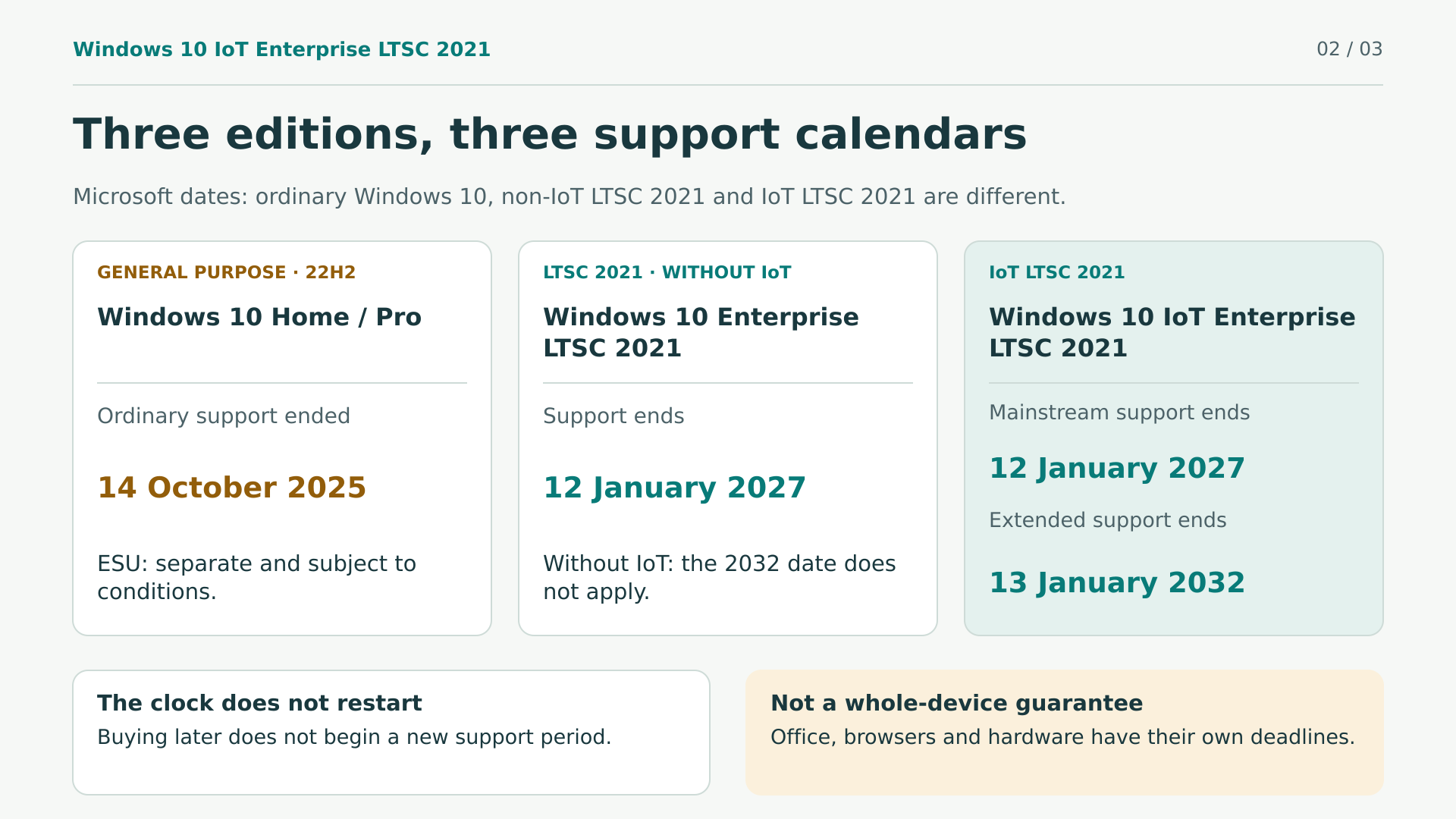
The word IoT makes a decisive difference to this edition’s support horizon. The official Windows release table distinguishes the deadlines. Keep the full names when comparing them:
- Windows 10 IoT Enterprise LTSC 2021: mainstream support ends on 12 January 2027 and extended support on 13 January 2032.
- Windows 10 Enterprise LTSC 2021, without IoT: its standard support ends on 12 January 2027. The 2032 date does not automatically apply to it.
- Windows 10 Home and Pro: standard support ended on 14 October 2025; 22H2 was the final version. ESU programmes are separate and subject to conditions.
The Home and Pro lifecycle does not cancel LTSC’s own support schedules. But neither does it authorise switching licences to evade their usage requirements.
Buying in 2026 does not start another ten years. The schedule belongs to the published release, not the date on your invoice. Moreover, 2032 describes the operating system, not a guarantee that your application, browser, printer or maintenance provider will continue supporting it until then.
4. LTSC offers stability, not freedom from maintenance
According to Microsoft’s overview, IoT LTSC does not receive the usual feature updates through Windows Update. It maintains a stable feature baseline while continuing to receive cumulative security, quality and reliability servicing. This makes it worth considering when platform changes require validation of an entire solution.
That does not mean freezing the device and forgetting about it. Patches, backups, checks and maintenance windows are still necessary. Stability reduces certain variations; it does not guarantee zero incidents or permanent protection against every threat.
The platform has controls for dedicated devices, such as Unified Write Filter and Shell Launcher. They can form part of the device’s design, but require configuration and planning; we should not assume they are ready by default. Nor does this edition automatically include Office licences, Intune or additional security subscriptions.
Moving to a later IoT LTSC release requires a new licence unless a documented agreement specifically provides that right. “Perpetual” describes the duration of the acquired right, not free future versions or indefinite support. If your application will need newer interfaces, you will have to assess that development separately.
Good planning distinguishes system changes from application changes. Even if Windows retains its feature baseline, the software provider may change requirements or external connections. Agree who will review each update and how to return to a recoverable state if a problem arises, rather than assuming LTSC removes that responsibility.
5. Hardware: technical minimums and practical capacity
The Windows IoT hardware table distinguishes preferred configurations from specialised alternatives. For Windows 10, its preferred minimums include a 1 GHz processor, 2 GB of RAM on x64 and 20 GB of storage. These are basic thresholds, not a recommendation for comfortable working capacity.
Leave headroom for the application, logs, updates and recovery. A till with several peripherals needs a different assessment from an information display. Choosing only by memory and disk capacity can hide problems with the reader’s driver, touch interface or firmware.
TPM and Secure Boot also need context: Microsoft allows optional TPM in certain IoT configurations and OEM exceptions to shipping with TPM or Secure Boot enabled for particular specialised devices. That does not prove that any old PC is compatible or recommend disabling protections. Ask the manufacturer for the supported configuration; the application or security policy may require additional components.
The official 2021 volume-licensing route uses x64 media. The processor guidance requires 64-bit builds for new Windows 10 OEM devices from version 2004. Older 32-bit devices and other channels are separate cases. Do not assume universal compatibility with ARM, Apple Silicon, Raspberry Pi or any 32-bit processor: confirm the model, image, drivers and OEM support.
Prepare an inventory before asking about compatibility: the exact device model, processor, available storage, adapters and peripheral model references. Add the main application’s version. With these details, the manufacturer or integrator can answer for a specific configuration; an enquiry saying only “I have an old computer” is unlikely to help you plan a reliable installation.
6. Applications, Office and browsers have their own limits
A program opening successfully does not prove that its manufacturer supports that combination. Microsoft warns of possible limitations for applications designed for the general Windows channel. Check the edition and build your software requires, certified peripherals and the provider’s maintenance dates.
The Office and Windows compatibility matrix marks Microsoft 365 Apps as “n/a” on Windows 10 LTSC 2021. It has no IoT row granting support until 2032. The general commitment to provide Microsoft 365 Apps security updates on Windows 10 until 10 October 2028 does not make every LTSC combination a fully supported configuration.
Office LTSC 2024 lists Windows 10 LTSC 2021 among its supported operating systems, but requires its own licence and compliance with its requirements. It has a separate five-year lifecycle, ending in October 2029; the matrix does not establish a specific Office-on-IoT support date extending to 2032. On ARM, Office LTSC 2024 requires Windows 11. Office LTSC 2021 has already reached its end of support in October 2026.
Edge is included in IoT LTSC 2021. The current list of operating systems supported by Edge includes it, but the browser follows its own modern lifecycle and changing requirements. This does not guarantee Edge, Chrome, Firefox or web services until 2032. Edge’s reference to “at least October 2028” concerns Windows 10 22H2. And being able to install Office or a browser does not remove the dedicated-use restrictions.
A web application also involves the remote server. Even if the browser still starts, the service may require newer features or authentication mechanisms. Ask the provider about its compatibility policy and the testing needed after major changes. Maintaining a connected kiosk involves that entire chain, not just the operating system installed locally.
7. OEM and volume licensing: two routes with different requirements
The IoT Enterprise licensing guide covers both OEM and volume licensing. This is not an OEM-only edition, nor should we invent a standard retail licence on the strength of a standalone key.
Under OEM licensing, the manufacturer preinstalls the system on new dedicated devices sold to the customer. Certain complete-solution upgrades also exist. When Microsoft refers to transferring that licence to the buyer, it describes the manufacturer’s device-linked handover: it does not grant general freedom to move a key between computers.
Volume licensing provides an upgrade licence for an existing device that already has a qualifying operating system licence. You must check the programme and the specific base edition. An empty disk or Windows Home does not automatically provide a valid basis. Installation and activation do not supply any missing underlying rights.
Microsoft’s current FAQ lists Microsoft Customer Agreement, MPSA and Select/Select Plus, and states that IoT Enterprise is not currently available through Enterprise Agreement. These details help you frame questions, but do not identify the channel of Licendi’s offer. That point needs to be clarified in writing before purchase.
If the purchase turns out to be a volume upgrade, include the base licence in your financial and documentary checks. Ask which previous edition the agreement accepts and how you should demonstrate that the device is already licensed. Avoid buying first and finding out afterwards whether you meet the requirement. The installed system’s commercial name is no substitute for evidence that you hold its usage rights.
8. Reinstallation, reassignment, resale and downgrade
These are different operations. Reinstalling on the same device is not the same as replacing the motherboard, moving the licence to another computer or selling a copy to another owner. Each scenario needs its own contractual answer and, where appropriate, legal analysis.
The Windows per-device terms specify permanent assignment unless relevant Software Assurance is in place. Do not simply apply the general rule allowing reassignment every 90 days: the general terms expressly defer to the Windows-specific terms. We have not established that this offer includes Software Assurance.
The general software terms also explain downgrade: using a permitted earlier version or edition instead of the licensed one. It does not mean receiving another simultaneous copy, a free upgrade or unrestricted conversion from Home or Pro. The licensed version’s restrictions still apply.
For this purchase, specific OEM downgrade rights and the availability of suitable media and keys have not been verified. If you need to recover the device after a failure, change components or keep an earlier version, raise those scenarios before ordering. A written answer is more useful than interpreting “perpetual” too broadly.
For example, following a failure, ask separately whether you retain usage rights, whether you can reinstall the image and how activation will be handled. These questions are related, but a favourable answer about assistance does not by itself grant mobility between devices. It is also worth knowing which documents the seller will request to investigate the problem.
9. Activation and connectivity: ask about the actual method
The OEM agreement published by Microsoft warns that successful activation does not confirm that the software is genuine or properly licensed. The invoice, key, activation status and rights documentation serve different purposes. Keep all the relevant evidence, not just a screenshot saying “activated”.
IoT does not mean a permanent internet connection either. The OEM activation guide covers devices prepared to operate offline, with activation deferred until they can reach the relevant servers, as well as proxy-activation options. It is guidance for the OEM ePKEA channel, not a universal exemption for any shop-bought key.
Volume licensing can use the organisation’s KMS or MAK. KMS requires periodic renewals; MAK’s technical message indicating permanent activation does not promise lifetime support or transferability. Before paying, confirm the intended method and network requirements. Do not assume telephone activation, unlimited reactivations or transfer through a Microsoft account, and do not use public third-party KMS servers.
10. Official installation is not a licensing shortcut
The documented volume-licensing route has an important detail: it starts with Windows 10 Enterprise LTSC 2021 x64 media and changes the edition to IoTEnterpriseS using the corresponding legitimate key. For 2021, it requires the May 2023 cumulative update, build 19044.2905, or later.
This technical possibility is not a free conversion or permission to use a key without rights. Nor does it prove that you can upgrade any Home or Pro installation while keeping applications and data. The procedure belongs to its channel and requires the appropriate rights, including a qualifying base where applicable.
Request trusted media, the exact edition and architecture, suitable instructions and a recovery procedure. Do not use modified images or activation scripts. The catalogue’s generic reference to a Windows Enterprise evaluation has not been verified as production media for IoT LTSC 2021. Clarify which image will actually be delivered rather than inferring it from the link’s name.
Before erasing the disk, confirm that the media received matches the agreed product and procedure. An evaluation image serves its evaluation purpose; its availability does not establish production rights. If the file, documentation and key do not match, resolve the discrepancy with the supplier before continuing.
11. Second-hand software: a conditional framework, not a certificate
The CJEU’s institutional press release on UsedSoft v Oracle, case C-128/11, dated 3 July 2012, summarises exhaustion of the distribution right in certain software sales. It includes downloaded copies and requires a first sale in the European Union by the rights holder or with their consent.
The summary covers payment for a right of unlimited duration, the original acquirer making their copy unusable when reselling, and not dividing the relevant multi-user licence to sell only part of it. It also explains that a contractual prohibition on transfer does not by itself prevent exhaustion when its conditions are met.
This does not automatically authorise detaching any OEM key from a device, splitting any volume agreement or reselling subscriptions. Nor does it remove IoT’s dedicated purpose. Contractual provisions and exhaustion rules are related, but they are not interchangeable.
The source consulted is an expressly non-binding institutional press release; the full judgment was not reviewed for this guide. It does not certify any particular stock. For a second-hand purchase, request the original agreement, evidence of the first sale, the chain of transfers, the disabling of previous copies and the base licence where applicable. Seek legal advice if the transaction requires it.
12. What exactly Licendi offers for 65 EUR
The listing for Windows 10 Enterprise IoT LTSC 2021 at Licendi corresponds to SKU 2234, product 699. On 21 October 2026, it displayed a price of 65 EUR per unit. This is a dated observation, not a standing quotation or a verified final total.
This is a standalone offer, with no selectable edition, duration or device-count variants. The quantity selector specifies purchase units; it does not turn one unit into a licence for several devices. The Spanish description presents it as perpetual for a single device and advertises digital delivery by email with an ISO download link and key.
These are the seller’s claims about this offer. Its positioning is aimed at businesses and specialised devices; we have not found general authorisation for home PCs, gaming or office workstations. The licence channel and activation method for this sale have not been identified either.
The shop generally presents itself as selling used software, but that does not establish this particular SKU’s history. Neither that presentation nor the structured “NewCondition” label resolves its provenance. The original contract, chain of rights and declarations that previous copies have been made unusable have not been inspected. Request clarification without confusing the product’s verified identity with an audit of its licence.
The price may be attractive if it avoids unnecessarily replacing a dedicated solution that remains suitable. To assess that benefit, include validation time, the assistance required and recovery after failures. Do not confuse a low purchase price with an equally low total operating cost.
In its general legal information, Licendi states that it offers activation keys and that this does not yet constitute a licence. That statement calls for a specific question: which rights and documents accompany this order besides the code? Accepting terms during installation is not enough if necessary rights are missing. Clarify this with the seller in writing beforehand rather than trying to reconstruct what the purchase included afterwards.
13. Commercial terms worth clarifying
Licendi’s listing states that activation is exclusive to the device for its lifetime, is non-reusable and requires a Microsoft account. Treat these as terms advertised by the seller, not universal Microsoft technical rules. Ask how they apply to your case and what assistance you will receive.
Its general terms remove the guarantee that the key will keep working after formatting, reinstallation or hardware changes. That is not the same as a legal prohibition on every reinstallation. Nor does it allow us to promise that a repair or motherboard replacement will be covered: written clarification is needed.
The seller mentions replacing failed keys and, for activation problems, replacement or a refund. We have not tested those procedures. Published delivery times are not consistent either: messages refer to immediate delivery, one hour, twenty-four hours and conditions relating to withdrawal rights. Do not schedule critical work on the assumption of guaranteed instant delivery.
The legal information refers to fourteen calendar days for consumers; the general terms say fourteen working days. For digital content, the former makes loss of the right of withdrawal conditional on performance beginning with the consumer’s express prior consent and acknowledgement of that loss. Confirm the applicable contract: checkout consent has not been reviewed, and unconditional returns should not be promised.
The general terms advertise VAT-inclusive prices for end customers, but the treatment of your destination, business transaction or basket total has not been checked. Review the invoice, taxes and final terms before confirming, without calculating savings from unverified reference prices.
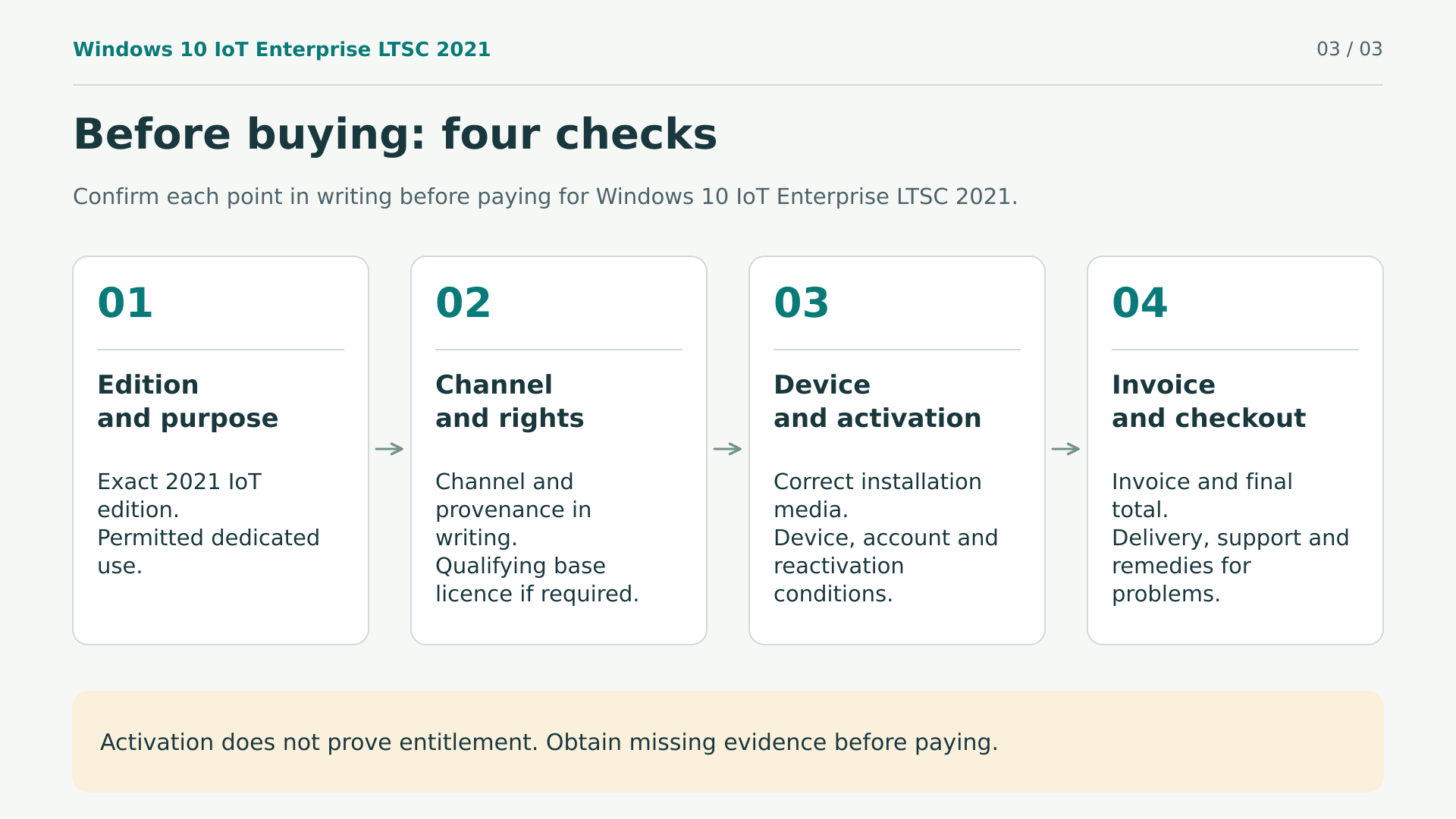
14. Your pre-order checklist
To turn this information into a decision, prepare a short enquiry stating the device model and its task. Ask for specific answers that you can keep with the order:
- Use: dedicated purpose, additional functions and compliance with the applicable terms.
- Rights: edition, channel, provenance, original agreement and qualifying base operating system if required.
- Compatibility: supported processor, architecture, firmware, drivers, application and peripherals.
- Delivery: correct production media, language, activation procedure and confirmed timescale.
- Continuity: reinstallation, repair, hardware changes, recovery and scope of assistance.
- Purchase: number of devices, invoice, taxes, remedies for failures and applicable withdrawal rights.
These answers let you compare the acquisition cost with the work involved in integration and maintenance. If an essential answer is missing, postpone the purchase until it is clear; a cheap key does not compensate for a service interruption or acquiring unsuitable rights.
You could summarise your enquiry like this: “This device will perform only this task, using this application and these peripherals. I need to confirm the channel, the rights included, the prerequisites and the procedure if reinstallation is needed.” Attach only the necessary information, without sending keys or credentials. Keeping the reply with the invoice makes future enquiries easier and avoids relying on memory.
15. From ordering to a careful deployment
Imagine, as an illustrative scenario, a kiosk dedicated to checking product availability. Before deployment, it would be sensible to keep a recoverable backup, test restoration and check the screen, reader and connection to the service. The aim would not be to demonstrate that Windows starts, but that the complete task works in a supported configuration.
Run a pilot before working on all devices. Define who installs patches, how failures are detected and how long the service can be unavailable. If it operates offline, also plan how updates will be distributed and how application dependencies will be handled.
During that pilot, also document how you will recognise a failure and who can intervene. A restoration that depends on the knowledge of someone who is absent can become an operational problem. Leave clear instructions for the person responsible for the device and check that recovery materials can be located when needed, without exposing sensitive information.
Keep documentation, authorised media and recovery information secure. Record the installed edition and the checks carried out. These are deployment recommendations, not results from our own tests or claims about devices shown in photographs. Sensible savings begin with avoiding a rushed installation.
16. Final questions and an informed purchase
Does buying it still make sense in 2026?
It can, for a compatible dedicated solution with documented rights and a suitable maintenance timeframe. The 2032 date is not enough if the application or hardware loses support earlier. Paying does not restart the schedule either.
Does one unit cover several devices?
The Spanish offer advertises one device. Buying several units does not remove the need to check the rights for each one, nor establish virtualisation or multiple-instance permissions that have not been documented.
Is it the answer to keeping any Windows 10 PC in use?
No. Its dedicated-purpose requirements and licence terms must be met. If you need a general-purpose computer, do not choose IoT solely because of the price or because you cannot install Windows 11.
When purpose, hardware, documentation and terms align, you can assess the offer through Licendi’s English-language shop. Buy to meet a specific need, not merely to obtain activation: that distinction helps you make use of LTSC with realistic expectations and stay in control of your investment.