EN
 FR
 DE
 IT
 PT
 ES


Edit PDFs Without Adobe: 6 One-Time-Purchase Options
Editing a contract, correcting an invoice or turning a scan into searchable text should not automatically mean paying another subscription for years. Yet finding a PDF editor with a one-time price is harder than the headline suggests. Terms such as “perpetual,” “lifetime” and “maintenance included” do not necessarily describe the same deal. You may have the right to keep one version indefinitely while still needing to pay for the next major release, additional cloud storage, artificial-intelligence credits or a managed electronic-signature service.
This guide compares six practical ways to edit PDFs without Adobe, using prices checked on 6 August 2026. It does not try to crown a universal winner. Instead, it asks what each desktop application can do, which operating systems and devices it supports, and exactly what right remains after the initial payment. The aim is to help you choose around your real workflow rather than an attractive but ambiguous marketing label.

Contents
- What a one-time payment really means
- How we compared the editors
- Quick comparison of all six alternatives
- 1. Nitro Pro 14
- 2. Ashampoo PDF Pro 5
- 3. PDF-XChange Editor Plus
- 4. UPDF Pro Individual Lifetime
- 5. Wondershare PDFelement Perpetual
- 6. Master PDF Editor
- Which editor suits which user?
- A three-year total-cost example
- Checklist before you buy
- Conclusion
- Frequently asked questions
What a one-time-purchase PDF editor really means
The useful question is not merely, “Do I pay once?” It is, “What will I still be able to use three years from now?” A perpetual licence generally gives you an indefinite right to run the version you purchased. That right does not automatically include the next major version. Nor does it guarantee permanent compatibility with future editions of Windows, macOS or Linux. The application may remain legally yours to use, but an operating-system change could eventually make an upgrade necessary.
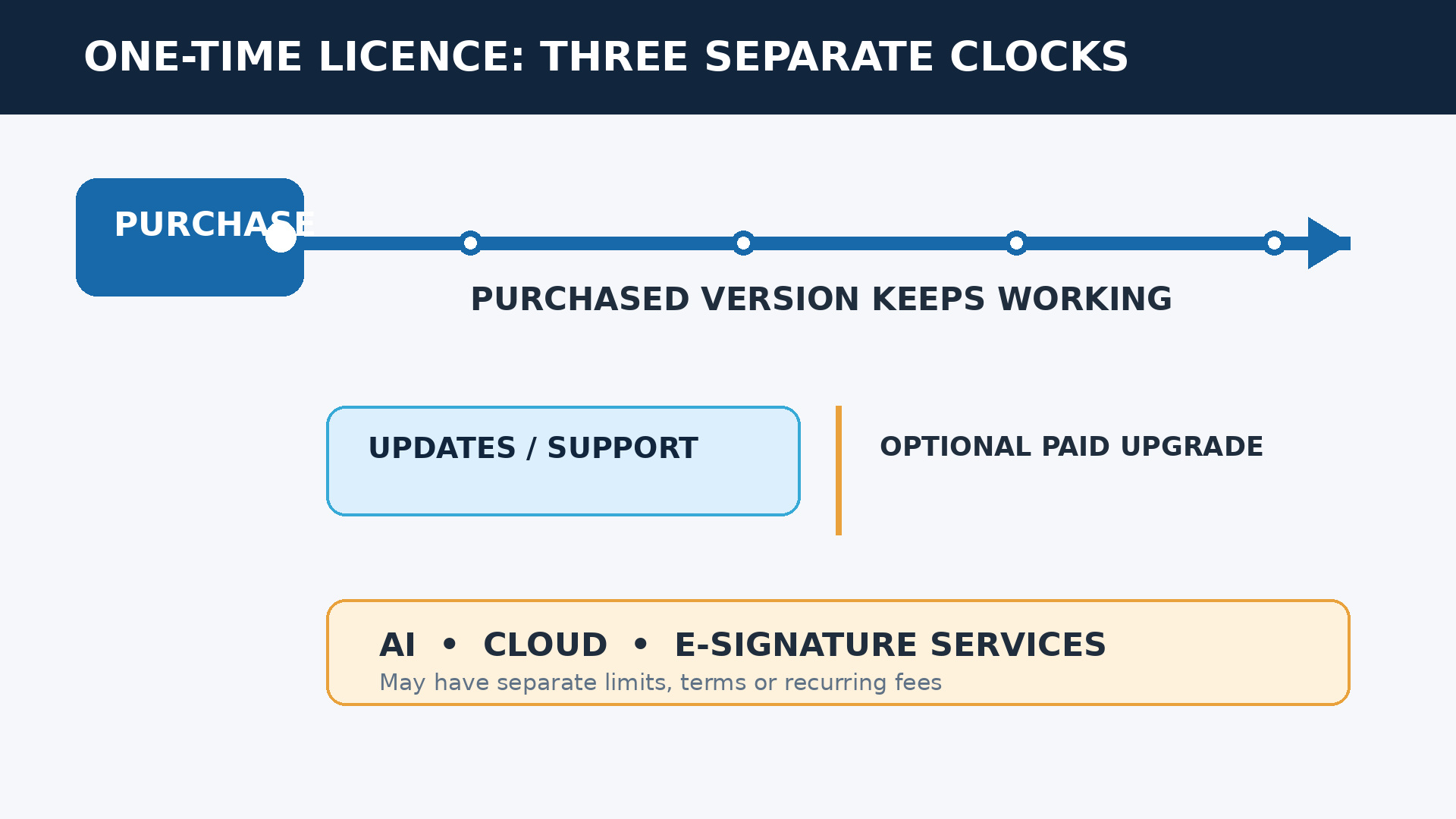
It helps to separate the purchase into five layers. The first is the desktop application itself: editing, annotation, conversion, forms, redaction and protection. The second is minor updates to the purchased release. The third is access to future major versions. The fourth is technical support or maintenance. The fifth covers services running on someone else’s servers, including AI, cloud storage, collaboration and electronic-signature requests. A vendor can sell the desktop layer permanently while charging separately for one or more of the others.
There is another distinction between a new licence bought directly from a developer and a licence obtained through the secondary market. In the second case, you are buying a transferred right to use a specified product under the seller’s offer, not the developer’s current subscription package. This can be a legitimate route for suitable buyers, but it calls for closer checks on the seller, version, device count, documentation and activation process. The Nitro Pro 14 offer in this comparison belongs to that category, so we describe it as such rather than presenting it as Nitro’s current direct plan.
How we compared these Adobe Acrobat alternatives
We applied the same representative office workload to all six products. It includes correcting text and images, rearranging pages, converting documents, recognizing a scan with OCR, preparing a form, permanently removing sensitive information and adding a signature. We then considered ease of use, operating-system coverage, user or device scope, licence model and update rules. AI features that rely on credits or a separate entitlement are not counted as permanent value unless the purchase explicitly includes them.
We also distinguish genuine redaction from drawing a black rectangle over text. Proper redaction removes the underlying information; a visual annotation may leave it selectable or recoverable. Likewise, placing an image of a signature or applying a local digital certificate is not the same as paying for a cloud service that emails recipients, sends reminders, tracks transactions and retains an audit trail. These differences matter more than the number of icons on a feature page.
Price is a snapshot, not a promise. Stores may vary a promotion by country, currency, tax location or browsing session. Euro and US-dollar figures should not be treated as directly equivalent without applying the exchange rate and taxes relevant to your purchase. Our recommendations therefore weigh cost against the time a tool can save, the platforms it covers and the functions you will genuinely use.
Quick comparison: price, licence and platform
| Editor | Price seen | Purchase model | Platform | Best suited to |
|---|---|---|---|---|
| Nitro Pro 14 | €45.00 at Licendi | Perpetual use of version 14, 1 PC | Windows | Office and business use |
| Ashampoo PDF Pro 5 | €29.95 at Licendi | Lifetime licence for the purchased version | Windows 10/11 | Tighter budgets |
| PDF-XChange Editor Plus | €69.00 | Perpetual, with 1 year of maintenance in the base option | Windows | Technical power users |
| UPDF Pro Individual Lifetime | US$103.99 promotional; US$159.99 reference | One-time purchase of the core editor | Windows, macOS, iOS and Android | Cross-platform work |
| Wondershare PDFelement Perpetual | US$139.99 for Windows | Perpetual plan for the purchased version | Windows in the offer reviewed | A polished all-in-one experience |
| Master PDF Editor | US$69.95 | Permanent use on 1 computer; 1 year of upgrades | Windows, macOS and Linux | Linux users |
1. Nitro Pro 14: professional value for one Windows PC
Nitro Pro 14 fits work that looks like a consultancy, sales department or small business: documents arrive from many sources, corrections need to be made quickly, and users want an interface that feels familiar after Microsoft Office. It can edit text and images, organize pages, convert between PDF and Office formats, create forms, apply passwords, redact confidential material and handle repetitive operations in batches.
OCR matters in an ordinary example. A supplier sends a scanned invoice, and you need to search for a purchase-order number or recover a table. Nitro can recognize the scan so that its contents become selectable and searchable. Its signing and security tools also cover common local workflows, although a placed signature or certificate should not be confused with a hosted service that manages recipient emails, reminders and signature transactions.
The offer reviewed is the Nitro Pro 14 one-time licence sold by Licendi for €45.00 for one Windows PC. It is a secondary-market licence providing perpetual use of version 14. That wording is important: this is not Nitro’s current direct subscription plan, and it is not a promise of free access to every future major release. Check the product description, invoice and activation instructions before relying on it for a managed business rollout.
Best point: professional tools, capable conversion and an approachable workflow at a low entry price. Main limitation: this offer is tied to Windows, one PC and the version 14 generation. It is our strongest price-to-capability choice for a business user who values a dependable desktop tool more than receiving every new release.
2. Ashampoo PDF Pro 5: the affordable, approachable option
Ashampoo PDF Pro 5 approaches editing more like a word processor. That is helpful for someone who opens a PDF editor a few times a week and does not want to learn a highly technical interface. You can modify paragraphs and objects, combine files, convert formats and create PDF/A-compatible documents for archiving. The feature set also includes OCR, document comparison, Bates numbering, forms, encryption and digital signatures.
Consider a small legal or administrative office that receives two versions of a contract with subtle changes. Document comparison can reveal the differences without manually placing every page side by side. Bates numbering is useful when a case file contains hundreds of pages that need consistent identifiers. The virtual PDF printer also turns output from another Windows application into a shareable document without requiring a dedicated export function.
The manufacturer describes the product as a lifetime licence. Licendi’s snapshot was €29.95 for the Ashampoo PDF Pro 5 lifetime licence. This establishes continued use of the edition purchased; it does not establish that every future major version will arrive at no charge. Confirm the exact edition, device allowance and any account requirements in the cart, particularly if the software will be shared across a team rather than used on a single workstation.
Best point: it has the lowest initial price in this comparison while offering much more than basic editing. Main limitation: it is restricted to Windows 10 and 11, and demanding automation users may want a deeper tool. For a freelancer, advanced student or microbusiness that needs OCR, conversion and protection without stretching the budget, it is a rational purchase.
3. PDF-XChange Editor Plus: advanced control with finite maintenance
PDF-XChange Editor Plus is designed for people who value control over minimalist presentation. Its menus bring together annotation, measurement, security, conversion and document-manipulation tools. The Plus edition adds fillable-form creation, dynamic stamps and enhanced OCR beyond the base Editor. That depth is valuable in engineering, records management and technical review, where one specialist command can save more time than a simplified interface.
A quality manager, for example, could mark up drawings, measure elements, compare documentation, stamp a review status and prepare approval fields without moving among several programs. Users who repeatedly annotate regulated or technical material can configure tools around a consistent process. The trade-off is visual density: an occasional user will take longer to find the right command, while a daily user is more likely to appreciate that the controls remain close at hand.
The official page showed €69.00 for a single-user licence with one year of maintenance. The licence remains usable after that period expires. Maintenance controls access to covered new builds or versions and support while it is active; the store offers one-, two- and three-year choices. This is more transparent than a vague lifetime promise, provided you budget for a renewal if receiving ongoing improvements is important.
Best point: extensive controls, capable forms and professional tools at a competitive initial price. Main limitation: it is Windows-only and can feel excessive if you edit two documents a month. It is the best fit here for a Windows power user who knows which advanced tools matter and is comfortable managing maintenance separately.
4. UPDF Pro Individual Lifetime: simplicity across desktop and mobile
UPDF stands out for a modern interface and an account that extends across Windows, macOS, iOS and Android. It supports editing, annotation, page organization, compression, conversion and OCR. That combination is appealing when you begin a review on a laptop, read the document on a tablet and make a final note from a phone. Before purchase, confirm the cart’s current limits on devices and simultaneous activations rather than assuming that platform coverage means unlimited installations.
The experience is less intimidating than a traditional technical suite. For a travelling consultant, a teacher reviewing material on different screens or someone who alternates between Mac and PC, cross-platform continuity may be worth more than a niche desktop feature. Even so, test demanding files. Embedded fonts, complex forms, layered documents and low-quality multilingual scans reveal suitability far better than a demonstration based on a perfectly prepared PDF.
The plan reviewed was called UPDF Pro Individual Lifetime. The promotional price observed was US$103.99, against a US$159.99 reference price. It is a one-time purchase for the core editor. UPDF AI should be treated as a separate service or entitlement unless the checkout bundle expressly includes it. The same caution applies to storage or other connected services, and the policy for future major versions should be reconfirmed when you pay.
Cross-platform convenience can also change total cost. If one purchase genuinely replaces separate desktop and mobile tools within the stated device rules, a higher headline price may still be economical. Conversely, someone who works only on one Windows PC may be paying for flexibility that never gets used. Assess the actual handoff between devices, not simply the number of platform logos.
Best point: an accessible interface with broad desktop and mobile coverage. Main limitation: it costs more than the budget options, while AI and cloud extras may add separate charges. It is the clearest recommendation for someone who prioritizes continuity across platforms and does not want a crowded technical interface.
5. Wondershare PDFelement Perpetual: a polished Acrobat-style suite
PDFelement aims for a complete, familiar experience: direct editing, OCR, conversion, forms, redaction, batch processing and signature tools. Its layout makes it relatively easy to move from one task to another without first learning the logic of a highly technical application. For a team used to mainstream commercial suites, that familiarity can reduce the friction and training cost of moving away from Acrobat.
A suitable scenario would be a property agency that combines appendices, corrects templates, removes personal information before sharing a case file, and converts completed forms into archive-ready documents. Batch operations can make a meaningful difference when the same treatment must be applied to dozens of files. As with the other products, local or certificate-based signing does not automatically equal a remote service for requesting, tracking and auditing signatures.
Wondershare’s store showed US$139.99 for the Windows perpetual plan. The purchase allows continued use of the acquired software or version, but you should not assume that it includes future major releases. Nor should AI, cloud storage or electronic-signature services sold as add-ons be treated as permanently included. Wondershare offers products for other platforms and various bundles, but the exact SKU matters: a Windows licence does not automatically become a universal licence.
The higher price can be justified when several modules are used frequently and the smoother interface saves staff time. It is harder to justify if your entire workflow consists of merging pages and adding an occasional note. Before deployment, test redaction, OCR accuracy, form behavior and round-trip conversion with representative documents; these are the operations most likely to expose whether a polished interface is backed by results that fit your files.
Best point: a broad toolset, polished presentation and a comfortable transition from Acrobat. Main limitation: it has the highest initial price in the table, and add-ons can raise the total. It suits professionals who will use several tools regularly and value an integrated experience more than the lowest purchase price.
6. Master PDF Editor: the option that includes Linux
Master PDF Editor serves a comparatively neglected audience: it runs on Windows, macOS and Linux. It can edit text and objects, create documents, work with forms, recognize scans, annotate, encrypt and sign. For a company with Linux workstations, or a professional who does not want to maintain a Windows machine solely for PDF work, that operating-system support may decide the purchase on its own.
Its approach is more traditional than that of consumer-focused apps, but it covers technical desktop tasks capably. It can suit a Linux-based architecture office, a system administrator preparing manuals or a researcher who needs to modify and protect documents without uploading them to a web platform. Local processing is also useful when internal policy prevents contracts, client records or personal data from being sent to external services.
The reviewed licence cost US$69.95 and allows permanent use on one computer. It includes one year of free upgrades. The program continues to work after that period; if you choose to renew or upgrade later, the vendor offers that transaction at 50% of the licence price. This is one of the easier models to budget because it explicitly separates the permanent usage right from the included upgrade window.
A larger organization must still multiply the cost by the number of computers and check how replacement machines are handled. Linux support also does not guarantee that every distribution, desktop environment or future library combination will remain compatible forever. Test the exact deployment environment, along with printing, font rendering, scanners and certificate hardware, before standardizing on it.
Best point: Linux compatibility and unusually clear upgrade terms. Main limitation: larger teams need to account for one licence per computer, and its ecosystem is less familiar than those of mainstream suites. It is the natural Linux choice and a capable option for technical desktop users who do not need extensive cloud collaboration.
Which editor should you choose for your workflow?
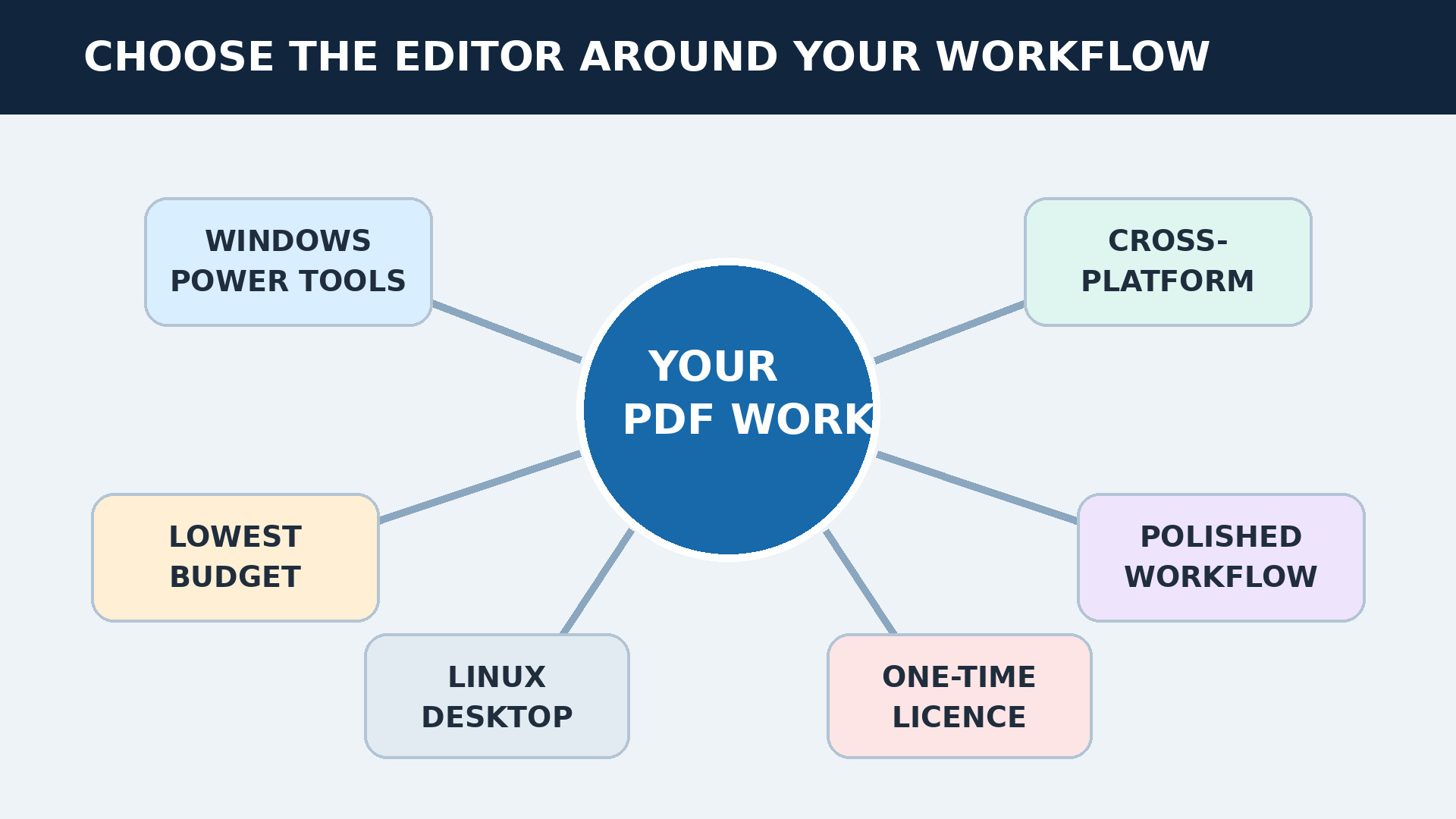
The decision becomes easier when you start with the environment and frequency of use. For recurring work on a Windows business PC, Nitro Pro 14 offers a particularly strong balance if staying on that version is acceptable. If price is the first constraint, Ashampoo PDF Pro 5 covers editing, OCR and security for less. Both are available through Licendi’s English-language store, where you can review the scope of the specific offer before completing the purchase.
- Feature-rich professional Windows work: Nitro Pro 14 for a familiar suite; PDF-XChange Editor Plus for granular control.
- Lowest initial cost: Ashampoo PDF Pro 5.
- Windows, Mac and mobile: UPDF Pro Individual Lifetime.
- Polished commercial-suite experience: PDFelement Perpetual.
- Linux: Master PDF Editor.
- Updates governed by an explicit rule: PDF-XChange through maintenance, or Master PDF Editor with one year included and a paid upgrade route afterward.
If you are still comparing Nitro’s experience with the market standard, read the Nitro Pro vs Adobe Acrobat comparison. If your real requirement is not “without Adobe” but simply avoiding a recurring fee, the Adobe Acrobat Pro DC 2020 perpetual licence provides a useful one-time-purchase benchmark. It is not one of this article’s six non-Adobe alternatives, and because it is an older release, compatibility and the absence of included future major versions also need careful consideration.
A three-year total-cost example
The purchase price is only one part of total cost of ownership. Imagine a professional with one Windows PC and a stable workflow: she edits 20 contracts a month, applies OCR to five scans and does not need AI or managed signature requests. If she buys Nitro Pro 14 for €45.00 and keeps that version for three years, the illustrative licence cost is €15.00 a year. With Ashampoo at €29.95, it is about €9.98 a year.
Now change the scenario. She buys PDF-XChange Editor Plus for €69.00 with one year of maintenance but needs improvements released during years two and three. The total can no longer be calculated from the initial figure alone; the applicable maintenance renewals must be added. Master PDF Editor is similar, although its published rule makes the possibilities easier to model: US$69.95 initially and, if she chooses to upgrade after the first year, an upgrade offered at 50% of the licence price. We do not state a final total because upgrade timing and future prices remain variable.
Device growth can alter the comparison as well. A business that adds a second workstation may need another licence, while a cross-platform account may have its own activation ceiling. Replacing a failed computer can also involve deactivation or transfer rules. These details rarely appear in a headline annualized figure, but they affect what the organization actually spends and how quickly a user can return to work.
The calculation must include time. If a €30 application adds ten minutes to every contract, the apparent saving disappears quickly. At 20 contracts a month, that is more than three extra hours of work each month. Conversely, paying for a broad suite makes little sense if you only merge pages three times a month. Training, failed conversions, manual OCR corrections and support requests belong in the cost model even though they do not appear on the invoice.
This example excludes taxes, exchange-rate movement, promotional changes, additional devices, support and add-ons. It also assumes the existing operating system remains compatible. It demonstrates a method rather than guaranteeing savings: list the required work, estimate how often it occurs, include likely upgrades and value the time spent completing it.
Checklist before buying a one-time-purchase PDF editor
Open the cart, but do not pay until you can answer the following questions from the wording of the offer itself. Save the invoice and applicable terms. Two years from now, they will be far more useful than a screenshot of an advertisement or a remembered promise.
- Exact version: Are you purchasing a named edition or access to future major releases?
- Duration: Is the right to use the software perpetual, annual or dependent on active maintenance?
- Computers and users: Is the licence assigned to a person, an account or a device? Can it be transferred when a computer is replaced?
- Operating system: Does the SKU cover Windows, macOS, Linux or more than one platform?
- OCR: Is it included in the edition you are buying, and does it support the languages in your documents?
- Forms and redaction: Confirm that these are functional tools, not merely visual annotations placed over a page.
- Signatures: Separate a placed signature, a local digital certificate and a tracked signature-request service.
- Connected services: Identify limits and charges for AI, storage, collaboration and cloud processing.
- Updates and support: Record when they end, what is included, and what happens afterward.
- Source: For a secondary-market licence, confirm the seller, documentation, activation and scope of the transfer.
- Real-world test: Use your hardest files during the trial or return period, including scans, forms, unusual fonts and large documents.
- Privacy: Decide whether files may leave your computer, and check where OCR, AI or signature processing takes place.
For business use, turn this checklist into a short acceptance test. Ask one typical user to complete a full task from receipt of a source file to secure delivery of the finished PDF. Confirm that the result opens correctly in another viewer and that redacted data cannot be selected, copied or recovered through an obvious layer. A thirty-minute test can prevent an expensive licensing mistake.
Conclusion: buy the version that solves your work
Editing PDFs without Adobe is entirely practical, but a one-time payment does not remove the need to read the licence. The right purchase retains the functions you need, works on your devices and makes the cost of future upgrades understandable. Nitro Pro 14 stands out for professional Windows value; Ashampoo PDF Pro 5 for price; PDF-XChange for depth; UPDF for mobility; PDFelement for polish; and Master PDF Editor for Linux.
A perpetual licence can pay for itself quickly in a stable desktop workflow. A subscription may still make sense if you depend on continuous major upgrades, cloud collaboration, recurring electronic-signature transactions, online AI services or immediate compatibility with every new operating system. Do not pay for an ideology about ownership or subscriptions. Pay for the outcome, the level of risk you can accept and terms you can explain to another person.
Frequently asked questions about one-time-purchase PDF editors
What does a perpetual PDF editor licence actually include?
It normally includes the right to keep using the version you purchased without a recurring fee. It may include fixes and minor updates for a stated period, but it does not automatically guarantee future major versions, unlimited support, storage, AI or electronic-signature services. Check each layer separately in the offer.
Can I keep using a PDF editor after maintenance expires?
With a perpetual licence and finite maintenance, yes: the purchased program continues to work, but you stop receiving the improvements and support covered by maintenance. PDF-XChange is a clear example. Future compatibility with your operating system remains a separate risk.
Which one-time-purchase PDF editor is best for Windows?
It depends on the workload. Nitro Pro 14 offers a strong office and business balance; Ashampoo PDF Pro 5 prioritizes price; PDF-XChange Editor Plus provides technical control; and PDFelement delivers a polished experience. Decide first whether you need OCR, forms, batch processing or advanced redaction.
Which option works on macOS, Linux and mobile devices?
None of these six covers macOS, Linux and mobile at the same time. UPDF works on Windows, macOS, iOS and Android. Master PDF Editor works on Windows, macOS and Linux. Choose according to whether mobile access or Linux support matters more, and confirm activation limits.
Do perpetual PDF licences include OCR?
All six options compared offer OCR within the cited product or edition, but supported languages, accuracy and limits vary. Confirm that OCR is included in the exact SKU you buy and test real scans, especially documents containing tables, low-resolution pages or multiple languages.
Are AI tools and electronic-signature services included forever?
You should generally assume they are not unless the offer says otherwise. AI, cloud storage and signature transactions rely on continuing infrastructure and may be sold through credits, limits or separate subscriptions. A perpetual desktop-editor licence does not automatically make those services perpetual.
Is a secondary-market Nitro Pro 14 licence different from a current subscription?
Yes. The Licendi offer reviewed provides perpetual use of Nitro Pro 14 on one PC under its stated conditions. It is not Nitro’s current direct subscription and does not automatically include every future major version. Check the licence source, activation process, invoice and transfer scope.
What should I verify before buying a one-time-purchase PDF editor?
Confirm the version, term, users, devices, operating system, OCR, updates, support and transfer policy. Separate local features from AI, cloud and electronic-signature services. Check the tax-inclusive total, test difficult documents, and retain both the terms and the invoice.