EN
EN FR
FR  DE
DE  IT
IT  PT
PT  ES
ES 


Choosing the best Office license in 2026 can feel overwhelming. With Microsoft offering perpetual licenses like Office 2024 LTSC alongside subscription plans such as Microsoft 365, the options have never been more varied — or more confusing. Whether you are a student on a tight budget, a freelancer who needs professional tools, or an IT manager outfitting an entire company, the right choice depends on how you work, what you need, and how much you want to spend.
In this comprehensive buying guide we break down every current Office license available in 2026, compare features and pricing side by side, and give you clear recommendations based on your profile. By the end you will know exactly which license to buy — and where to get it at the best price.
Types of Office Licenses: Perpetual vs Subscription
Before diving into specific products, it is essential to understand the two fundamentally different licensing models Microsoft offers today. This distinction will shape every purchasing decision you make.
Perpetual Licenses (Office 2024 LTSC)
A perpetual license is a one-time purchase that gives you the right to use a specific version of Office indefinitely. You pay once, you own it forever. Office 2024 LTSC (Long-Term Servicing Channel) is the latest perpetual release, succeeding Office 2021.
Key characteristics of perpetual licenses:
- One-time payment — no recurring fees, no surprises on your credit card statement
- Version-locked — you get the features available at launch, with security updates but no major feature additions
- No cloud dependency — works fully offline, no internet connection required after activation
- 5+ years of security updates — Microsoft provides security patches for the supported lifecycle
- No cloud storage included — you need to arrange your own backup and storage solution
Perpetual licenses are ideal for users who prefer stability, want to avoid recurring costs, or work in environments with limited internet connectivity. They are also the go-to choice for budget-conscious buyers who plan to use the same version for several years.
Subscriptions (Microsoft 365)
Microsoft 365 is a subscription service that bundles the latest Office desktop apps with cloud services, storage, and continuous updates. You pay monthly or annually and always have access to the newest features.
Key characteristics of Microsoft 365:
- Monthly or annual payment — typically between 7 and 22 EUR per user per month depending on the plan
- Always up to date — new features, AI tools (including Copilot integration), and improvements roll out regularly
- Cloud storage — 1 TB of OneDrive storage per user included in most plans
- Web and mobile apps — full access to Office apps in the browser and on smartphones
- Collaboration tools — Teams, SharePoint, and real-time co-authoring built in
- Stops working if you cancel — no subscription means no access to the apps
Subscriptions make sense for teams that rely on cloud collaboration, businesses that need the latest features (especially AI-powered tools), and users who want a predictable all-inclusive package.
Which Model Is Right for You?
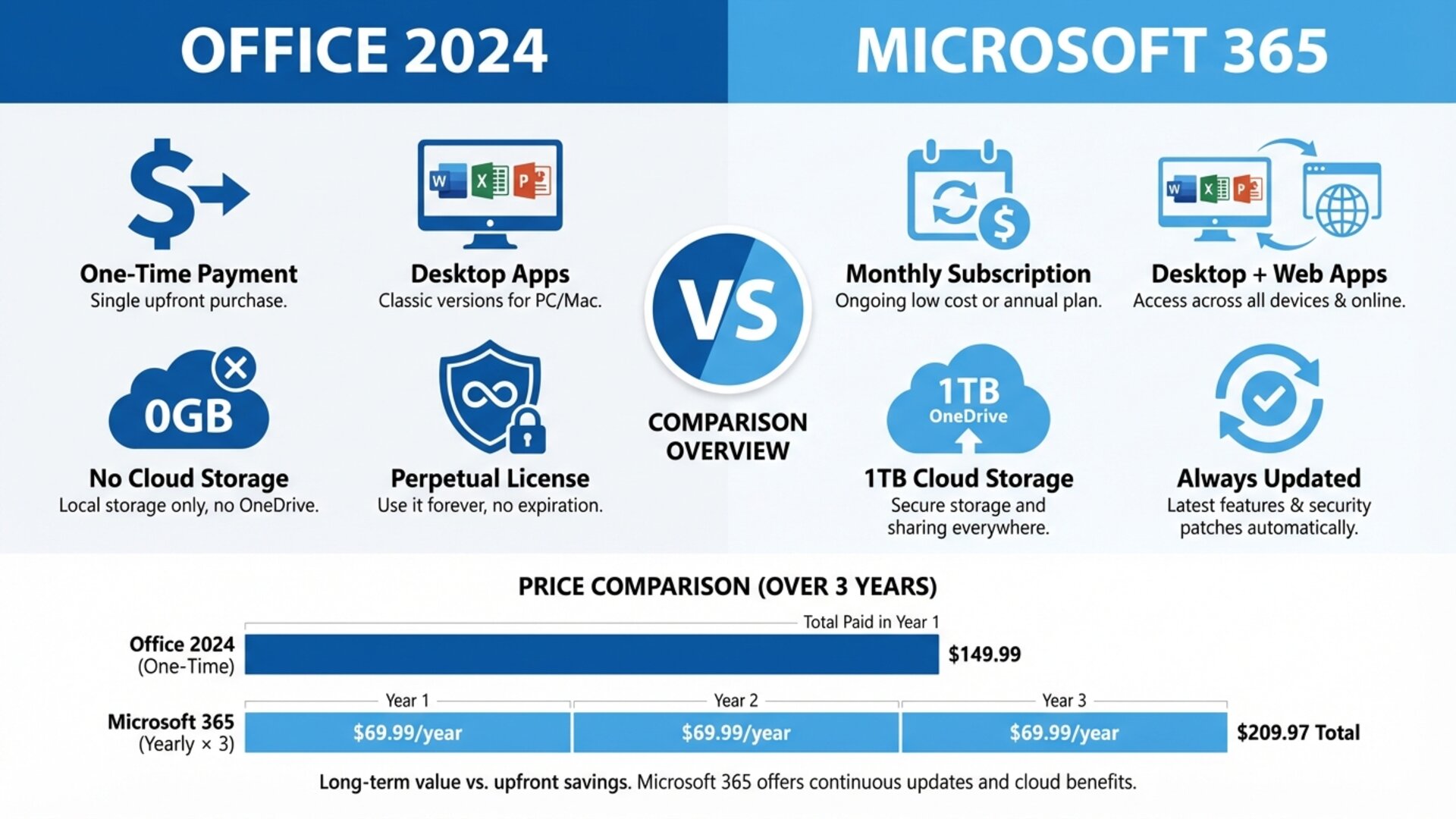
The perpetual vs subscription debate often comes down to one question: how long will you use it? If you plan to keep the same Office version for more than three years, a perpetual license is almost always cheaper. If you need cloud services, Teams, and continuous updates, Microsoft 365 pays for itself in productivity gains. We will revisit this comparison with concrete numbers later in this guide.
The Best Office Licenses in 2026
Now let us look at the specific licenses available and who each one is designed for. We have tested and compared every option to help you make an informed decision.
Office 2024 Professional Plus LTSC — For Power Users and Professionals
Office 2024 Professional Plus LTSC is the most complete perpetual Office suite available in 2026. It includes the full range of desktop applications: Word, Excel, PowerPoint, Outlook, Access, Publisher, and OneNote. This is the edition professionals choose when they need everything Microsoft offers in a one-time purchase.
What sets Professional Plus apart from other editions is the inclusion of Access (database management) and Publisher (desktop publishing), plus enhanced Excel features like Power Pivot and advanced data analysis tools. If you work with databases, create marketing materials, or handle complex spreadsheets, this is your edition.
Best for: Accountants, data analysts, marketing professionals, IT administrators, and anyone who needs the complete Office toolkit without ongoing costs.
Office 2024 Standard LTSC — For Business Essentials
Office 2024 Standard LTSC delivers the core Office applications — Word, Excel, PowerPoint, Outlook, and OneNote — without the advanced tools like Access and Publisher. For most business users, this covers everything they need on a daily basis.
Standard is the smart choice for companies that want to standardise their software across the organisation without paying for features only a few employees use. The savings compared to Professional Plus are significant, especially when multiplied across dozens or hundreds of seats.
Best for: Small to medium businesses, office workers who primarily use Word, Excel, and Outlook, and organisations standardising their software stack.
Office 2024 Home and Business — For Home Offices and Freelancers
Office 2024 Home and Business bridges the gap between personal and professional use. It includes Word, Excel, PowerPoint, Outlook, and OneNote, and supports both Windows and Mac. Unlike the LTSC editions (which are Windows-only), Home and Business works across platforms.
This licence is particularly attractive for freelancers, consultants, and remote workers who need professional-grade Office tools on their personal computer. The Mac compatibility alone makes it the top choice for creative professionals and anyone in the Apple ecosystem.
Best for: Freelancers, consultants, home office workers, Mac users who need Outlook and the full desktop suite.
Microsoft 365 Family — For Households with Multiple Users
Microsoft 365 Family is the best value subscription if you have multiple people who need Office. One subscription covers up to 6 users, each with their own 1 TB OneDrive storage (6 TB total), plus the full Office desktop and mobile apps on unlimited devices.
At roughly 100 EUR per year for the entire household, the cost per person drops to under 17 EUR per year — far less than any individual licence. Family members get their own accounts with separate storage and personalised settings, making it ideal for families with students, working parents, or anyone who shares a household.
Best for: Families with 2-6 members who use Office, households with students, shared living situations where everyone needs their own cloud storage.
Microsoft 365 Business Standard — For Growing Teams
Microsoft 365 Business Standard is the workhorse plan for small and medium enterprises. It includes all desktop Office apps, Teams for communication, SharePoint for document management, Exchange for professional email, and 1 TB OneDrive per user. It also unlocks web-based versions of Outlook, Word, Excel, and PowerPoint for browser-based work.
Business Standard is where collaboration truly shines. Real-time co-authoring, shared calendars, video conferencing, and centralised file management transform how teams work together. For businesses with 5 to 300 employees, this plan offers the best balance of features and cost.
Best for: SMEs with 5-300 employees, remote teams, businesses that rely on email and collaboration tools, companies that need centralised IT management.
Office 2021 Professional Plus — Best Value for Money
Office 2021 Professional Plus remains an excellent choice in 2026 for buyers who want maximum value. Although it is the previous generation, it includes the same core applications as the 2024 version — Word, Excel, PowerPoint, Outlook, Access, Publisher, and OneNote — at a significantly lower price.
The differences between Office 2021 and 2024 are modest for most users: some UI refinements, improved performance in Excel with large datasets, and a few new functions. If you do not need the very latest features and want to save 30-50% compared to the 2024 edition, Office 2021 Pro Plus is the smart buy. It is supported with security updates until October 2026, and many businesses continue to deploy it with confidence.
Best for: Budget-conscious buyers, businesses deploying Office across many computers, users who prioritise savings over having the latest version.
Detailed Price and Feature Comparison
The following table compares all major Office licences available in 2026 across the most important criteria. Use it as a quick reference to narrow down your choice.
| Product | Type | Apps Included | Devices | Cloud Storage | Mac Support |
|---|---|---|---|---|---|
| Office 2024 Pro Plus LTSC | Perpetual | Word, Excel, PPT, Outlook, Access, Publisher, OneNote | 1 PC | None | No |
| Office 2024 Standard LTSC | Perpetual | Word, Excel, PPT, Outlook, OneNote | 1 PC | None | No |
| Office 2024 Home & Business | Perpetual | Word, Excel, PPT, Outlook, OneNote | 1 PC or Mac | None | Yes |
| Office 2021 Pro Plus | Perpetual | Word, Excel, PPT, Outlook, Access, Publisher, OneNote | 1 PC | None | No |
| Microsoft 365 Family | Subscription | Word, Excel, PPT, Outlook, OneNote, Teams | Up to 6 users, unlimited devices | 6 TB (1 TB/user) | Yes |
| Microsoft 365 Personal | Subscription | Word, Excel, PPT, Outlook, OneNote, Teams | 1 user, unlimited devices | 1 TB | Yes |
| Microsoft 365 Business Standard | Subscription | Word, Excel, PPT, Outlook, Teams, SharePoint, Exchange | 1 user, 5 devices | 1 TB/user | Yes |
Office 2024 vs Microsoft 365: The Big Decision
This is the question everyone asks, and the answer depends entirely on your situation. Let us break it down with real numbers and practical considerations.
Advantages of Office 2024 (Perpetual)
- Total cost of ownership is lower over 3+ years. A perpetual licence purchased at Licendi costs a fraction of what you would spend on 3-5 years of Microsoft 365 subscriptions. For example, Office 2024 Professional Plus through Licendi can cost less than 12 months of a Microsoft 365 Business Standard subscription.
- No vendor lock-in. You own the software. If you decide to switch providers, change your workflow, or simply stop paying for things, your Office apps keep working.
- Predictable budgeting. One payment, done. No annual renewals to track, no price increases to worry about, no accidental lapses.
- Privacy-first. No cloud dependency means your documents stay on your machine. For industries with strict data regulations (legal, medical, government), this is often a requirement, not just a preference.
Advantages of Microsoft 365 (Subscription)
- Always the latest features. AI-powered tools, new Excel functions, design enhancements — you get them as they roll out, not when the next version launches.
- Cloud ecosystem. OneDrive, SharePoint, Teams, and Exchange work together seamlessly. For distributed teams, this integration is transformative.
- Lower upfront cost. If cash flow matters more than total cost, starting at around 10 EUR/month per user is easier to swallow than a larger one-time payment.
- Multi-device access. Use Office on your PC, Mac, tablet, and phone with a single licence. Perpetual licences are typically locked to one device.
- Microsoft Copilot integration. The AI assistant that can draft documents, analyse spreadsheets, and create presentations is only available through Microsoft 365.
Recommended Scenarios
Choose Office 2024 if: You work primarily offline, you want to avoid recurring costs, you will use the same version for 3+ years, you need Access or Publisher, or you are deploying software across many computers where per-seat subscription costs add up quickly.
Choose Microsoft 365 if: Your team collaborates remotely, you need Teams for communication, cloud storage is important, you want AI features like Copilot, or you prefer always having the newest tools without manual upgrades.
How to Choose the Right Office Licence
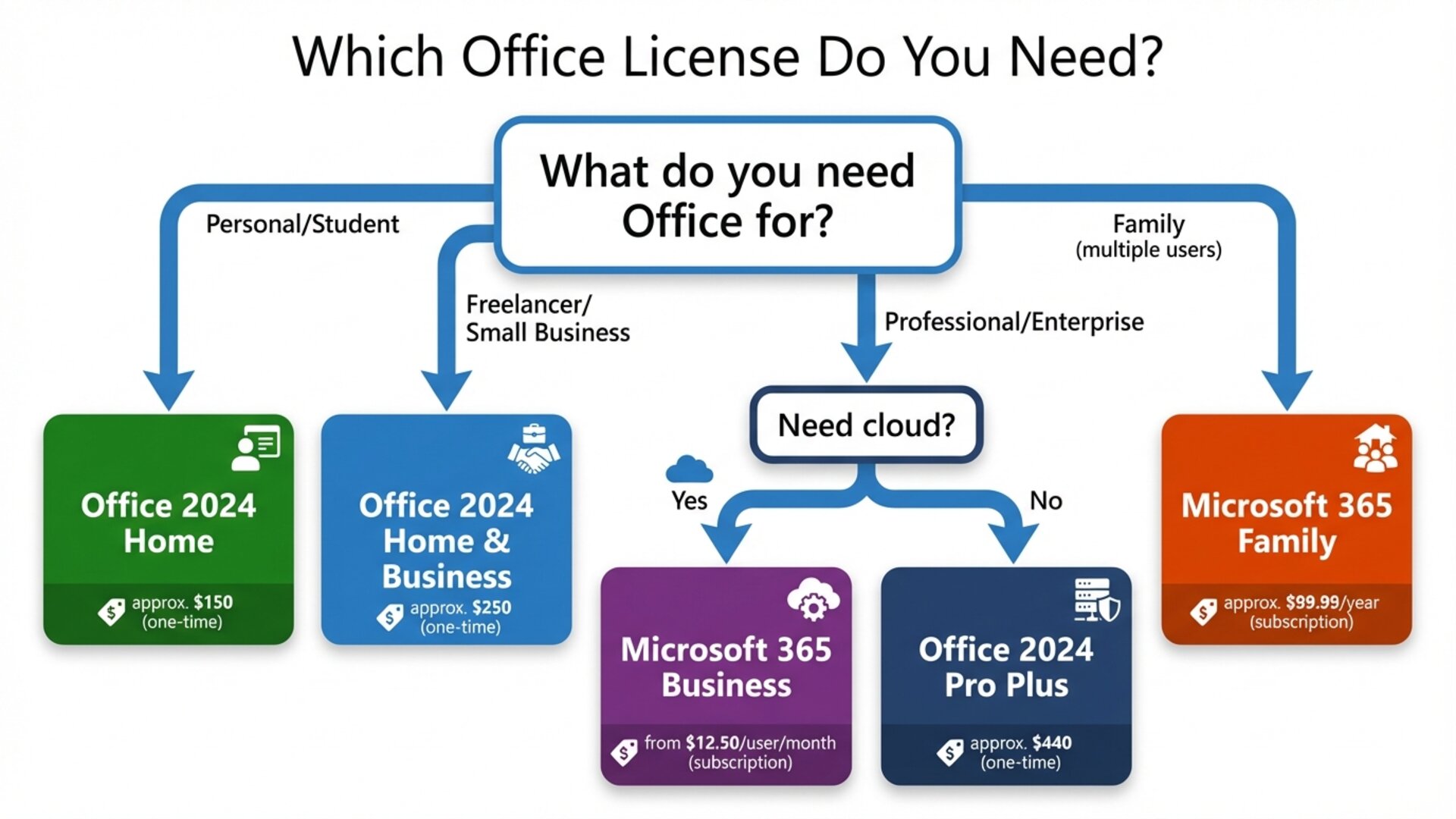
Still not sure? Let us map each user profile to a specific recommendation.
For Students and Personal Use
If you need Office for essays, personal budgets, and basic presentations, Office 2021 Home and Student or Microsoft 365 Personal are your best options. Home and Student gives you Word, Excel, and PowerPoint as a one-time purchase at the lowest price point. Microsoft 365 Personal adds Outlook, 1 TB cloud storage, and mobile apps for a yearly fee. If you are a student who frequently collaborates on group projects, the cloud features of Microsoft 365 will serve you well. If you just need basic apps and want to pay once, go perpetual.
For Freelancers and Self-Employed Professionals
As a freelancer, you need professional email (Outlook), reliable document tools, and the flexibility to work from anywhere. Office 2024 Home and Business is the top choice — it includes Outlook, works on both Windows and Mac, and requires no ongoing subscription. If you also need cloud storage and Teams for client calls, consider Microsoft 365 Business Standard instead.
For SMEs (5-50 Employees)
Small and medium businesses face the biggest decision. The total cost of Microsoft 365 Business Standard for 20 employees over 3 years can exceed 7,000 EUR. The same 20 users equipped with Office 2024 Professional Plus licences from Licendi could cost a fraction of that — with the software remaining usable for 5+ years.
However, if your team relies on Teams for daily communication and SharePoint for document management, the productivity gains from Microsoft 365 may justify the ongoing cost. Our recommendation for most SMEs: use perpetual licences for the Office apps and consider standalone cloud services (like Google Drive or Dropbox) for storage if you want to avoid the subscription trap.
For Large Enterprises
Enterprise deployments typically go through Microsoft volume licensing programmes or Enterprise Agreements. However, many organisations use secondary-market perpetual licences for satellite offices, temporary staff, or specific departments. Microsoft 365 Business Basic (web-only apps at a low price) combined with perpetual licences for power users can create a cost-effective hybrid strategy.
Where to Buy Office Licences Safely
Price matters, but so does legitimacy. The Office licence market includes authorised resellers, secondary-market dealers, and unfortunately, some fraudulent sellers. Here is how to navigate it.
Second-Hand Licences: Legal in the EU
In the European Union, buying and selling used software licences is completely legal. The landmark 2012 ruling by the Court of Justice of the European Union in the UsedSoft vs Oracle case (Case C-128/11) established that the principle of exhaustion applies to software, whether distributed physically or digitally. This means that once a licence has been legitimately sold within the EU, the original rights holder cannot oppose its resale.
This ruling is the legal foundation for businesses like Licendi, which specialise in providing legitimate, verified second-hand software licences at prices significantly lower than retail. You can read more about the legality of second-hand licences in our dedicated article.
Why Buy from Licendi
Licendi is a Microsoft-recognised partner based in Alicante, Spain. Every licence sold is verified for authenticity, comes with a lifetime guarantee, and includes free technical support. With over 10,000 customers across Europe and a 100% satisfaction rating, Licendi has established itself as one of the most trusted sources for Office licences on the continent.
Buying from Licendi means you get genuine Office licences at up to 70% less than Microsoft's retail prices, with instant digital delivery and full legal protection under EU law.
Frequently Asked Questions
Can I use a perpetual Office licence on more than one computer?
Standard perpetual licences (OEM and Retail) are bound to one PC. If you need Office on multiple devices, you need one licence per device or a Microsoft 365 subscription, which supports multiple devices per user.
Is Office 2021 still supported in 2026?
Yes. Microsoft provides mainstream support for Office 2021 until October 2026. After that, extended security updates may continue, but new features will not be added. It remains a fully functional and secure choice for the time being.
Can I upgrade from Office 2021 to Office 2024?
There is no direct upgrade path. You purchase a new Office 2024 licence and install it on your computer. Your previous licence can potentially be resold on the secondary market, effectively reducing your upgrade cost.
Do I need internet access to use Office 2024?
You need internet access for initial activation. After that, Office 2024 works fully offline. Periodic online validation may be required (approximately every 30 days), but the apps continue to function during that window without a connection.
Is buying a second-hand Office licence safe?
Yes, when purchased from a reputable dealer like Licendi. All licences are verified, come with a lifetime guarantee, and are protected by EU consumer law. Avoid unverified sellers on marketplaces or social media who cannot provide proof of legitimate acquisition.
What is the difference between OEM and Retail licences?
OEM licences are tied to the first computer they are activated on and cannot be transferred. Retail licences can be moved to a new computer if you deactivate the old one first. Retail licences are more flexible but typically cost more. Both are equally genuine and functional.