EN
EN FR
FR  DE
DE  IT
IT  PT
PT  ES
ES 

Windows Server 2022 Datacenter vs Standard: Which Edition Do You Need?
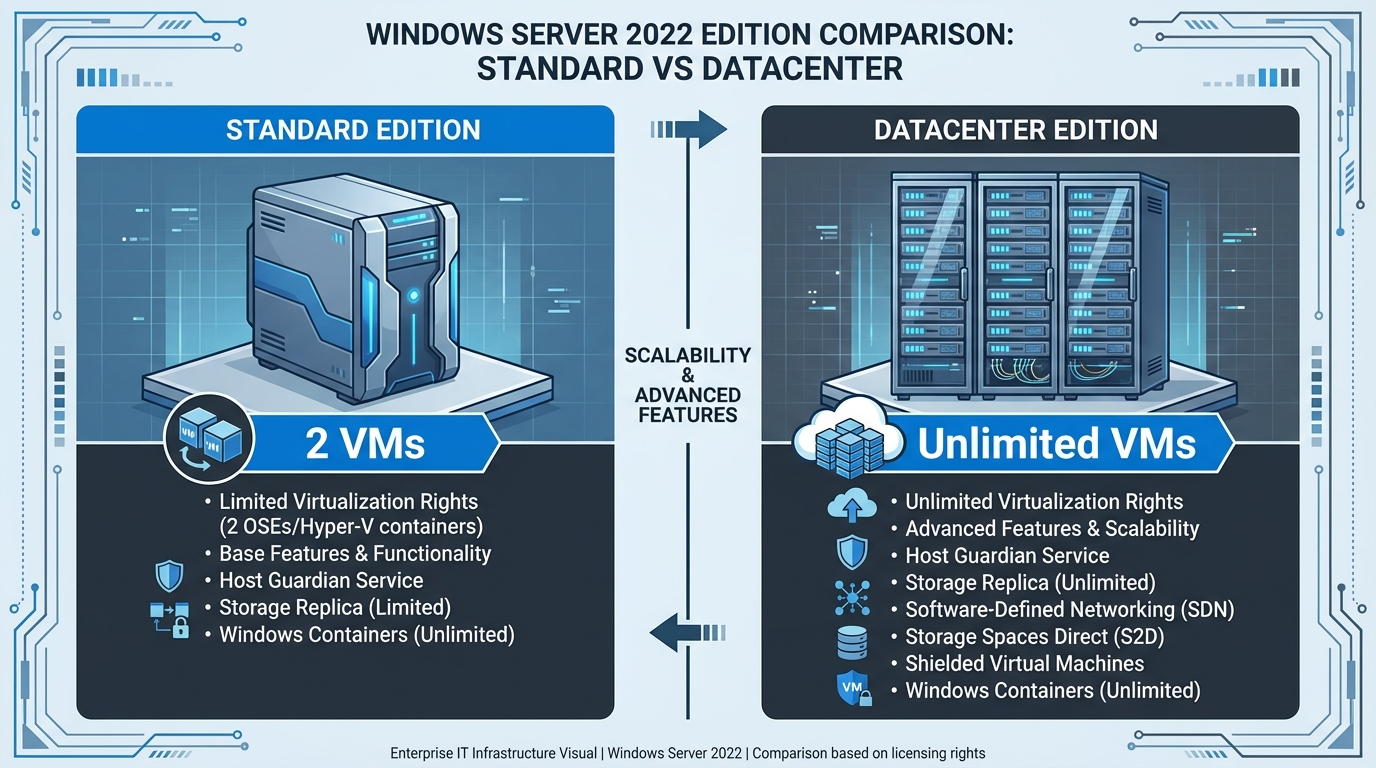
Quick answer: Choose Windows Server 2022 Standard if you run fewer than 3 virtual machines per host. Choose Datacenter if you need unlimited VMs, software-defined networking, or shielded VMs. The price difference is significant — Standard starts at €239.66 (2 cores), Datacenter at €316.66 (2 cores) — so getting this right saves your organisation real money.
Standard vs Datacenter at a Glance
| Feature | Standard | Datacenter |
|---|---|---|
| Virtual machines per licence | 2 VMs (per 16-core set) | Unlimited VMs |
| Shielded VMs | No | Yes |
| Software-Defined Networking (SDN) | No | Yes |
| Storage Spaces Direct | No | Yes |
| Storage Replica | Limited (single volume, 1 partner) | Full (unlimited) |
| Host Guardian Service | No | Yes |
| Hyper-V containers | Unlimited | Unlimited |
| Windows Server containers | Unlimited | Unlimited |
| Nano Server | Yes | Yes |
| Hot-patching | No | Yes (Azure Arc-enabled) |
| Licendi price (16 cores) | €404.95 | €492.40 |
| CALs required | Yes | Yes |
What Is Windows Server 2022 Standard?
Windows Server 2022 Standard is designed for physical or lightly virtualised environments. It includes all core server features — Active Directory, DNS, DHCP, file services, IIS, Remote Desktop Services — and supports up to 2 Hyper-V virtual machines per 16-core licence.
This is the right choice for most small and medium-sized businesses (SMBs) that run a few servers with modest virtualisation needs. You get enterprise-grade security (Secured-core server, TLS 1.3, DNS-over-HTTPS) without paying for features you will never use.
Standard is best for:
- File servers, print servers, domain controllers
- Web servers running IIS
- Application servers with 1–2 VMs per host
- Remote Desktop Session Host (with RDS CALs)
- Organisations with < 50 employees
What Is Windows Server 2022 Datacenter?
Windows Server 2022 Datacenter is built for heavily virtualised and cloud-ready environments. The headline feature: unlimited virtual machines per licensed host. It also unlocks enterprise-grade capabilities that Standard does not include.
Datacenter-exclusive features:
- Unlimited VMs: Run as many Hyper-V virtual machines as your hardware supports
- Shielded Virtual Machines: Encrypt VM data so even compromised admins cannot access it
- Software-Defined Networking (SDN): Programmatically manage network infrastructure
- Storage Spaces Direct (S2D): Build hyper-converged infrastructure with local drives
- Full Storage Replica: Synchronous block-level replication across sites for disaster recovery
- Host Guardian Service: Attestation service for guarded hosts and shielded VMs
- Hot-patching (Azure Arc): Apply security updates without reboots
Datacenter is best for:
- Hosting providers and shared-services teams
- Environments running 3+ VMs per physical host
- Organisations that need software-defined infrastructure
- High-security environments requiring shielded VMs
- Disaster recovery with Storage Replica across sites
Feature-by-Feature Comparison
| Category | Feature | Standard | Datacenter |
|---|---|---|---|
| Virtualisation | Hyper-V VMs per licence | 2 | Unlimited |
| Shielded VMs | ✗ | ✓ | |
| Host Guardian Service | ✗ | ✓ | |
| Storage | Storage Spaces Direct | ✗ | ✓ |
| Storage Replica (limited) | ✓ (1 volume) | ✓ (unlimited) | |
| Data deduplication | ✓ | ✓ | |
| Networking | Software-Defined Networking | ✗ | ✓ |
| Network controller | ✗ | ✓ | |
| Security | Secured-core server | ✓ | ✓ |
| TLS 1.3 by default | ✓ | ✓ | |
| DNS-over-HTTPS | ✓ | ✓ | |
| Containers | Windows Server containers | Unlimited | Unlimited |
| Hyper-V containers | Unlimited | Unlimited | |
| Management | Hot-patching (Azure Arc) | ✗ | ✓ |
How Core-Based Licensing Works
Both editions use per-core licensing. The rules:
- Minimum 16 cores per server — even if your CPU has fewer physical cores, you must licence at least 16.
- Minimum 8 cores per processor — a 4-core CPU still counts as 8 for licensing purposes.
- Licences sold in 2-core packs. A 16-core minimum means you need at least 8 × 2-core packs.
- Standard VM stacking: If you need 4 VMs on Standard, you buy two sets of 16-core licences for that host (each set grants 2 VMs).
Cost crossover point: Once you need more than 2 VM sets (6+ VMs) on Standard, Datacenter typically becomes cheaper because its unlimited VM rights eliminate the need to stack licences.
For a detailed guide on calculating your core requirements, read our post on Windows Server core licensing explained.
Pricing at Licendi
| Product | Cores | Licendi Price |
|---|---|---|
| Server 2022 Standard | 2 cores | €239.66 |
| Server 2022 Standard | 16 cores | €404.95 |
| Server 2022 Datacenter | 2 cores (digital) | €316.66 |
| Server 2022 Datacenter | 16 cores (digital) | €492.40 |
| Server 2022 Datacenter | 16 cores (physical) | €3,116.66 |
All licences are 100% EU-legal, backed by the European Court of Justice UsedSoft ruling, and come with a lifetime activation warranty.
Do Not Forget: Client Access Licences (CALs)
Both Standard and Datacenter require CALs for every user or device that connects to the server. The server licence covers the server itself; CALs cover the clients.
| CAL Type | 5 CALs | 10 CALs | 20 CALs | 50 CALs |
|---|---|---|---|---|
| User CAL | €140.49 | €199.99 | €297.51 | — |
| Device CAL | €140.49 | €199.99 | €297.51 | €383.33 |
| RDS User CAL | €140.49 | €199.99 | €297.51 | €383.33 |
| RDS Device CAL | €140.49 | €199.99 | €297.51 | €383.33 |
Tip: Choose User CALs if your users access from multiple devices. Choose Device CALs if multiple users share the same workstations. For a deeper explanation, read our complete guide to Windows Server CALs.
Decision Guide: Which Edition for Your Scenario?
Choose Standard if:
- You run a physical server with no or minimal virtualisation (0–2 VMs)
- You are a small business with a single file/AD/print server
- You do not need software-defined networking, shielded VMs, or Storage Spaces Direct
- Budget is a priority and you want the lower upfront cost
Choose Datacenter if:
- You run 3 or more VMs per host (Datacenter becomes cheaper at 3+ VMs)
- You need shielded VMs for compliance or security
- You are building hyper-converged infrastructure with Storage Spaces Direct
- You need full disaster recovery with unlimited Storage Replica
- You are a hosting provider or run shared services for multiple tenants
Cost example: 16-core host with 4 VMs
- Standard route: 2 × 16-core Standard = 2 × €404.95 = €809.90
- Datacenter route: 1 × 16-core Datacenter = €492.40
- Savings with Datacenter: €317.50 (39%)
At 3+ VMs per host, Datacenter is almost always the smarter investment.
→ Browse Server 2022 Datacenter | Browse Server 2022 Standard
Frequently Asked Questions
Can I upgrade from Standard to Datacenter?
Yes. You can purchase a Datacenter licence and re-licence the same server without reinstalling Windows. The upgrade is a licensing change, not a software reinstall — both editions use the same installation media.
Do both editions require CALs?
Yes. Every user or device connecting to Windows Server needs a Client Access Licence (CAL), regardless of whether you use Standard or Datacenter. CALs are sold separately. See our CAL guide for details.
What is the minimum licensing requirement?
You must licence a minimum of 16 cores per physical server and 8 cores per physical processor. Licences are sold in 2-core packs, so you need at least 8 packs (16 cores) per server.
When does Datacenter become cheaper than stacking Standard?
When you need 3 or more VMs on a single host. Standard allows 2 VMs per 16-core licence, so 4 VMs require two Standard sets (€809.90). A single Datacenter licence (€492.40) covers unlimited VMs — saving €317.50 in this example.
Is it legal to buy discounted Server licences?
Yes. The European Court of Justice UsedSoft ruling (C-128/11) confirmed that reselling software licences within the EU is legal. Licendi is an authorised EU reseller and Microsoft Partner. Every licence includes a lifetime activation warranty.