 EN
EN FR
FR  DE
DE  IT
IT  PT
PT  ES
ES 

Technical Comparison: Photoshop vs Affinity Photo
Introduction
Today, professional photo editing is dominated by two major players: Adobe Photoshop, the industry standard for decades, and Affinity Photo, a more recent contender that has gained ground thanks to its powerful feature set and subscription-free licensing model. In this technical comparison, we will thoroughly examine Photoshop vs Affinity Photo, exploring their features, performance, pricing, and license management—especially in professional and business environments. We’ll present clear technical details and practical examples to help you decide which option best suits your needs.

Overview of Photoshop and Affinity Photo
Adobe Photoshop
Released in 1990, Photoshop has become synonymous with professional image editing. It is part of the Adobe Creative Cloud suite and offers a wide range of tools for photo retouching, graphic design, and digital illustration. It has evolved by incorporating advanced features (such as AI-powered filters and the recent Generative Fill for AI-based content creation). It is the industry standard in fields like photography, advertising, web design, and audiovisual media. It uses a subscription-based model (modern perpetual licenses are not available), which means monthly or yearly payments are required to use the software in exchange for continuous updates and integrated cloud services (file syncing, fonts, libraries, etc.).
Affinity Photo
Released in 2015 by Serif, Affinity Photo emerged as a professional alternative to Photoshop with a clear value proposition: offering most advanced features without a subscription, via a one-time payment. It is part of the Affinity suite (alongside Designer and Publisher) and is available for Windows, macOS, and iPadOS, with excellent cross-platform file compatibility. Affinity Photo stands out for its optimized performance and for including professional-grade tools by default (layers, masks, non-destructive adjustments, RAW development, advanced filters, etc.) at a very accessible cost. Its perpetual license means you pay once and can use the software indefinitely in that version, which appeals to users and organizations looking to reduce recurring expenses. Unlike Photoshop, Affinity does not rely on cloud services: projects are saved locally and the user retains full control without requiring an online connection or account registration.
Similarities in Functionality
Despite their differences, Photoshop and Affinity Photo share a solid base of capabilities. Some key similarities include:
- Advanced editing tools: Both provide a wide range of tools for retouching, selection, digital painting, and professional photomontage. You can remove unwanted objects, apply artistic filters, use custom brushes, and more in either one.
- Layers and non-destructive editing: Both programs support unlimited layers and offer masks, blending modes, and adjustment layers. This allows for complex compositions while keeping a non-destructive workflow (you can make or undo changes at any time without losing the original image).
- AI-assisted features: Both Photoshop and Affinity integrate intelligent algorithms to speed up editing tasks. For example, they offer automatic subject selection and content-aware fill. (Adobe is ahead in next-gen AI, but both implement artificial intelligence in specific tools.)
- Cross-platform (including iPad): Both applications are available for Windows and Mac, and include mobile versions on iPad that let you continue working on the go. A user can start editing on a desktop and later make adjustments on a tablet using either Photoshop or Affinity.
- Format compatibility: Both programs support standard image formats (JPEG, PNG, TIFF, RAW, etc.) and high bit-depth color (up to 16 bits per channel, in RGB and CMYK modes). Additionally, Affinity Photo can open and export Photoshop PSD files, largely retaining layers and adjustments, making file exchange between tools easier.
Main Technical Differences
There are also important differences that influence the decision between Photoshop and Affinity Photo:
- License and cost: Photoshop requires an active subscription (ongoing payments), while Affinity Photo is acquired with a one-time payment and no ongoing fees. In the long run, Affinity is much more affordable, while Photoshop provides access to the latest updates during the subscription period.
- Advanced AI features: Adobe Photoshop includes exclusive generative AI tools (such as Generative Fill and other Firefly features) that are not available in Affinity Photo.
- Ecosystem and integration: Photoshop is part of a larger ecosystem (Creative Cloud) and natively integrates with other Adobe apps (Illustrator, InDesign, Lightroom, etc.) and cloud services. Affinity Photo works more independently (though it complements the other Affinity apps), and does not integrate with third-party cloud platforms.
- Interface and learning curve: Photoshop is very powerful but also more complex to learn, with numerous panels and advanced options. Affinity Photo offers a cleaner, more intuitive interface, lowering the learning curve for new users.
- Plugins and extensions: Photoshop has a massive ecosystem of plugins and third-party extensions developed over many years. Affinity Photo has limited compatibility with some Photoshop plugins, and its native plugin ecosystem is considerably smaller.
Interface and Performance
In everyday user experience, the differences in approach are noticeable. Photoshop offers a powerful but cluttered interface: multiple panels, extensive menus, and advanced options everywhere, which can overwhelm beginners (although the workspace can be customized and shortcuts can be created to streamline the workflow). Affinity Photo, on the other hand, provides a more minimalist and user-friendly interface, initially showing only the essential tools. It organizes its functions into "Personas" or work modes (Develop, Liquify, Export, etc.), allowing users to focus on one task at a time with fewer distractions. (A side-by-side image of the interfaces would illustrate this: Photoshop shows numerous panels and toolbars, while Affinity Photo displays a cleaner window with fewer visible elements.)
Regarding performance, Affinity Photo tends to be more lightweight and faster. It usually starts faster than Photoshop and uses less RAM when working with very large files or multiple layers. Many filters and adjustments in Affinity are applied almost instantly thanks to its optimized engine. Photoshop is also highly efficient on modern systems (especially when leveraging GPU and powerful hardware), but on modest setups it can feel heavier in comparison. In short, Affinity runs more smoothly for day-to-day tasks, while Photoshop demands robust hardware to perform at its peak, due to its large feature set.
Integration and Collaborative Workflow
For teams or users working across multiple programs, integration and collaboration are essential factors. Photoshop, as part of Adobe, benefits from Creative Cloud: for instance, you can easily send a photo from Lightroom to Photoshop or place a .psd file into an InDesign project. It also includes collaboration tools such as Creative Cloud Libraries (to share assets like colors, fonts, and graphics with team members) and cloud documents that colleagues can comment on or edit at different stages (although simultaneous real-time co-editing is limited).
Affinity Photo, in contrast, does not include integrated cloud services or real-time collaboration features. Collaboration in Affinity relies on traditional methods: manually sharing files (e.g., sending the .afphoto file or exporting to PSD for a colleague using Photoshop) via email, internal servers, or standard cloud storage solutions. There is no “Affinity cloud” for automatic project syncing or integrated comment/version control. In organizations where intense collaboration and integration with other apps is crucial, Photoshop has the advantage. However, in smaller teams or simpler workflows, Affinity’s lack of these features is not a major drawback and is balanced by the simplicity of working with local files.
Licensing, Pricing, and Usage Models
The licensing scheme is a key differentiator between both programs.
Adobe Photoshop (subscription)
As of 2025, Photoshop is only available through subscription. The individual Photoshop plan costs around €25 per month (about €300 per year) if you subscribe to this app alone, while the Photography Plan (Photoshop + Lightroom) is approximately €13 per month. For businesses (Creative Cloud for teams), the price per Photoshop license is around €30 per month per user. These recurring payments ensure access to the latest version and support but represent a significant long-term expense.
Affinity Photo (one-time payment)
Affinity Photo is purchased with a one-time payment of approximately €74.99 (desktop license for Windows or Mac) and €19.99 for iPad, with no recurring fees. Minor updates are free, and although major future versions may require a new payment, the update cycle is slow (Affinity 2 was released several years after version 1). In just a few months of Photoshop subscription, you spend as much as the full cost of Affinity Photo, making the mid- and long-term price difference quite significant.
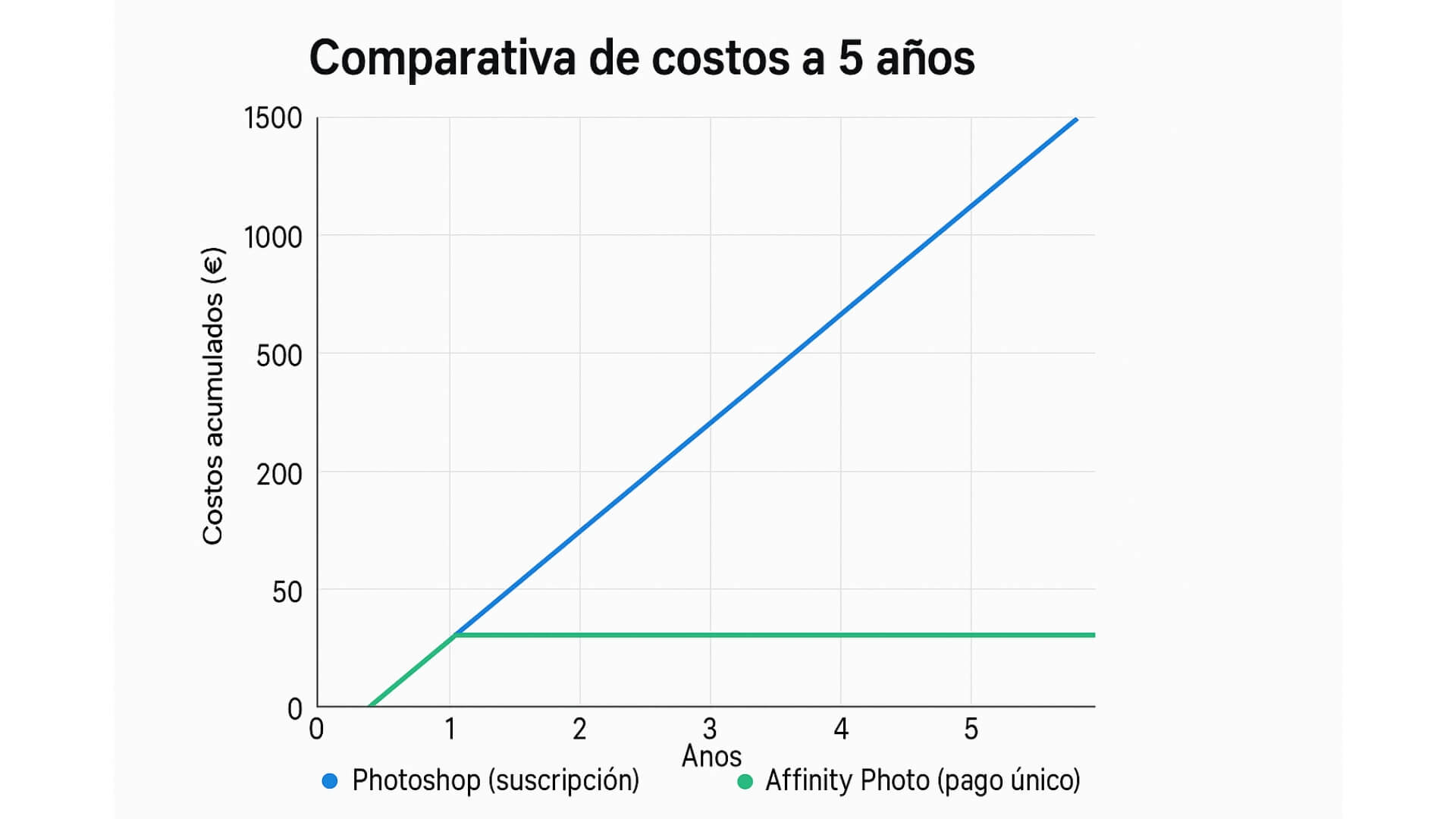
A 5-year cost comparison chart would clearly illustrate this difference: Photoshop’s cost line (subscription) increases each year, while Affinity Photo’s (one-time payment) remains flat after the initial purchase.
Pricing at Licendi: In our store, you can find Photoshop with special offers. For example, we offer a 1-year Adobe Photoshop subscription for around €190, which represents a savings compared to paying month by month on Adobe's official site.
We also offer the Adobe Photoshop 2021 (perpetual license) for around €60, aimed at those who want to use Photoshop without a subscription (classic version without continuous updates).
Prices at Licendi: At our store, we help professionals and businesses access Photoshop at a more affordable price, whether through discounted annual subscriptions or by purchasing older perpetual versions at reduced rates.
Although Affinity Photo is only available on Serif’s official website, it's worth comparing the costs: the initial investment for Affinity is low compared to maintaining Photoshop, but if you need Photoshop, options like those offered at our Licendi store can significantly reduce your expenses.
User and License Management in Business Environments
In corporate environments, beyond pricing, user and license administration also comes into play. Adobe provides the Adobe Admin Console (the Adobe Creative Cloud management console) for centralized user and license management within an organization. Through this web-based platform, an IT administrator can add employees (by creating or assigning enterprise Adobe IDs) and assign Photoshop or other app licenses—or revoke them when necessary.
This user management in Adobe Creative Cloud makes it easy to control who has access to the software at any time, reassign licenses without hassle (e.g., if an employee leaves, their license can be reassigned with just a few clicks), and even integrate with corporate directories (like Azure AD or Google) to automate user provisioning. (A screenshot of the Adobe Admin Console showing the user/license management panel would help illustrate this capability.)
In the case of Affinity Photo, there is no centralized console—simply because it’s not needed. The company purchasing X licenses receives that number of activation codes (or a multi-user code) and just installs the software on the authorized devices. The main advantage is simplicity: there’s no need for cloud management or user accounts—the organization keeps internal control, maintaining its own inventory of where Affinity is installed. There are no monthly renewals to track or risk of the software being disabled due to missed payments.
However, there are no advanced administrative tools either. For example, to “reclaim” a license, it must be manually uninstalled from one device before being installed on another, relying on internal policies to avoid exceeding the allowed number of concurrent uses. In short, Adobe offers a robust system for managing dozens or hundreds of licenses centrally (ideal for large companies with high employee turnover or many different users), while Affinity opts for a more autonomous model where the company purchases and controls its licenses independently—something that usually works well for smaller organizations or those with fixed teams.
Case Study: Migration in a Creative Agency
Let’s imagine a design agency with 10 employees currently paying about €300 per month for their Photoshop licenses (around €3,600 per year in total). Seeking to reduce costs, they decide to test Affinity Photo on part of the team. They purchase 2 Affinity licenses (€150 total, one-time payment) and install the software on two of their workstations, keeping Photoshop installed as well during the transition. After a couple of months of testing, they find that the Affinity workflow covers virtually all their needs without major issues. Common tasks like retouching, compositing, and exporting are done with the same quality and in similar timeframes. They even notice some advantages: Affinity opens large files faster and includes handy tools like built-in focus stacking, which streamlines their macro photography projects compared to the manual process they used in Photoshop.
There were, however, minor challenges related to file compatibility. For example, some complex PSD files received from external collaborators lost the editability of Smart Objects when opened in Affinity Photo (those layers became rasterized). The solution was to request those elements as flattened layers or to recreate certain effects directly in Affinity, which required a small extra effort. Aside from a few isolated cases, there were no major issues: Affinity’s simpler interface helped designers adapt quickly, and all new projects could be started directly in Affinity without missing Photoshop.
Encouraged by the pilot, the agency decided to migrate 8 out of their 10 workstations completely to Affinity Photo, keeping just 2 Photoshop subscriptions active for specific needs (mainly to handle legacy projects or features unique to Photoshop). After one year, the cost savings were significant: instead of spending €3,600 on subscriptions, they invested approximately €750 in a set of perpetual Affinity licenses that they will use for years to come. Team productivity remained steady and their dependency on Adobe decreased. This example illustrates how, for many companies, adopting Affinity Photo can be a technically and financially viable move—provided that their essential Photoshop features have functional equivalents in Affinity.
Conclusion: Which One Should You Choose?
Adobe Photoshop and Affinity Photo are both top-tier tools; there’s no universal answer as to which is “better,” but rather which one best fits your needs.
- When should you choose Photoshop? If you need all the advanced features (such as the latest AI tools, full integration with other Adobe apps, standard PSD format, etc.) and work in collaborative environments where Photoshop is the norm, then this will likely remain your primary option. Keep in mind the commitment to a recurring subscription in terms of cost. (At Licendi, you can opt for annual plans or perpetual versions to get a better deal if you go with Photoshop.)
- When should you choose Affinity Photo? If you value affordability and simplicity over having every extra feature, Affinity Photo is probably right for you. Its affordable one-time payment, fast performance, and full set of tools are more than enough for most photographers, designers, and independent creatives or small businesses. You avoid monthly fees while still accessing capable professional software. You’ll just need to accept that a few ultra-specific Photoshop features might be missing—but for many, that trade-off is worth it.
Ultimately, the decision comes down to your priorities: Photoshop offers maximum power and ecosystem at the cost of a subscription, while Affinity Photo delivers 90% of that power for a fraction of the cost—and with more independence. Both options are excellent in their field, so identify which aspects are crucial to your daily workflow and choose accordingly.
Frequently Asked Questions (FAQ)
Which is better, Photoshop or Affinity Photo?
There’s no absolute answer. Photoshop offers a broader set of features (including advanced AI tools and integration with other Adobe apps) and is the industry standard, while Affinity Photo stands out for its low cost (no subscription), fast performance, and ease of use. Each one is “better” depending on what you need and value in your workflow.
Can Photoshop be purchased without a subscription in 2025?
Officially, no. Adobe no longer sells perpetual licenses for Photoshop; the current version is only available via Creative Cloud subscription. You could only use Photoshop without a subscription if you already owned an older version (pre-2013) or if you obtain a perpetual license for a previous edition through a third party (for example, Licendi offers Photoshop 2021 with a permanent license).
Is Affinity Photo compatible with Photoshop PSD files?
Yes. Affinity Photo is largely compatible with Photoshop PSD files: it can open them and retain most layers, effects, and adjustments, and even export back to PSD. Only some native Photoshop features (like Smart Objects or very specific layer styles) might not translate perfectly, but overall compatibility is very high.
What are the advantages of Affinity Photo over Photoshop?
The main advantages of Affinity Photo are its one-time payment with no subscription (much more cost-effective in the long term) and its optimized performance/interface (it runs smoothly and is easier to learn). Despite costing significantly less, Affinity Photo includes virtually all the professional photo editing features most users need for their work.
How are Adobe Photoshop licenses managed in a company?
Through the Adobe Admin Console, a centralized web-based platform from Adobe. The company’s administrator adds users to the console (using their corporate Adobe IDs) and assigns them Photoshop or other Creative Cloud application licenses. From this console, licenses can be reassigned when someone leaves the organization, the number of active licenses can be tracked, and renewals can be managed centrally—making license administration in corporate environments much more efficient.




