 EN
EN FR
FR  DE
DE  IT
IT  PT
PT  ES
ES 

Adobe InDesign: What It Is and Its Features
Adobe InDesign is a professional editorial design and layout application developed by Adobe Systems. This tool, known for its versatility and power, is used to create magazines, books, brochures, newspapers, posters, and all kinds of printed or digital publications with a professional finish. InDesign allows for efficient combination of text and images, managing complex documents with ease and ensuring high-quality design results. Due to its wide adoption in the industry, many users search for information about the program using terms like adobe indesign or even indesign adobe, both referring to the same Adobe software.
Next, we will take an in-depth look at this tool: what it is, its main functionalities, its key features, and how to download or obtain it officially.
We will also review the updates in its most recent versions (2024 and 2025), as well as information about the portable version and where to buy Adobe InDesign 2020 in the Licendi store.
What is InDesign?
Adobe InDesign is a layout software and page design tool (Adobe InDesign software in English) used by graphic designers, publishers, and creative professionals. It emerged in the late 1990s as Adobe’s answer for editorial design, quickly becoming the industry standard tool for creating publications. With InDesign, you can create and lay out multi-page documents, precisely controlling the placement of text, images, and graphic elements on each page. It is part of the Adobe Creative Cloud suite, which means it integrates seamlessly with other Adobe applications such as Photoshop or Illustrator, enabling an efficient workflow when combining illustrations, photos, and textual content.
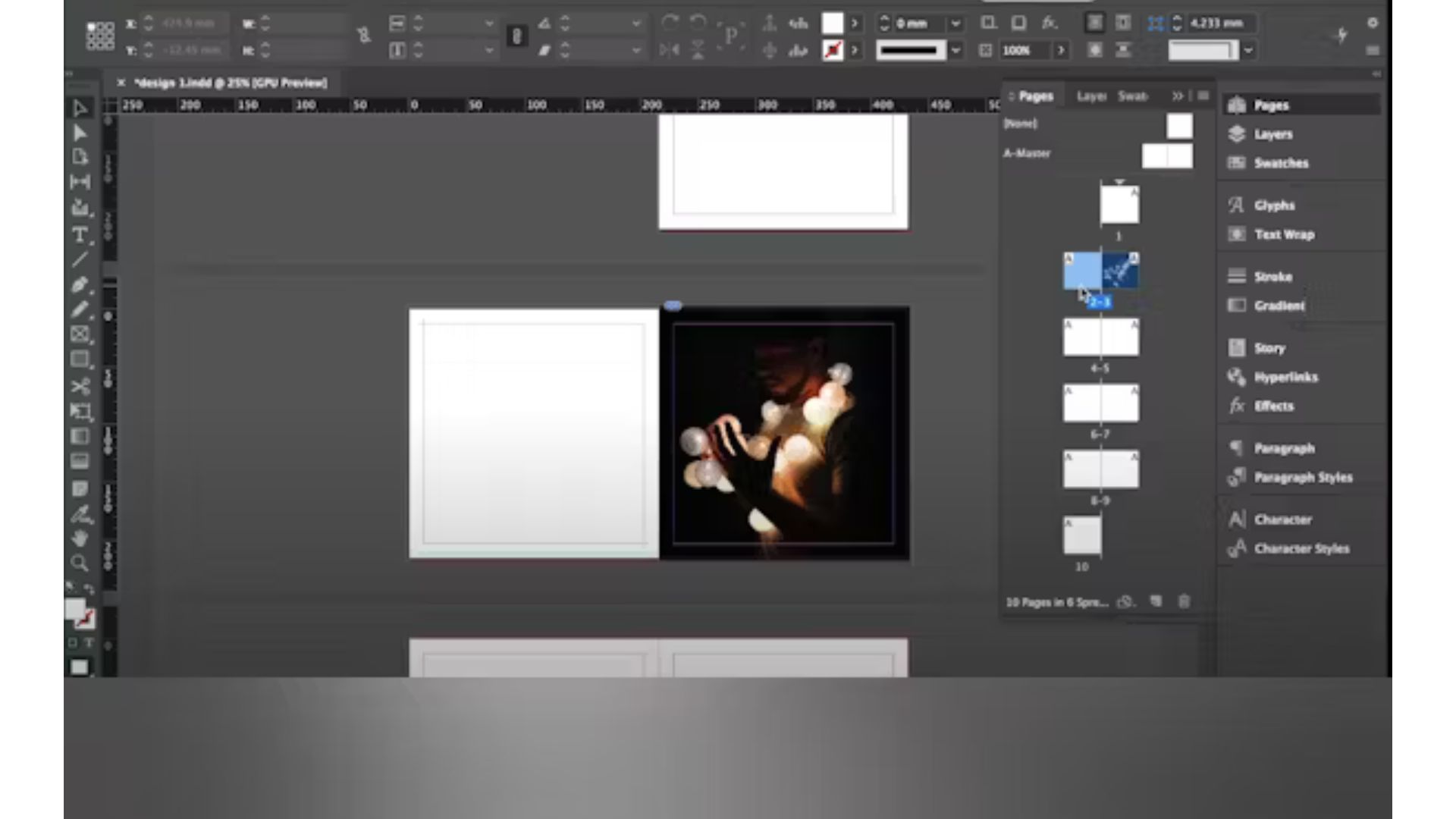
In essence, InDesign acts as a digital canvas where the designer can organize content for both print and digital publications. Unlike common text editors, this application offers advanced control over typography (fonts, sizes, spacing) and columns, making it possible to create complex designs such as magazines with multiple sections, books with chapters, or catalogs with hundreds of products. In addition, it is designed to handle large-scale projects while maintaining style consistency across all pages through the use of master pages and predefined styles. Its alignment tools and smart guides help place every element in the right spot effortlessly.
Main Features of InDesign
InDesign offers a wide range of features for professional editorial design. Some of the most notable are:
Precise Layout and Use of Master Pages
It allows you to define base layouts (templates) that apply to multiple pages, ensuring uniformity throughout the publication. With master pages, you save time by automatically repeating common elements (such as headers, footers, or page numbering) across all sections.
Advanced Typography Tools
The application provides full control over text. You can adjust line spacing, letter spacing (tracking), kerning, create balanced text columns, and consistently apply paragraph and character styles. InDesign supports OpenType typography, allowing the use of ligatures, alternate characters, and special glyphs from each font to achieve professional results.
Image and Graphic Integration
The program works through frames where images or other objects are placed. Imported photos and illustrations can be linked to keep the working file lightweight, updating automatically in the document when the original is edited in Photoshop (or another tool). InDesign supports the most common image and graphic formats, making it easy to integrate high-quality visual content.
Digital Publishing and Interactivity
In addition to preparing documents for print, InDesign allows you to create interactive digital publications. You can export eBooks in EPUB format (compatible with Kindle and other devices) and design interactive PDFs with multimedia elements and navigation buttons, providing a more dynamic experience than a static PDF.
Together, these features make InDesign a very complete tool. Its intuitive and customizable interface helps both experienced professionals and beginners make the most of its capabilities. Each new version of InDesign has added improvements to these core functions, keeping the software up to date with current design needs.
What Is InDesign Used For?
InDesign is mainly used in the field of editorial design, but its applications are very diverse within graphic design. Some of the things InDesign is currently used for include:
Magazines, Newspapers, and Catalogs
It is the preferred tool for creating periodicals and product catalogs. Thanks to its multi-page and style functions, designers can compose publications with well-defined sections, maintaining consistency across all content presentation.
Books and Long Documents
InDesign is ideal for laying out books, manuals, or long reports, offering control over chapters, automatic page numbering, global styles, and indexes. This way, a large book maintains a uniform style, and any changes to the styles are instantly applied throughout the document.
Printed Advertising Material
InDesign is also used to design printed advertising materials (brochures, posters, etc.), especially when text and images need to be combined with a refined layout. While other tools (Illustrator, Photoshop) work well for simple pieces, InDesign excels in multi-page projects or those with a lot of text that require typographic precision.
Digital and Interactive Publications
InDesign is also used to create digital publications. It allows exporting eBooks in EPUB format (compatible with Kindle and other devices) and designing interactive PDFs with multimedia elements and navigation buttons, offering readers a more dynamic experience than a traditional PDF.
In short, InDesign is used whenever you need to give a professional and attractive form to written information combined with visual elements. From a simple brochure to a large book or a digital magazine, this tool provides the flexibility and power needed to bring a designer’s ideas to the final product with print or digital publication quality.
Adobe InDesign 2024: Main Updates
Each year, Adobe releases new versions of InDesign with improvements and features requested by the user community. The Adobe InDesign 2024 version was no exception, introducing several interesting updates aimed at optimizing workflow and program functionality. Some notable improvements in InDesign 2024 are:
- Auto Style for text: a feature that automatically applies paragraph styles when pasting plain text into a document, speeding up the formatting of large blocks of text intelligently.
- Search and analytics in Publish Online: documents published online with InDesign now allow text search within their content. In addition, Google Analytics was integrated so authors can track traffic and reader interaction with those digital publications.
- Export and page improvements: when exporting images (JPEG/PNG) from InDesign, you can include a dynamic suffix in the filename (for example, the page number). The option to hide spreads (double pages) within a document was also added to exclude them from export without deleting them.
- Expanded typographic support: the text rendering engine was updated using HarfBuzz, improving correct display of glyphs and characters in complex languages (Arabic, Hindi alphabets, etc.).
These 2024 improvements focused on saving designers time and refining details that make professional document creation easier. As with every annual update, InDesign 2024 also included performance optimizations and general fixes to keep the application stable and efficient.
Adobe InDesign 2025: Latest Innovations
The most recent version, Adobe InDesign 2025, introduced impactful innovations, integrating artificial intelligence technologies and collaboration enhancements that reflect the latest design trends. Some of the most notable new features are:
Generative AI Fill
InDesign 2025 introduces the ability to extend images or backgrounds beyond their borders using artificial intelligence (similar to Generative Fill in other Adobe applications). This feature allows empty spaces to be filled consistently directly in InDesign, saving designers time.
PDF to Editable Conversion
For the first time, the beta option to open a PDF file in InDesign and convert it into an editable document was included. Although it still has limitations and may require adjustments after import, it is very useful for reusing existing designs without the original InDesign file.
Cloud Collaboration Tools
It is now possible to invite other users to edit an InDesign file in real time through the cloud, and even export it to Adobe Express for online joint editing. Elements can be locked to preserve the design while multiple collaborators work simultaneously, making it easier to share projects with colleagues or clients and get instant feedback.
Other Technical Improvements
The 2025 version added native support for mathematical formulas (MathML) and an option to export designs as HTML5 for easy integration into websites, among other usability and performance updates.
These innovations show that InDesign continues to evolve to meet the needs of creative professionals, combining smart automation, online collaboration, and user experience improvements to maintain its status as the leading editorial design tool.
Download Adobe InDesign: How to Get the Program
At this point, you may be wondering how to obtain InDesign officially and safely. This program is part of the Adobe Creative Cloud subscription, so the most direct way to get it is through Adobe’s official website or via the Creative Cloud app on your computer. Adobe offers a free trial version for a limited time (usually 7 days) that you can download to test all of InDesign’s features. After the trial period, you will need to purchase a subscription (either the individual InDesign plan or the full plan that includes all Adobe applications).
To download the software, you simply need to create an Adobe account (if you don’t already have one), go to the InDesign section, and select the download or free trial option. This will start the download of the Creative Cloud installer, from where you can install InDesign and any other Adobe apps included in your plan. It is important to always obtain the program from official sources; when searching online for adobe indesign download, you may find unofficial sites, but going directly to Adobe ensures you get the latest version, virus-free, with all updates and support available.
In short, the safe way to download Adobe InDesign is through Adobe Creative Cloud. You can start with the free trial and then subscribe to continue using the software without limitations. This way, you ensure access to official support and constant updates provided by Adobe.
Adobe InDesign Portable: What You Should Know
You may have heard about a portable version of InDesign, meaning an edition that doesn’t require conventional installation. In practice, Adobe does not offer any official “portable” version of InDesign. Portable versions sometimes found online are usually unauthorized editions modified by third parties. While the idea of carrying the program on a USB drive and using it on any computer without installing it may sound convenient, there are significant disadvantages and risks:
- Lack of updates and support: since it doesn’t come from Adobe, a “portable” InDesign will not receive security updates or official improvements. Furthermore, if a technical issue arises, Adobe does not provide support for unofficial versions.
- Possible security threats: many files labeled as “portable” on download sites may contain viruses or malware. Installing or running software from unreliable sources puts the security of your computer and projects at risk.
- Legality and performance: using unlicensed or modified Adobe software violates the terms of use and is considered piracy. In addition, these versions are often unstable or lack features, which can cause errors and loss of work in important projects.
For these reasons, it is not recommended to try to get a portable version of InDesign. If you need to use InDesign, it is better to opt for the official route (subscription or legal purchase). This ensures the tool works correctly, gives you access to all its features, and keeps you compliant with the law. Below, we present an option to purchase an official license for the 2020 version of InDesign as a one-time payment, in case you don’t want a subscription.
Buy Adobe InDesign 2020 at Licendi
Although Adobe currently distributes InDesign under subscription, some users may prefer a permanent license for an earlier version. In the Licendi store, it is possible to purchase Adobe InDesign 2020 with a one-time payment license. Licendi is an original software store where you can obtain this version of InDesign legally and safely.
Buy InDesign 2020 at Licendi has several advantages: you get an official serial number to activate it on your PC, with no monthly fees. This permanent license lets you use InDesign 2020 indefinitely on one device if you don’t require the latest Creative Cloud features.
It is worth noting that InDesign 2020 is still a very powerful piece of software capable of covering most editorial design needs. While it doesn’t include the latest features of Creative Cloud editions, it provides all the essential functionalities for creating professional documents. At a competitive price, the Licendi store gives you the opportunity to obtain this tool with an official license.
In Conclusion...
InDesign is a key tool in the world of editorial design and layout. With its extensive features, constant updates (as we saw in the 2024 and 2025 versions), and its integration within the Adobe suite, it remains the preferred choice for designing high-quality publications.
Whether through the Creative Cloud subscription or by acquiring a perpetual license of an earlier version from stores like Licendi, accessing InDesign will open the doors to creating both print and digital projects at a professional level. If you are just starting out in editorial design, InDesign may seem overwhelming at first, but with practice it becomes an essential ally for bringing your ideas onto the page in a clean, organized, and attractive way. Creativity combined with a powerful tool like InDesign has no limits!




