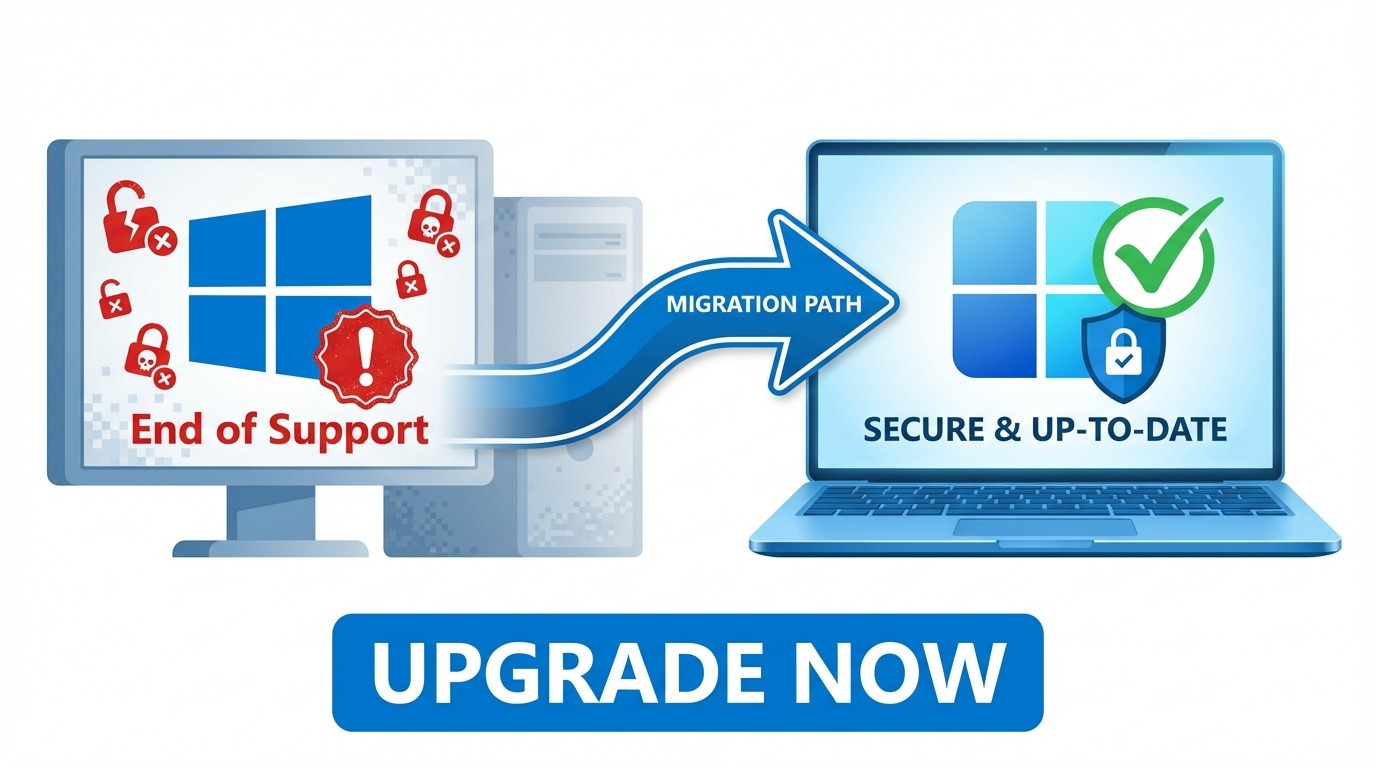
Windows 10 ha raggiunto la fine del supporto il 14 ottobre 2025. Se stai ancora utilizzando Windows 10, il tuo computer non riceve piu aggiornamenti di sicurezza da Microsoft - lasciando i tuoi sistemi vulnerabili a nuove minacce ogni giorno.
Ma non farti prendere dal panico. Questa guida completa ti spieghera tutto cio che devi sapere sulla migrazione a Windows 11 nel 2026: requisiti di compatibilita, opzioni di aggiornamento e come farlo senza spendere una fortuna.
Cosa Significa Fine del Supporto?
Quando Microsoft termina il supporto per un sistema operativo, significa:
Niente piu patch di sicurezza - Le nuove vulnerabilita scoperte dopo ottobre 2025 NON verranno corrette
Niente piu correzioni di bug - Qualsiasi bug o problema rimarra permanente
Nessun supporto tecnico - Microsoft non aiutera con i problemi di Windows 10
Rischio di compatibilita software - Le nuove versioni software potrebbero smettere di supportare Windows 10
Problemi di conformita - Molti settori richiedono sistemi operativi supportati per la conformita normativa
In termini pratici: ogni giorno che rimani su Windows 10, il tuo rischio di sicurezza aumenta. Gli hacker prendono di mira attivamente i sistemi non supportati perche sanno che le vulnerabilita non verranno corrette.
Aggiornamenti di Sicurezza Estesi (ESU): Unopzione Temporanea
Microsoft offre Aggiornamenti di Sicurezza Estesi (ESU) per le organizzazioni che non possono migrare immediatamente. Tuttavia, questo ha un costo significativo:
Anno 1 (2025-2026): $61 per dispositivo
Anno 2 (2026-2027): $122 per dispositivo (raddoppia)
Anno 3 (2027-2028): $244 per dispositivo (raddoppia ancora)
Per unazienda con 100 dispositivi, sono $6.100 solo nel primo anno - e $42.700 in tre anni. Per la maggior parte delle organizzazioni, migrare a Windows 11 e significativamente piu economico che pagare per ESU.
Requisiti Hardware di Windows 11
Prima di pianificare la migrazione, devi verificare se il tuo hardware attuale supporta Windows 11. I requisiti di Microsoft sono piu rigidi delle versioni precedenti:
Requisiti Minimi
Processore: 1 GHz o piu veloce con 2+ core su un processore compatibile a 64 bit (8a gen Intel o AMD Ryzen serie 2000 o successivo)
RAM: 4 GB minimo (8 GB consigliati)
Archiviazione: 64 GB o superiore
TPM: Trusted Platform Module versione 2.0
Secure Boot: Firmware UEFI con capacita Secure Boot
Grafica: Compatibile DirectX 12 con driver WDDM 2.0
Come Verificare la Compatibilita
Opzione 1: App PC Health Check
Scarica lapp ufficiale PC Health Check di Microsoft da microsoft.com. Analizzera il tuo sistema e ti dira esattamente se il tuo PC e compatibile.
Opzione 2: Verifica Manuale
Premi Windows + R, digita tpm.msc e premi Invio. Questo mostra lo stato e la versione del tuo TPM. Hai bisogno di TPM 2.0 per Windows 11.
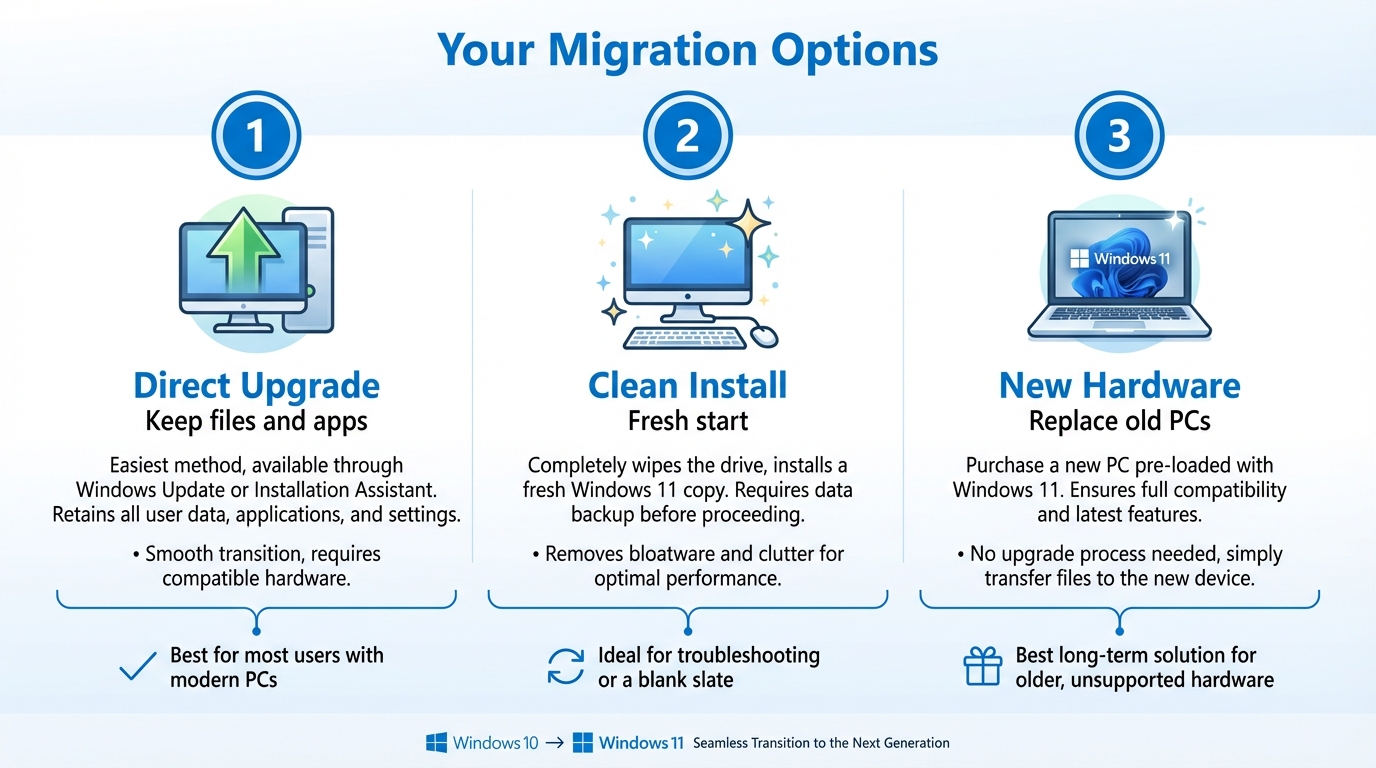
Le Tue Opzioni di Migrazione
Opzione 1: Aggiornamento Diretto (Hardware Compatibile)
Se il tuo PC soddisfa tutti i requisiti di Windows 11, puoi aggiornare direttamente:
Fai il backup dei tuoi dati importanti
Vai su Impostazioni, Aggiornamento e sicurezza, Windows Update
Se sei idoneo, vedrai lopzione Aggiorna a Windows 11
Segui le istruzioni per completare laggiornamento
Opzione 2: Installazione Pulita
Per un nuovo inizio o quando aggiorni da unedizione diversa:
Scarica il supporto di installazione di Windows 11 da Microsoft
Crea una chiavetta USB avviabile
Fai il backup di tutti i tuoi dati
Avvia dalla USB ed esegui uninstallazione pulita
Attiva con la tua chiave di licenza Windows 11
Opzione 3: Sostituzione Hardware
Se i tuoi PC attuali non soddisfano i requisiti di Windows 11, dovrai aggiornare lhardware. Questo e comune per computer con piu di 5-6 anni che non hanno TPM 2.0 o hanno processori piu vecchi.
Windows 11 Home vs Pro: Quale Ti Serve?
Per la maggior parte degli utenti domestici, Windows 11 Home e sufficiente. Tuttavia, le aziende tipicamente necessitano di Windows 11 Pro per:
Crittografia BitLocker - Crittografia completa del disco per la protezione dei dati
Host Desktop Remoto - Consente connessioni remote al tuo PC
Aggiunta al dominio - Connessione allActive Directory aziendale
Criteri di gruppo - Gestione centralizzata e impostazioni di sicurezza
Hyper-V - Virtualizzazione integrata
Se sei unazienda, un libero professionista o un utente avanzato, Windows 11 Pro e quasi sempre la scelta giusta.
Come Risparmiare sulle Licenze Windows 11
Ecco cosa la maggior parte delle persone non sa: non devi pagare il prezzo pieno di Microsoft per Windows 11.
NellUnione Europea, la rivendita di licenze software e completamente legale. La Corte di Giustizia dellUE lo ha confermato nel 2012 (UsedSoft c. Oracle, Causa C-128/11). Questo significa che puoi acquistare licenze Windows 11 genuine usate a una frazione del prezzo al dettaglio.
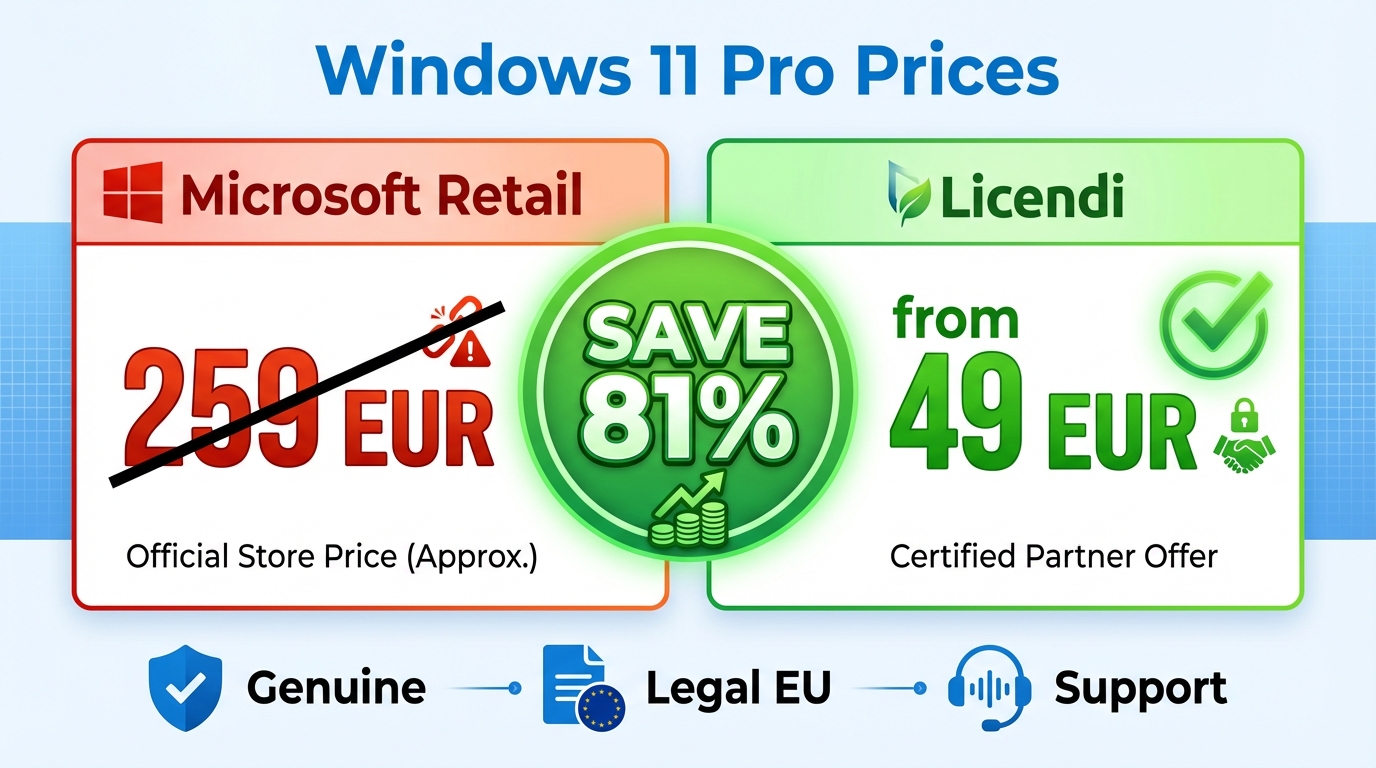
Confronto Prezzi
Tipo di Licenza
Microsoft Retail
Licendi (Usata)
Risparmio
Windows 11 Home
EUR 145
da EUR 39
fino al 73%
Windows 11 Pro
EUR 259
da EUR 49
fino all81%
Per unazienda che aggiorna 50 PC a Windows 11 Pro:
Base legale: La sentenza della CGUE (UsedSoft c. Oracle, 2012) ha stabilito che la rivendita di software e legale
Licenze genuine: Sono vere licenze Microsoft originariamente acquistate da aziende che non ne hanno piu bisogno
Funzionalita completa: Stesse funzionalita, stessi aggiornamenti, stesse patch di sicurezza delle licenze retail
Conformita agli audit: Con documentazione adeguata, le licenze usate superano gli audit di licenze Microsoft
Da Licendi, ogni licenza include documentazione legale completa e verifica della catena di custodia.
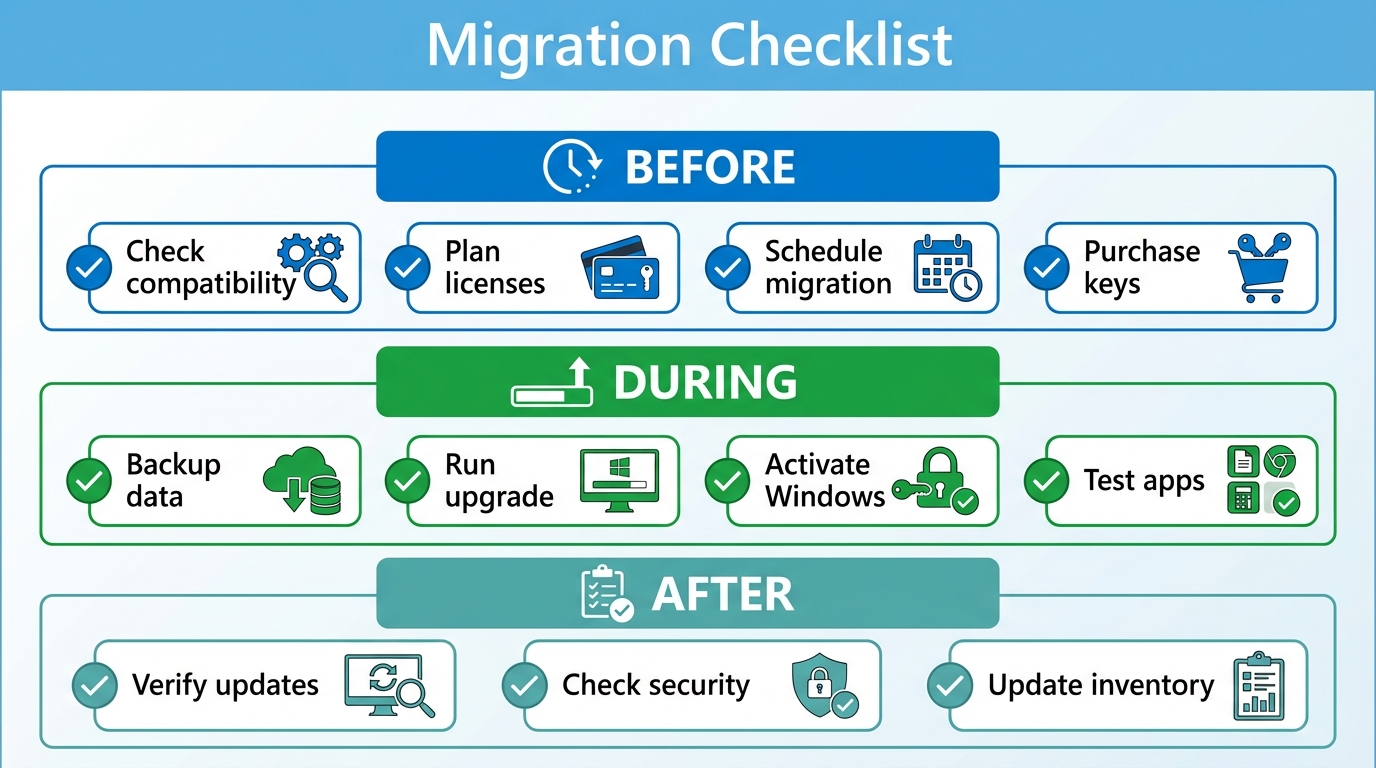
Checklist di Migrazione Passo dopo Passo
Prima della Migrazione
Inventaria tutti i PC e verifica la compatibilita con Windows 11
Identifica quali macchine necessitano di aggiornamenti hardware o sostituzione
Verifica il software attuale per la compatibilita con Windows 11
Calcola i requisiti di licenza (Home vs Pro)
Acquista le licenze necessarie
Pianifica il calendario di migrazione (raccomandiamo ondate di 20-30 macchine)
Durante la Migrazione
Fai il backup di tutti i dati utente prima di ogni aggiornamento
Esegui laggiornamento o linstallazione pulita
Attiva Windows con la chiave di licenza
Verifica che tutte le applicazioni funzionino correttamente
Configura le impostazioni di sicurezza (BitLocker, Windows Hello, ecc.)
Dopo la Migrazione
Conferma che Windows Update funziona
Verifica che lantivirus/software di sicurezza sia attivo
Documenta eventuali problemi per le macchine rimanenti
Aggiorna linventario degli asset IT
Domande Frequenti
Posso continuare a usare Windows 10 dopo la fine del supporto?
Tecnicamente si, ma non e raccomandato. Il tuo sistema continuera a funzionare, ma senza aggiornamenti di sicurezza, sei sempre piu vulnerabile a malware e ransomware.
Laggiornamento a Windows 11 e gratuito?
Se il tuo PC e arrivato con Windows 10 e soddisfa i requisiti di Windows 11, potresti essere idoneo per un aggiornamento gratuito alla stessa edizione. Tuttavia, passare da Home a Pro richiede lacquisto di una licenza.
Per quanto tempo Windows 11 sara supportato?
Windows 11 segue la Modern Lifecycle Policy di Microsoft con aggiornamenti di funzionalita annuali. Ogni versione e supportata per 24 mesi (Home/Pro) o 36 mesi (Enterprise).
Agisci Ora
Ogni giorno su Windows 10 e un giorno senza aggiornamenti di sicurezza. La migrazione a Windows 11 non deve essere costosa ne complicata.
Pronto per laggiornamento? Sfoglia le nostre licenze Windows 11 e risparmia fino al 70% rispetto ai prezzi al dettaglio. Tutte le licenze includono documentazione legale e garanzia di conformita.
Windows 10 a atteint sa fin de vie le 14 octobre 2025. Si vous utilisez encore Windows 10, votre ordinateur ne recoit plus de mises a jour de securite de Microsoft - laissant vos systemes vulnerables aux nouvelles menaces chaque jour.
Mais pas de panique. Ce guide complet vous explique tout ce que vous devez savoir sur la migration vers Windows 11 en 2026 : exigences de compatibilite, options de mise a niveau et comment le faire sans vous ruiner.
Que Signifie la Fin du Support ?
Quand Microsoft met fin au support dun systeme dexploitation, cela signifie :
Plus de correctifs de securite - Les nouvelles vulnerabilites decouvertes apres octobre 2025 ne seront PAS corrigees
Plus de corrections de bugs - Tous les bugs ou problemes resteront permanents
Pas de support technique - Microsoft naidera plus avec les problemes de Windows 10
Risque de compatibilite logicielle - Les nouvelles versions de logiciels pourraient cesser de prendre en charge Windows 10
Problemes de conformite - De nombreuses industries exigent des systemes dexploitation pris en charge pour la conformite reglementaire
En termes pratiques : chaque jour que vous restez sur Windows 10, votre risque de securite augmente. Les pirates ciblent activement les systemes non pris en charge car ils savent que les vulnerabilites ne seront pas corrigees.
Mises a Jour de Securite Etendues (ESU) : Une Option Temporaire
Microsoft propose des Mises a Jour de Securite Etendues (ESU) pour les organisations qui ne peuvent pas migrer immediatement. Cependant, cela a un cout significatif :
Annee 1 (2025-2026) : 61 $ par appareil
Annee 2 (2026-2027) : 122 $ par appareil (double)
Annee 3 (2027-2028) : 244 $ par appareil (double encore)
Pour une entreprise avec 100 appareils, cest 6 100 $ la premiere annee seulement - et 42 700 $ sur trois ans. Pour la plupart des organisations, migrer vers Windows 11 est nettement moins cher que de payer pour ESU.
Configuration Requise pour Windows 11
Avant de planifier votre migration, vous devez verifier si votre materiel actuel prend en charge Windows 11. Les exigences de Microsoft sont plus strictes que les versions precedentes :
Configuration Minimale
Processeur : 1 GHz ou plus rapide avec 2+ coeurs sur un processeur 64 bits compatible (8e generation Intel ou AMD Ryzen serie 2000 ou plus recent)
RAM : 4 Go minimum (8 Go recommande)
Stockage : 64 Go ou plus
TPM : Module de plateforme securisee version 2.0
Demarrage securise : Firmware UEFI avec capacite de demarrage securise
Graphiques : Compatible DirectX 12 avec pilote WDDM 2.0
Comment Verifier la Compatibilite
Option 1 : Application PC Health Check
Telechargez lapplication officielle PC Health Check de Microsoft depuis microsoft.com. Elle analysera votre systeme et vous dira exactement si votre PC est compatible.
Option 2 : Verification Manuelle
Appuyez sur Windows + R, tapez tpm.msc et appuyez sur Entree. Cela affiche letat et la version de votre TPM. Vous avez besoin de TPM 2.0 pour Windows 11.
Vos Options de Migration
Option 1 : Mise a Niveau Directe (Materiel Compatible)
Si votre PC repond a toutes les exigences de Windows 11, vous pouvez effectuer une mise a niveau directe :
Sauvegardez vos donnees importantes
Allez dans Parametres, Mise a jour et securite, Windows Update
Si vous etes eligible, vous verrez loption Mettre a niveau vers Windows 11
Suivez les instructions pour terminer la mise a niveau
Option 2 : Installation Propre
Pour un nouveau depart ou lors de la mise a niveau depuis une edition differente :
Telechargez le support dinstallation Windows 11 de Microsoft
Creez une cle USB bootable
Sauvegardez toutes vos donnees
Demarrez depuis lUSB et effectuez une installation propre
Activez avec votre cle de licence Windows 11
Option 3 : Remplacement du Materiel
Si vos PC actuels ne repondent pas aux exigences de Windows 11, vous devrez mettre a niveau le materiel. Cest courant pour les ordinateurs de plus de 5-6 ans qui nont pas de TPM 2.0 ou ont des processeurs plus anciens.
Windows 11 Famille vs Pro : Lequel Vous Faut-il ?
Pour la plupart des utilisateurs domestiques, Windows 11 Famille est suffisant. Cependant, les entreprises ont generalement besoin de Windows 11 Pro pour :
Chiffrement BitLocker - Chiffrement complet du disque pour la protection des donnees
Hote Bureau a distance - Permet les connexions a distance vers votre PC
Jonction de domaine - Connexion a lActive Directory de lentreprise
Strategie de groupe - Gestion centralisee et parametres de securite
Hyper-V - Virtualisation integree
Si vous etes une entreprise, un freelance ou un utilisateur avance, Windows 11 Pro est presque toujours le bon choix.
Comment
Economiser sur les Licences Windows 11
Voici ce que la plupart des gens ne savent pas : vous navez pas a payer le plein prix de Microsoft pour Windows 11.
Dans lUnion europeenne, la revente de licences logicielles est completement legale. La Cour de justice de lUE la confirme en 2012 (UsedSoft c. Oracle, Affaire C-128/11). Cela signifie que vous pouvez acheter des licences Windows 11 authentiques doccasion a une fraction du prix de detail.
Comparaison des Prix
Type de Licence
Microsoft Detail
Licendi (Occasion)
Economies
Windows 11 Famille
145 EUR
a partir de 39 EUR
jusqua 73%
Windows 11 Pro
259 EUR
a partir de 49 EUR
jusqua 81%
Pour une entreprise mettant a niveau 50 PC vers Windows 11 Pro :
Microsoft detail : 12 950 EUR
Licendi : environ 2 450 EUR
Economies totales : plus de 10 000 EUR
Les Licences dOccasion Sont-elles
Legitimes ?
Oui, absolument. Voici pourquoi vous pouvez faire confiance aux licences logicielles doccasion dans lUE :
Base juridique : Larret de la CJUE (UsedSoft c. Oracle, 2012) a etabli que la revente de logiciels est legale
Licences authentiques : Ce sont de vraies licences Microsoft achetees a lorigine par des entreprises qui nen ont plus besoin
Fonctionnalite complete : Memes fonctionnalites, memes mises a jour, memes correctifs de securite que les licences au detail
Conformite aux audits : Avec une documentation appropriee, les licences doccasion passent les audits de licences Microsoft
Chez Licendi, chaque licence comprend une documentation juridique complete et une verification de la chaine de possession.
Liste de Controle de Migration Etape par Etape
Avant la Migration
Inventoriez tous les PC et verifiez la compatibilite Windows 11
Identifiez les machines qui necessitent des mises a niveau materielles ou un remplacement
Auditez les logiciels actuels pour la compatibilite Windows 11
Calculez les besoins en licences (Famille vs Pro)
Achetez les licences requises
Planifiez le calendrier de migration (nous recommandons des vagues de 20-30 machines)
Pendant la Migration
Sauvegardez toutes les donnees utilisateur avant chaque mise a niveau
Effectuez la mise a niveau ou linstallation propre
Activez Windows avec la cle de licence
Verifiez que toutes les applications fonctionnent correctement
Configurez les parametres de securite (BitLocker, Windows Hello, etc.)
Apres la Migration
Confirmez que Windows Update fonctionne
Verifiez que lantivirus/logiciel de securite est actif
Documentez tous les problemes pour les machines restantes
Mettez a jour votre inventaire des actifs informatiques
Questions Frequemment Posees
Puis-je continuer a utiliser Windows 10 apres la fin du support ?
Techniquement oui, mais ce nest pas recommande. Votre systeme continuera a fonctionner, mais sans mises a jour de securite, vous etes de plus en plus vulnerable aux malwares et ransomwares.
La mise a niveau vers Windows 11 est-elle gratuite ?
Si votre PC est venu avec Windows 10 et repond aux exigences de Windows 11, vous pouvez etre eligible a une mise a niveau gratuite vers la meme edition. Cependant, passer de Famille a Pro necessite lachat dune licence.
Combien de temps Windows 11 sera-t-il pris en charge ?
Windows 11 suit la politique de cycle de vie moderne de Microsoft avec des mises a jour de fonctionnalites annuelles. Chaque version est prise en charge pendant 24 mois (Famille/Pro) ou 36 mois (Entreprise).
Agissez Maintenant
Chaque jour sur Windows 10 est un jour sans mises a jour de securite. La migration vers Windows 11 ne doit pas etre couteuse ni compliquee.
Pret a mettre a niveau ? Parcourez nos licences Windows 11 et economisez jusqua 70% par rapport aux prix de detail. Toutes les licences incluent la documentation juridique et la garantie de conformite.
Windows 10 hat sein Support-Ende am 14. Oktober 2025 erreicht. Wenn Sie noch Windows 10 verwenden, erhaelt Ihr Computer keine Sicherheitsupdates mehr von Microsoft - Ihre Systeme sind jeden Tag neuen Bedrohungen ausgesetzt.
Aber keine Panik. Dieser umfassende Leitfaden fuehrt Sie durch alles, was Sie ueber die Migration zu Windows 11 im Jahr 2026 wissen muessen: Kompatibilitaetsanforderungen, Upgrade-Optionen und wie Sie dies kostenguenstig umsetzen koennen.
Was bedeutet Support-Ende?
Wenn Microsoft den Support fuer ein Betriebssystem beendet, bedeutet das:
Keine Sicherheitspatches mehr - Neue Sicherheitsluecken, die nach Oktober 2025 entdeckt werden, werden NICHT behoben
Keine Fehlerbehebungen mehr - Alle Fehler oder Probleme bleiben dauerhaft bestehen
Kein technischer Support - Microsoft hilft nicht mehr bei Windows 10-Problemen
Software-Kompatibilitaetsrisiko - Neue Softwareversionen koennten die Unterstuetzung fuer Windows 10 einstellen
Compliance-Probleme - Viele Branchen erfordern unterstuetzte Betriebssysteme fuer die Einhaltung von Vorschriften
Praktisch bedeutet das: Jeden Tag, den Sie auf Windows 10 bleiben, steigt Ihr Sicherheitsrisiko. Hacker greifen aktiv nicht unterstuetzte Systeme an, weil sie wissen, dass Sicherheitsluecken nicht gepatcht werden.
Extended Security Updates (ESU): Eine temporaere Option
Microsoft bietet Extended Security Updates (ESU) fuer Organisationen an, die nicht sofort migrieren koennen. Dies ist jedoch mit erheblichen Kosten verbunden:
Jahr 1 (2025-2026): $61 pro Geraet
Jahr 2 (2026-2027): $122 pro Geraet (verdoppelt sich)
Jahr 3 (2027-2028): $244 pro Geraet (verdoppelt sich erneut)
Fuer ein Unternehmen mit 100 Geraeten sind das allein im ersten Jahr $6.100 - und $42.700 ueber drei Jahre. Fuer die meisten Organisationen ist die Migration zu Windows 11 deutlich guenstiger als die Zahlung fuer ESU.
Windows 11 Hardware-Anforderungen
Bevor Sie Ihre Migration planen, muessen Sie pruefen, ob Ihre aktuelle Hardware Windows 11 unterstuetzt. Die Anforderungen von Microsoft sind strenger als bei frueheren Versionen:
Mindestanforderungen
Prozessor: 1 GHz oder schneller mit 2+ Kernen auf einem kompatiblen 64-Bit-Prozessor (8. Generation Intel oder AMD Ryzen 2000-Serie oder neuer)
RAM: Mindestens 4 GB (8 GB empfohlen)
Speicher: 64 GB oder groesser
TPM: Trusted Platform Module Version 2.0
Secure Boot: UEFI-Firmware mit Secure Boot-Faehigkeit
Grafik: DirectX 12-kompatibel mit WDDM 2.0-Treiber
So pruefen Sie die Kompatibilitaet
Option 1: PC Health Check App
Laden Sie die offizielle PC Health Check App von Microsoft von microsoft.com herunter. Sie scannt Ihr System und sagt Ihnen genau, ob Ihr PC kompatibel ist.
Option 2: Manuelle Pruefung
Druecken Sie Windows + R, geben Sie tpm.msc ein und druecken Sie Enter. Dies zeigt Ihren TPM-Status und die Version an. Sie benoetigen TPM 2.0 fuer Windows 11.
Ihre Migrationsoptionen
Option 1: Direktes Upgrade (Kompatible Hardware)
Wenn Ihr PC alle Windows 11-Anforderungen erfuellt, koennen Sie direkt upgraden:
Sichern Sie Ihre wichtigen Daten
Gehen Sie zu Einstellungen, Update und Sicherheit, Windows Update
Wenn Sie berechtigt sind, sehen Sie die Option Upgrade auf Windows 11
Folgen Sie den Anweisungen, um das Upgrade abzuschliessen
Option 2: Neuinstallation
Fuer einen Neuanfang oder beim Upgrade von einer anderen Edition:
Laden Sie das Windows 11-Installationsmedium von Microsoft herunter
Erstellen Sie einen bootfaehigen USB-Stick
Sichern Sie alle Ihre Daten
Booten Sie vom USB und fuehren Sie eine Neuinstallation durch
Aktivieren Sie mit Ihrem Windows 11-Lizenzschluessel
Option 3: Hardware-Ersatz
Wenn Ihre aktuellen PCs die Windows 11-Anforderungen nicht erfuellen, muessen Sie die Hardware aufruestenen. Dies ist
haeufig bei Computern, die aelter als 5-6 Jahre sind und kein TPM 2.0 haben oder aeltere Prozessoren besitzen.
Windows 11 Home vs Pro: Was brauchen Sie?
Fuer die meisten Privatanwender ist Windows 11 Home ausreichend. Unternehmen benoetigen jedoch typischerweise Windows 11 Pro fuer:
BitLocker-Verschluesselung - Vollstaendige Festplattenverschluesselung zum Datenschutz
Remote Desktop Host - Erlaubt Remote-Verbindungen zu Ihrem PC
Domaenenbeitritt - Verbindung zum Unternehmens-Active Directory
Gruppenrichtlinien - Zentrale Verwaltung und Sicherheitseinstellungen
Hyper-V - Integrierte Virtualisierung
Wenn Sie ein Unternehmen, Freiberufler oder Power-User sind, ist Windows 11 Pro fast immer die richtige Wahl.
So sparen Sie Geld bei Windows 11-Lizenzen
Was die meisten Menschen nicht wissen: Sie muessen nicht den vollen Einzelhandelspreis von Microsoft fuer Windows 11 bezahlen.
In der Europaeischen Union ist der Weiterverkauf von Softwarelizenzen vollstaendig legal. Der Europaeische Gerichtshof hat dies 2012 bestaetigt (UsedSoft gegen Oracle, Rechtssache C-128/11). Das bedeutet, dass Sie echte, gebrauchte Windows 11-Lizenzen zu einem Bruchteil des Einzelhandelspreises kaufen koennen.
Preisvergleich
Lizenztyp
Microsoft Einzelhandel
Licendi (Gebraucht)
Ersparnis
Windows 11 Home
EUR 145
ab EUR 39
bis zu 73%
Windows 11 Pro
EUR 259
ab EUR 49
bis zu 81%
Fuer ein Unternehmen, das 50 PCs auf Windows 11 Pro aktualisiert:
Microsoft Einzelhandel: EUR 12.950
Licendi: ca. EUR 2.450
Gesamtersparnis: ueber EUR 10.000
Sind gebrauchte Lizenzen
legitim?
Ja, absolut. Hier ist, warum Sie gebrauchten Softwarelizenzen in der EU vertrauen koennen:
Rechtsgrundlage: Das EuGH-Urteil (UsedSoft gegen Oracle, 2012) hat festgestellt, dass der Weiterverkauf von Software legal ist
Echte Lizenzen: Dies sind echte Microsoft-Lizenzen, die urspruenglich von Unternehmen gekauft wurden, die sie nicht mehr benoetigen
Volle Funktionalitaet: Gleiche Funktionen, gleiche Updates, gleiche Sicherheitspatches wie Einzelhandelslizenzen
Audit-konform: Mit ordnungsgemaesser Dokumentation bestehen gebrauchte Lizenzen Microsoft-Lizenzaudits
Bei Licendi enthaelt jede Lizenz eine vollstaendige rechtliche Dokumentation und Ueberpruefung der Lieferkette.
Schritt-fuer-Schritt Migrations-Checkliste
Vor der Migration
Inventarisieren Sie alle PCs und pruefen Sie die Windows 11-Kompatibilitaet
Identifizieren Sie, welche Maschinen Hardware-Upgrades oder Ersatz benoetigen
Pruefen Sie aktuelle Software auf Windows 11-Kompatibilitaet
Berechnen Sie den Lizenzbedarf (Home vs Pro)
Kaufen Sie die erforderlichen Lizenzen
Planen Sie den Migrationsplan (wir empfehlen Wellen von 20-30 Maschinen)
Waehrend der Migration
Sichern Sie alle Benutzerdaten vor jedem Upgrade
Fuehren Sie Upgrade oder Neuinstallation durch
Aktivieren Sie Windows mit dem Lizenzschluessel
Ueberpruefen Sie, ob alle Anwendungen korrekt funktionieren
Konfigurieren Sie Sicherheitseinstellungen (BitLocker, Windows Hello, etc.)
Nach der Migration
Bestaetigen Sie, dass Windows Update funktioniert
Ueberpruefen Sie, ob Antivirus/Sicherheitssoftware aktiv ist
Dokumentieren Sie alle Probleme fuer die verbleibenden Maschinen
Aktualisieren Sie Ihr IT-Asset-Inventar
Haeufig gestellte Fragen
Kann ich Windows 10 nach dem Support-Ende weiter nutzen?
Technisch ja, aber es wird nicht empfohlen. Ihr System funktioniert weiterhin, aber ohne Sicherheitsupdates werden Sie zunehmend anfaellig fuer Malware und Ransomware.
Ist das Windows 11-Upgrade kostenlos?
Wenn Ihr PC mit Windows 10 geliefert wurde und die Windows 11-Anforderungen erfuellt, sind Sie moeglicherweise fuer ein kostenloses Upgrade auf die gleiche Edition berechtigt. Ein Upgrade von Home auf Pro erfordert jedoch einen Lizenzkauf.
Wie lange wird Windows 11 unterstuetzt?
Windows 11 folgt der Microsoft Modern Lifecycle Policy mit jaehrlichen Feature-Updates. Jede Version wird 24 Monate (Home/Pro) oder 36 Monate (Enterprise) unterstuetzt.
Jetzt handeln
Jeder Tag auf Windows 10 ist ein Tag ohne Sicherheitsupdates. Die Migration zu Windows 11 muss weder teuer noch kompliziert sein.
Cookies Affinché questo sito funzioni correttamente, a volte inseriamo piccoli file di dati, noti come cookie, nei dispositivi degli utenti. Anche la maggior parte dei grandi siti web lo fa.
 IT
IT EN
EN  FR
FR  DE
DE  PT
PT  ES
ES